Note
Access to this page requires authorization. You can try signing in or changing directories.
Access to this page requires authorization. You can try changing directories.
Question
Tuesday, February 26, 2019 3:00 AM
Hi All,
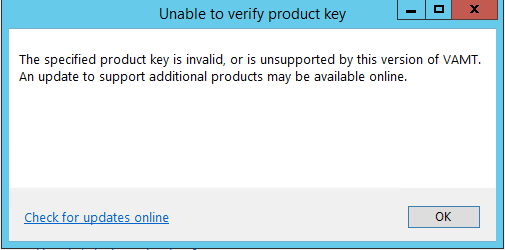
I encounter the error below when I try to add Office 2019 KMS product key into VAMT 3.1. The product key is correct as I copy directly from the VLSC.
Nursyafika
All replies (3)
Tuesday, February 26, 2019 6:48 AM ✅Answered | 2 votes
Found the answer myself. Lol
Download "office2019volumelicensepack_x64.exe" from MS website, Run the .exe,
copy pkeyconfig-office-kmshost from "C:\Program Files (x86)\MSECache\OfficeKMS\win8" to "C:\Program Files (x86)\Windows Kits\10\Assessment and Deployment Kit\VAMT3\pkconfig",
restart service protection, retry.
And voila. it works in my case :)
Nursyafika
Tuesday, August 27, 2019 1:14 PM
Found the answer myself. Lol
Download "office2019volumelicensepack_x64.exe" from MS website, Run the .exe,
copy pkeyconfig-office-kmshost from "C:\Program Files (x86)\MSECache\OfficeKMS\win8" to "C:\Program Files (x86)\Windows Kits\10\Assessment and Deployment Kit\VAMT3\pkconfig",
restart service protection, retry.
And voila. it works in my case :)
Nursyafika
Thanks for this! Resolved my issue as well. For others looking to this answer, OP meant for you to restart the Software Protection service.
Tuesday, September 17, 2019 5:51 PM
this worked for me as well. Thank you !! You saved me a lot of troubleshooting.