Note
Access to this page requires authorization. You can try signing in or changing directories.
Access to this page requires authorization. You can try changing directories.
Question
Monday, August 7, 2017 12:38 PM
Hi,
I have a combobox in windows form
and I'm trying to change the highlight of combobox.
if I type in my combobox and then press enter it put the backcolor of my combobox like this image

How can I change that default value?
also here it take the system color

All replies (8)
Monday, August 7, 2017 2:45 PM
You need to modify you ComboBox DrawMode to OwnerDrawFixed and handle the selection events:
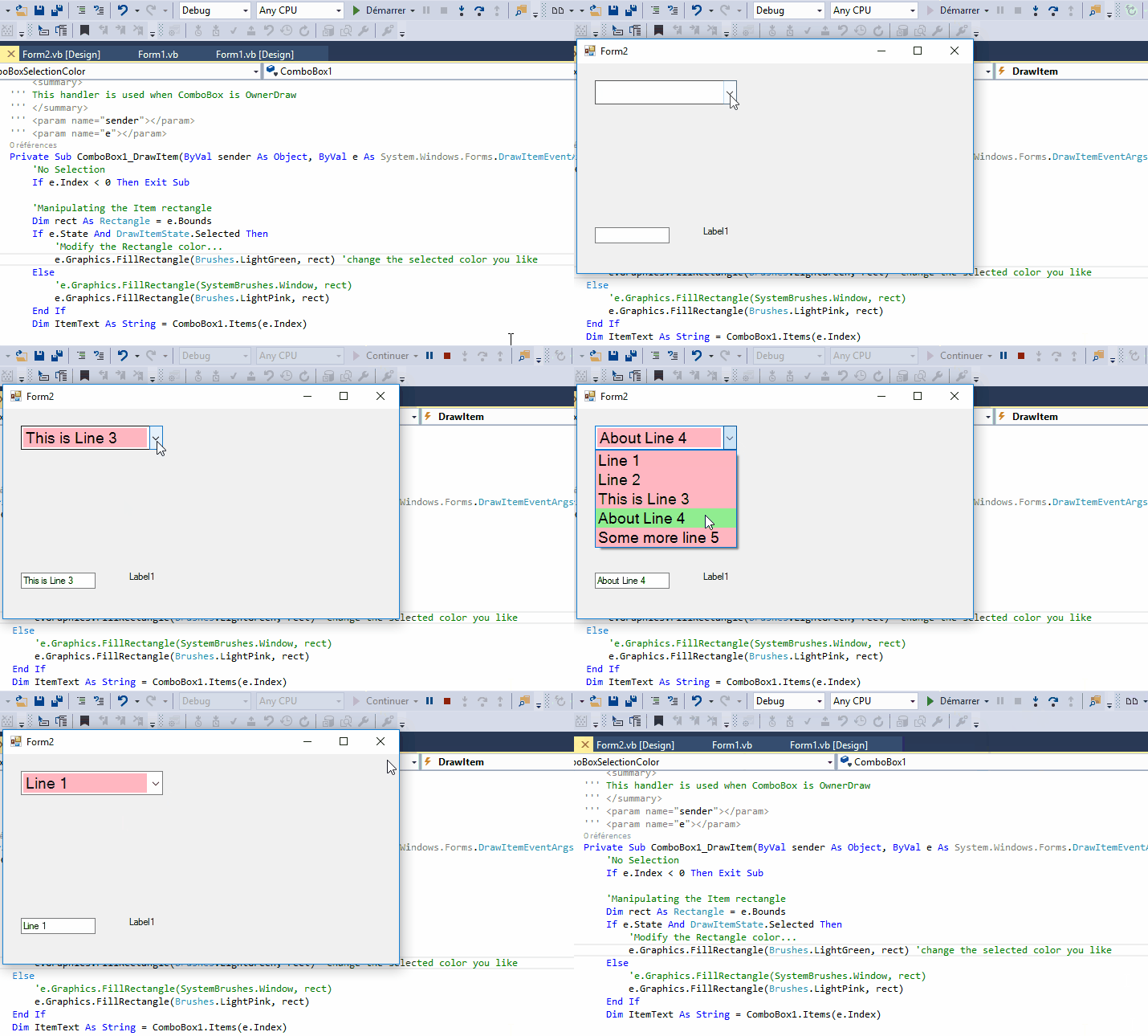
With the code:
Private Sub Form2_Load(sender As System.Object, e As System.EventArgs) Handles MyBase.Load
        Me.Location = New Point(100, 100)

        UpdateComboBoxDrawMode()

    End Sub

'Initialize the ComboBox so DrawMode is OwnerDrawFixed
    Private Sub UpdateComboBoxDrawMode()
        Me.ComboBox1.DrawMode = DrawMode.OwnerDrawFixed
        Me.ComboBox1.DropDownStyle = ComboBoxStyle.DropDownList

    End Sub

''' <summary>
    ''' This handler is used when ComboBox is OwnerDraw
    ''' </summary>
    ''' <param name="sender"></param>
    ''' <param name="e"></param>
    Private Sub ComboBox1_DrawItem(ByVal sender As Object, ByVal e As System.Windows.Forms.DrawItemEventArgs) Handles ComboBox1.DrawItem
        'No Selection
        If e.Index < 0 Then Exit Sub

        'Manipulating the Item rectangle
        Dim rect As Rectangle = e.Bounds
        If e.State And DrawItemState.Selected Then
            'Modify the Rectangle color...
            e.Graphics.FillRectangle(Brushes.LightGreen, rect) 'change the selected color you like
        Else
            'By default the item will be ligthPink background.... not pretty but for showing the example
            e.Graphics.FillRectangle(Brushes.LightPink, rect)
        End If
        Dim ItemText As String = ComboBox1.Items(e.Index)
'Draw the text in a black Brush...could be any color
        Dim ItemTextBrush As Brush = Brushes.Black
        e.Graphics.DrawString(ItemText, Me.ComboBox1.Font, ItemTextBrush, rect.X, rect.Y)
    End Sub
Tuesday, August 8, 2017 7:43 AM
Hi,
Thank you for replay but to change backcolor of item and rectangle I know how to do.
the problem is on selected test and also if I go down with keydown key.
the property of combobox are those:
 Private Sub UpdateComboBoxDrawMode()
        Me.ComboBox1.DrawMode = DrawMode.OwnerDrawFixed
        Me.ComboBox1.DropDownStyle = ComboBoxStyle.DropDown
        Me.ComboBox1.AutoCompleteMode = AutoCompleteMode.Suggest
        Me.ComboBox1.AutoCompleteSource = AutoCompleteSource.ListItems
    End Sub
Here the result of your code:
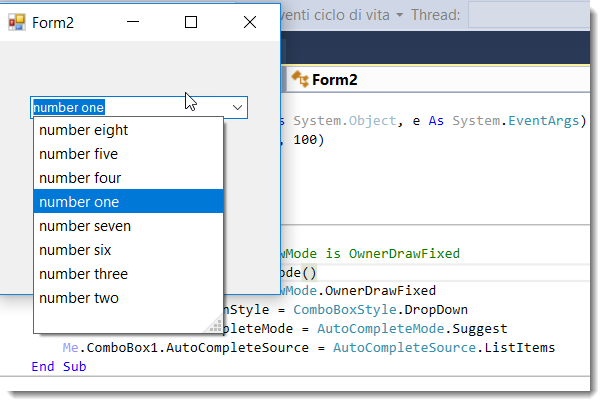
Tuesday, August 8, 2017 7:49 AM
Paolo,
Combobox related with autocomplete mode is always problemful to describe.
Did you know that there is as well a very good Italian VB forum.
Italia has many well known MVP's specialized in VB.
Success
Cor
Tuesday, August 8, 2017 8:44 AM
Hi Cor,
thanks for your suggestion.
I know about VB italian forum, I apologize for the hassle.
I feel at home here and also have received good replays in very fast time.
I think also that the problem has been explained well also in english.
what I'm trying to say is my problem about the default blu color of highlighting combobox.
Cyrille Précetti have solved part of problem with drawMode but not the default blu when text of combobox is selected like my picture.
Anyway Thank you for your help.
I apologize for the hassle
Tuesday, August 8, 2017 8:49 AM
Paolo,'
Than you have to wait at the drawing experts (Tommy, Ray and John for instance). However, those are AFAIK not active 2 hours after that it is by us noon.
Success
Cor
Thursday, August 10, 2017 9:52 AM
Have you implemented the ComboBox1.DrawItem event handler code I proposed?
Because it would modify the color of both the background and the text as you wanted.
Also, this shows a test using the down and up arrows to move up and down the combobox.
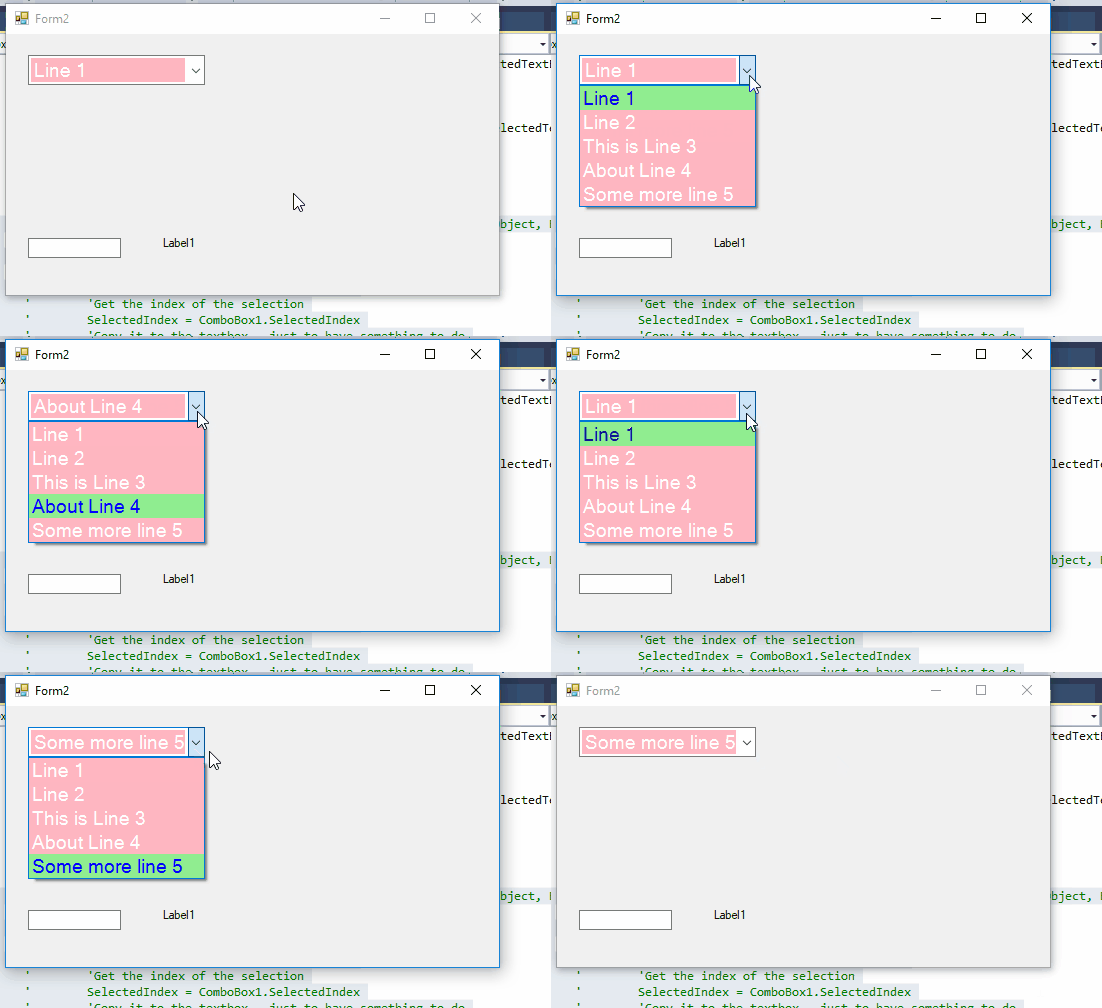
Wednesday, August 16, 2017 10:05 AM
Hi,
autocompletemode--> autocomplitemode.suggest
autocomplitesource-->autocomplitesource.listitems
when combobox source has populate items
try to digit inside combobox and see yourself default BLU color, not clicking dropdown combobox
but wait the suggest opening.
I think is not possible to change that color.
thank you anyway Cyrille for your help
Monday, August 21, 2017 8:59 AM
Hi PaoloDeBeneditis,
According to your description, you want to change highlight color of combobox control, am I right?
If yes, I find one thread that you can refer to:
https://stackoverflow.com/questions/13212179/changing-the-color-of-combobox-highlighting
Just add this class to your project and you will have a new ComboBox control that has the HightlightColor property which will makes it easier to use the control all over the project.
It uses C# , but you can use any one Convert tool to convert into the vb.net.
Best Regards,
Cherry
MSDN Community Support
Please remember to click "Mark as Answer" the responses that resolved your issue, and to click "Unmark as Answer" if not. This can be beneficial to other community members reading this thread. If you have any compliments or complaints to MSDN Support, feel free to contact [email protected].