Note
Access to this page requires authorization. You can try signing in or changing directories.
Access to this page requires authorization. You can try changing directories.
Question
Tuesday, February 17, 2015 8:20 PM
Since I got no responses to my original post in section, "Exchange Server 2013 - Sharing and Collaboration: Site Mailboxes and Public Folders" I'll give it a try here...
We have Exchange 2013 Server (Version 15.0 - Build 913.22). I have a shared mailbox for our support team, "Support Center". This mailbox is configured as a "SharedMailbox". Our team members have been given Full Access either by the Admin Web Interface or by "Add-MailboxPermission -User user1 -AccessRights FullAccess".
I am seeing this issue using Outlook 2013 Pro plus that manually created subfolders either in the root of the mailbox or folders under the Inbox are not visible. These folders are just for organization, like "Work Order Entered" and are not like contact folders or any other special folders.
We determined if the Outlook client is configured for "Online Mode"/non-cached the folders appear and are accessible, but if your enabled Cached exchange mode the folders disappear and are no longer accessible. I have cahnged the cache slider to go all the way right to say cache everything, not just the last so many days, but this did not resolve the issue either.
Upon further testing I have the same issue when I use Search-Mailbox with Targetmailbox and TargetFolder to my "Discovery Search Mailbox". The folders is created and logs are made, but the folder does not show unless I am in exchange online mode and not cached.
HELP PLEASE! This is very annoying and we need cached mode for the registry key to place sent mail in "SenderAndFrom" sent items. It doesn't work in online mode.
Find this post helpful? Does this post answer your question? Be sure to mark it appropriately to help others find answers to their searches.
All replies (7)
Tuesday, February 17, 2015 9:06 PM
Hi CHase,
shared mailboxes shouldnt be cached,only user mailboxes should.Reason for this is because it will download all info from shared mailbox and it can take some time.All company info will also be stored locally,so its security concern.
You mention that you turn on cached mode,is this under user mailbox or additional mailbox as shown below?
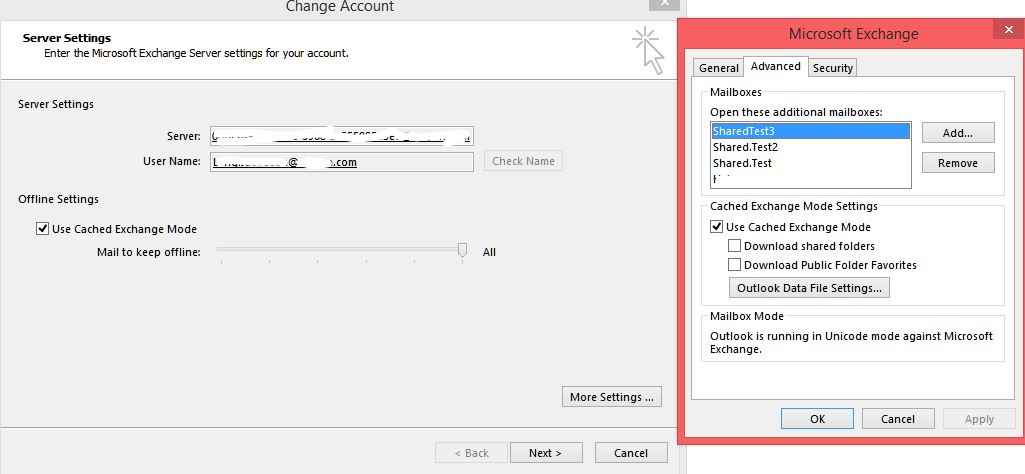
The one to left should be fine to cache all,but the one to the right only first check mark should be on.We have this configuratuon and senderandfrom registry works well.
If you access OWA,then choose to open another mailbox,then choose the "support center" mailbox,do you see all folders?
By granting full access doesnt give you send as permission,for this you will need to run this command:
Get-Mailbox "[email protected]" | Add-ADPermission -User "[email protected]" -ExtendedRights "Send As"
Please mark as helpful if you find my contribution useful or as an answer if it does answer your question. That will encourage me - and others - to take time out to help you. Thank you! Off2work
Tuesday, February 17, 2015 9:07 PM
If you are able to see all the folders when switching to Online mode, this is an issue with the local Outlook profile. Recreating it should resolve it.
I would also recommend turning off the File -> Account settings -> More settings -> Advanced -> Download shared folders option, in order to keep your profile size smaller and to make sure that Outlook displays the shared folder structure directly from the server. This should not affect the Sent items key.
Tuesday, February 17, 2015 9:19 PM
I changed my settings to be as shown in the screenshot and it seems to have resolved it. I was just checking the "Use Cached Exchange Mode" and sliding the bar to "All". While I do not see the mailboxes listed under "Open additional mailboxes" like you do, since we have Full Control to the shared mailbox it is automatically added to my Outlook, but I did not have the "Download shared folders" unchecked. I do now.
That seems to have resolved the issue, however as a test I tried checking it again, thinking it would break it again, it did not. So it is a little misleading as I try to force it to fail again to verify the solution, however I'll try and find another user with the same issue to check it out,
Find this post helpful? Does this post answer your question? Be sure to mark it appropriately to help others find answers to their searches.
Wednesday, November 23, 2016 1:32 PM | 1 vote
We have the same problem with Outlook 2013/2016 connecting to Office365, old profiles/users work fine in cached mode, but when we switch to new PCs (fresh install), the shared folders misses subfolders when cached. If we uncheck cached mod for shared folders, outlook will become extrem slow while accessing the folders.
Thursday, July 20, 2017 3:18 PM
Did you ever find a fix for this? Same issue. Old computer/profile shows subfolders in cached mode, new computer/profile does not. Works without cache, but slow.
Wednesday, September 27, 2017 3:47 AM
Any solution? The only thing I have found is to remove the mailbox and re-add it again in Outlook, but that causes the complete mailbox to have to be re-downloaded. We have a folder with close to 30GB which causes an issue for us.
Wednesday, September 27, 2017 2:18 PM
I have not found any solution.
Find this post helpful? Does this post answer your question? Be sure to mark it appropriately to help others find answers to their searches.