Note
Access to this page requires authorization. You can try signing in or changing directories.
Access to this page requires authorization. You can try changing directories.
Question
Tuesday, November 4, 2014 4:51 PM
I need to give 1 group permissions to manage printer queues for all printers (200 printers). How can I do this using powershell on server 2008 r2?
All replies (3)
Thursday, November 6, 2014 1:54 AM ✅Answered
Hi,
à I need to give 1 group permissions to manage printer queues for all printers (200 printers).
Printer permissions control which printing tasks users can perform on newly added printers that are managed by the print server. The Manage Server permission assigns the ability to create and delete print queues (with already installed drivers), add or delete ports, and add or delete forms.
Please open Print Management, click Print Servers, then right-click the applicable print server and select Properties. In Print Server Properties dialog box, please select Security tab and add that one group which you want to assign permission, then assign that group Manage Server permission. Please check if help you to achieve the target.
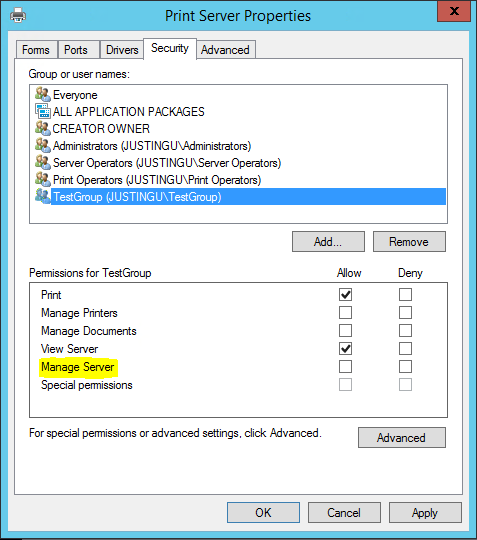
For more details, please refer to following article and check if can help you.
Assign Delegated Print Administrator and Printer Permission Settings in Windows Server 2012
à How can I do this using powershell on server 2008 r2?
For PowerShell, I suggest that you would post the question in PowerShell Forum and check if help you to achieve this target via PowerShell. I believe we will get a better assistance there.
By the way, please also refer to following article and check if can help you.
Print Management Cmdlets in Windows PowerShell
Hope this helps.
Best regards,
Justin Gu
Thursday, November 6, 2014 3:33 AM ✅Answered
Perform this task using a Windows 8 machine to remotely target all the printers on the 2008 R2 server.
Alan Morris formerly with Windows Printing Team
Wednesday, November 5, 2014 12:37 PM
bump!