Note
Access to this page requires authorization. You can try signing in or changing directories.
Access to this page requires authorization. You can try changing directories.
Question
Tuesday, April 16, 2019 1:17 PM
We have noticed this bug last October 2018
We have linked a table in MS Access with Azure SQL
when date/time for example is "2019-03-20 01:35:14.8766667" then if 14.8766667 is not Divisible by 2 then a user edit the linked table in MS Access, it will give an Error message: The Data has been changed. "Another user edited this record and saved the changes before you attempted to save your changes. Re-edit the record."
Another error message is : Write Conflict "This record has been changed by another user since you started editing it. If you save the record, you will overwrite the changes the other user made. Copying the changes to the clipboard will let you look at the values the other user entered, and then paste your changes back in if you decide to make changes."
The Result is: Unable to edit the linked table
when date/time for example is "2019-03-20 01:01:12.160" then if 12.160 is Divisible by 2 then a user edit the linked table in MS Access. it does not give any error messages. the results is: we are able to edit the linked table in ms access
We have been using MS Access for a while as well as SQL server. The strange thing is this: the record that shows the locking issue to the user can easily be change directly via the SQL Server back-end. So it must be an issue with how MS Access treats this record
The linked table in MS access doesn’t correctly identify the field value thus when comparing the record before updating the record for this field it reports a change (although there was no change).
I already replicated this exact issue on my test environment and I got the same results
I have used all other MS Access Channels
Office Insider, Monthly Channel, Monthly Channel (Targeted) , Semi-annual Channel (Targeted) ,Semi-annual Channel
I have used other Virtual machines and other networks
But the Issue is still the same
Any idea on this issue?
All replies (3)
Monday, April 22, 2019 6:39 AM ✅Answered
Hi,
I am checking the status of this issue. Do you have any update for it?
If my reply is helpful to this question, please remember to mark it as answer. Your action would be helpful to other users who encounter the same issue and read this thread. Thanks for your understanding.
Anything unclear or any questions, feel free to post them back to let us know. I will be glad to follow up and help you.
Best Regards,
Herb
Please remember to mark the replies as answers if they helped. If you have feedback for TechNet Subscriber Support, contact [email protected].
Click here to learn more. Visit the dedicated forum to share, explore and talk to experts about Microsoft Office 2019.
Tuesday, April 30, 2019 4:48 AM ✅Answered
Hi,
Thank you for followups, this issue was resolved by Rowversion (Although we have to make structural changes for this).
This was answered by Albert Kallal from this forum
:D
Regards,
Smith
smithbryanespina
Wednesday, April 17, 2019 5:57 AM
Hi Smith,
Thanks for your feedback here. The quickest route to get your comments to Office developers’ ears is right from within any Office app. And if you want to, you can even tell them your email address in case they need to contact you for clarification. They read all feedback.
From your Access, click File > Feedback.
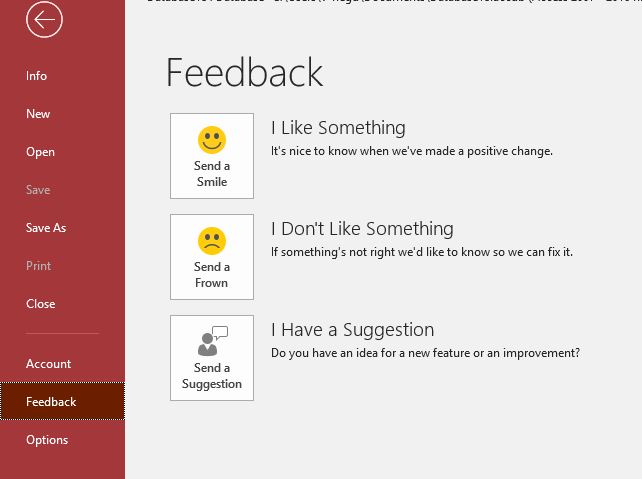
You can also use Access UserVoice for feature suggestions and feedback. In addition, you can also ask question at Access for developer forum for help. You may get more helpful replies there.
Hope the issue could be resolved smoothly.
Best Regards,
Herb
Please remember to mark the replies as answers if they helped. If you have feedback for TechNet Subscriber Support, contact [email protected].
Click here to learn more. Visit the dedicated forum to share, explore and talk to experts about Microsoft Office 2019.