Note
Access to this page requires authorization. You can try signing in or changing directories.
Access to this page requires authorization. You can try changing directories.
Question
Monday, June 8, 2020 11:32 AM
Hi all,
a customer experiences the following behavior:
When having a DocLib with Document ID feature not activated the link created by context menu "Copy link" looks as follows (aka "durable" links not being durable when moving the document to a different library):
When clicking this link e. g. out of an e-mail application the document opens up in the client application (or Office Online Server if in place) and is "connected" to the server, meaning the document can be edited and saved directly. This is fine and the desired behavior.
Now, when the DocId feature is enabled the link looks like this:
Now depending on your browser and its preferences the document is downloaded or offered to be downloaded or "opened" directly. However, if you chose "open", it opens in the client application but "offline", meaning a the local downloaded copy of the document. You can then say "Save as" in the client application but you cannot edit and save the document directly.
The customer need the DocID feature for obvious reasons (having "real durable" links but also wants to have the ability to open and edit the documents "online" after clicking the generated link.
Did you get my point? Is there any hidden configuration changing the way DocIdRedir.aspx opens the document?
Thanks in advance.
All replies (8)
Monday, June 22, 2020 10:04 AM ✅Answered
Hi michael,
I would suggest you open a MS premium support case for this.
Best Regards,
Lisa Chen
Please remember to mark the replies as answers if they helped. If you have feedback for TechNet Subscriber Support, contact [email protected].
SharePoint Server 2019 has been released, you can click
here to download it.
Click
here to learn new features. Visit the dedicated
forum to share, explore and talk to experts about SharePoint Server 2019.
Monday, June 22, 2020 2:25 PM ✅Answered
This is an issue with non-IE browsers and DocIDs and unfortunately cannot be changed. Either you'll want to use IE or you'll want to disable DocIDs.
Trevor Seward
Office Apps and Services MVP
Author, Deploying SharePoint 2019
Author, Deploying SharePoint 2016
This post is my own opinion and does not necessarily reflect the opinion or view of Microsoft, its employees, or other MVPs.
Tuesday, June 9, 2020 7:18 AM
Hi michael,
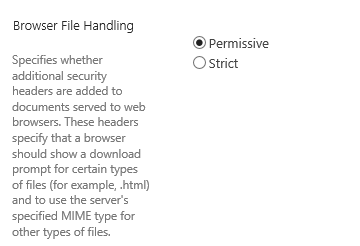
Go to Central Administration -> Application Management -> Manage Web Applications->Select the web application and click General Settings->Scroll down to Browser File Handling, and choose Permissive instead of strict.
Best Regards,
Lisa Chen
Please remember to mark the replies as answers if they helped. If you have feedback for TechNet Subscriber Support, contact [email protected].
SharePoint Server 2019 has been released, you can click
here to download it.
Click
here to learn new features. Visit the dedicated
forum to share, explore and talk to experts about SharePoint Server 2019.
Tuesday, June 9, 2020 9:50 AM
Hi Lisa,
thanks for your response. I can confirm this is already set to "Permissive". And yes, it's working when have the old "durable" link type and also when browsing "normally" through the sites and documents. However, must be something special in how DocIdRedir.aspx handles the file. Did you test this special constellation in your enviroment?
Kind Regards
Michael
Monday, June 15, 2020 11:44 AM
Hi michael,
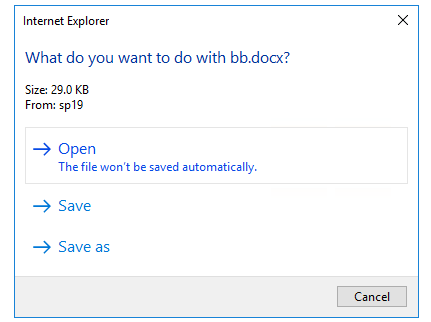
I have done a test in my SharePoint with IE and after i setting Browser File Handling to "Permissive",
DocID link opening it in client application.
Try to open DocID link with other browser and compare the results.
Best Regards,
Lisa Chen
Please remember to mark the replies as answers if they helped. If you have feedback for TechNet Subscriber Support, contact [email protected].
SharePoint Server 2019 has been released, you can click here to download it.
Click here to learn new features. Visit the dedicated forum to share, explore and talk to experts about SharePoint Server 2019.
Wednesday, June 17, 2020 1:24 PM
Yes, Lisa. This is exactly what happens in my ID when I use the DocIdRedir-Link. But when actually opening the file in the client application it is read-only (means being a local copy/download). You can not edit the file directly and save it back to the server. This is also, what your message says: "Open - The file won't be saved automatically."
When I disable the DocID feature, the link has the "old" durable format:
When I open this link in IE or in Chrome, the file is opened in Office Online Server (if configured) or directly and editable in the Word client application.
And yes, my web application file handling setting is set to permissive. Do you get the point? Or will I have to open a MS premium support case for this?
Thursday, June 18, 2020 2:48 PM
Hello Michael.
I've noticed the DocIdRedir.aspx addition to the URL as well. Chrome was my default browser and it just downloads the doc with no ref back to the server. It works okay with IE and Edge though. However, I wonder if it is the link wherein lies the issue? It seems that the link field (or whatever that is called) on the document pop-up is the offending link. I say that because, if you choose the Share Option THAT URL works great with all 3 browsers I use and it includes the name of the document AND the DocID and the DocIdRedir.aspx is not in the URL.
So I'm wondering if there is a config issue or bug there?
Ken
Tuesday, June 23, 2020 9:49 AM
Thanks to all of you. We now configured Office Online Server as the default and first option to render documents. This works well for "durable links" and "DocId links" - in all tested browsers. So, maybe this is an option, but good to know that this is considered as an "issue" on non-IE browsers that cannot be changed (except of the OOS option).