Note
Access to this page requires authorization. You can try signing in or changing directories.
Access to this page requires authorization. You can try changing directories.
Question
Wednesday, August 21, 2019 11:05 AM
I have created setup project for WPF application and need to setup automatic build. So I am trying to build application from command project. I could not able to build setup project using following command.
"Program Files (x86)\Microsoft Visual Studio\2017\Enterprise\Common7\IDE\devenv" D:\Projects\Pos.sln /rebuild "Release|Any CPU".
I have been receiving below error
Starting pre-build validation for project 'Pos.Setup'
ERROR: An error occurred while validating. HRESULT = '8000000A'
Pre-build validation for project 'Pos.Setup' completed
11> Rebuild All started: Project: Pos.Setup, Configuration: Release
========== Rebuild All: 10 succeeded, 1 failed, 0 skipped ==========
I tried with MSBuild. But msbuild will not support setup project (The project file "Pos.Setup.vdproj" is not supported by MSBuild and cannot be built). Am using visual studio installer -> Setup Project.
I have gone through the every website I could not able to find the answer. Any help?
All replies (2)
Thursday, August 22, 2019 6:12 AM
Hi KPam1234,
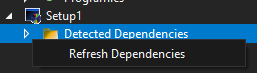
Please try to right click "Detected Dependencies" and "Refresh Dependencies" in "Solution Explorer".
And here I found a similar thread maybe you can refer to.
An error occurred while validating. HRESULT = '8000000A'
Hope this can help you.
Regards,
Kyle
MSDN Community Support
Please remember to click "Mark as Answer" the responses that resolved your issue, and to click "Unmark as Answer" if not. This can be beneficial to other community members reading this thread. If you have any compliments or complaints to MSDN Support, feel free to contact [email protected].
Friday, August 23, 2019 7:05 AM
After refreshing the dependencies also it is not working. the provided thread seems to be a workaround. should I go with third party packager?