Note
Access to this page requires authorization. You can try signing in or changing directories.
Access to this page requires authorization. You can try changing directories.
Question
Thursday, May 7, 2020 2:35 PM
I'm experiencing the same issue w/Outlook calendar invite sending cancellation notices.. I have a recurring meeting on the calendar and send frequent updates to the attendees, about 50 people. Every time I add more attendees to the invite and then send out an update, everybody receives a cancellation notice, instead. It's causing a lot of confusion for everyone, and I have to keep creating new calendar invites for the recurring meeting. Huge inconvenience..
All replies (2)
Friday, May 8, 2020 1:56 AM
Hi KJ,
What's the version of your Outlook client? (File > Office Account > About Outlook). Please make sure you have upgraded your Outlook to the latest version.
There are several things needed to be confirmed:
1. Try updating a meeting on the web mail to see if issue can be reproduced.
2. Check your Sent Items folder if the right update emails were sent out.
3. Was meeting really cancelled in recipient’s calendar?
4. Does this issue only happen when you add more attendees? How about changing other items? Such as location, time...
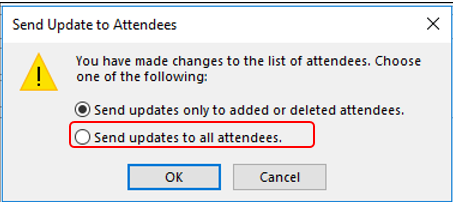
When sending updates, please select “Send updates to all attendees”.
If issue only occurs to one meeting in Outlook client, we can recreate this meeting.
If it always occurs when updating meetings, please try starting Outlook in safe mode and see whether this issue continues. To do this, please exit Outlook, press Win key + R to open the Run command, type outlook /safe, press Enter.
Any updates, please feel free to post back.
Regards,
Aidan Wang
Please remember to mark the replies as answers if they helped. If you have feedback for TechNet Subscriber Support, contact [email protected].
Monday, May 11, 2020 8:52 AM
Hi,
Have you got the issue fixed?
I'm writing to see if the reply above is helpful to you. If yes, would you mind helping mark the reply as answer? So that others who might have a similar question can benefit from your thread? Thanks for your understanding and support.
Regards,
Aidan Wang
Please remember to mark the replies as answers if they helped. If you have feedback for TechNet Subscriber Support, contact [email protected].