Note
Access to this page requires authorization. You can try signing in or changing directories.
Access to this page requires authorization. You can try changing directories.
Question
Wednesday, July 5, 2017 9:17 PM
I have to make application similar to task manager in c# and I'm stuck on "networking" part.
Question :How can I get informations on processes network usage?How can I show how much data certain process downloaded/uploaded?(Like taskmgr or Resource Manager does it)
Where I got so far,and what I have found while searching on google.
Like i previously said,I have to make c# application similar to task manager;showing and refreshing list of running processes,show their usage of CPU time and RAM,showing how much data did some process download/upload, and give some description about certain process. Im stuck on networking part.All i managed to do is show network adapters,their speed,availability and downloaded/uploaded data per adapter.
So if you have any idea(without writing my own network driver or so) how could i show network usage per process(like taskmgr does that) please let me know,any kind of help is appreciated. Thank you
All replies (7)
Thursday, July 6, 2017 11:11 AM ✅Answered
Hi Cole031,
If you want to monitor network traffic for certain process , I suggest you use SharpPcap,which is A framework for capturing, injecting and analyzing network packets for .NETapplications .
And I have done a simple demo base on your description.
public  class ProcessPerformanceInfo
    {
        public int ProcessID { get; set; }
        public long NetSendBytes { get; set; }
        public long NetRecvBytes { get; set; }
        public long NetTotalBytes { get; set; }

    }
class Program
    {
        static ProcessPerformanceInfo ProcInfo;
        static void Main(string[] args)
        {
            ProcInfo = new ProcessPerformanceInfo()
            {
                ProcessID = 3684
            };

            int pid = ProcInfo.ProcessID;
            List<int> ports = new List<int>();

            #region get ports for certain process through executing the netstat -ano command  in cmd
            Process pro = new Process();
            pro.StartInfo.FileName = "cmd.exe";
            pro.StartInfo.UseShellExecute = false;
            pro.StartInfo.RedirectStandardInput = true;
            pro.StartInfo.RedirectStandardOutput = true;
            pro.StartInfo.RedirectStandardError = true;
            pro.StartInfo.CreateNoWindow = true;
            pro.Start();
            pro.StandardInput.WriteLine("netstat -ano");
            pro.StandardInput.WriteLine("exit");
            Regex reg = new Regex("\\s+", RegexOptions.Compiled);
            string line = null;
            ports.Clear();
            while ((line = pro.StandardOutput.ReadLine()) != null)
            {
                line = line.Trim();
                if (line.StartsWith("TCP", StringComparison.OrdinalIgnoreCase))
                {
                    line = reg.Replace(line, ",");
                    string[] arr = line.Split(',');
                    if (arr[4] == pid.ToString())
                    {
                        string soc = arr[1];
                        int pos = soc.LastIndexOf(':');
                        int pot = int.Parse(soc.Substring(pos + 1));
                        ports.Add(pot);
                    }
                }
                else if (line.StartsWith("UDP", StringComparison.OrdinalIgnoreCase))
                {
                    line = reg.Replace(line, ",");
                    string[] arr = line.Split(',');
                    if (arr[3] == pid.ToString())
                    {
                        string soc = arr[1];
                        int pos = soc.LastIndexOf(':');
                        int pot = int.Parse(soc.Substring(pos + 1));
                        ports.Add(pot);
                    }
                }
            }
            pro.Close();
            #endregion

            //get ip address
            IPAddress[] addrList = Dns.GetHostByName(Dns.GetHostName()).AddressList;
            string IP = addrList[0].ToString();


            //var devices = SharpPcap.WinPcap.WinPcapDeviceList.Instance;
            var devices = CaptureDeviceList.Instance;

            // differentiate based upon types

            int count = devices.Count;
            if (count < 1)
            {
                Console.WriteLine("No device found on this machine");
                return;
            }

            for (int i = 0; i < count; ++i)
            {
                for (int j = 0; j < ports.Count; ++j)
                {
                    CaptureFlowRecv(IP, ports[j], i);
                    CaptureFlowSend(IP, ports[j], i);
                }
            }
            while (true)
            {
                Console.WriteLine("proc NetTotalBytes : " + ProcInfo.NetTotalBytes);
                Console.WriteLine("proc NetSendBytes : " + ProcInfo.NetSendBytes);
                Console.WriteLine("proc NetRecvBytes : " + ProcInfo.NetRecvBytes);

                //Call refresh function every 1s
                RefershInfo();
            }

        }

        private static void CaptureFlowSend(string IP, int portID, int deviceID)
        {
            ICaptureDevice device = CaptureDeviceList.New()[deviceID];

            device.OnPacketArrival += new PacketArrivalEventHandler(device_OnPacketArrivalSend);
            int readTimeoutMilliseconds = 1000;
            device.Open(DeviceMode.Promiscuous, readTimeoutMilliseconds);
            string filter = "src host " + IP + " and src port " + portID;
            device.Filter = filter;
            device.StartCapture();

        }

        private static void device_OnPacketArrivalSend(object sender, CaptureEventArgs e)
        {
            //DateTime time = e.Packet.Timeval.Date;
            //int len = e.Packet.Data.Length;
            //Console.WriteLine("{0}:{1}:{2},{3} Len={4}",
            //    time.Hour, time.Minute, time.Second, time.Millisecond, len);
            var len = e.Packet.Data.Length;
            ProcInfo.NetSendBytes += len;

        }

        private static void CaptureFlowRecv(string IP, int portID, int deviceID)
        {
            ICaptureDevice device = CaptureDeviceList.New()[deviceID];
            device.OnPacketArrival += new PacketArrivalEventHandler(device_OnPacketArrivalRecv);

            int readTimeoutMilliseconds = 1000;
           device.Open(DeviceMode.Promiscuous, readTimeoutMilliseconds);

            string filter = "dst host " + IP + " and dst port " + portID;
            device.Filter = filter;
            device.StartCapture();

        }
        private static void device_OnPacketArrivalRecv(object sender, CaptureEventArgs e)
        {
            var len = e.Packet.Data.Length;
            ProcInfo.NetRecvBytes += len;
        }
        public static void RefershInfo()
        {
            ProcInfo.NetRecvBytes = 0;
            ProcInfo.NetSendBytes = 0;
            ProcInfo.NetTotalBytes = 0;
            Thread.Sleep(1000);
            ProcInfo.NetTotalBytes = ProcInfo.NetRecvBytes + ProcInfo.NetSendBytes;
        }
        private static void device_OnPacketArrivalSend(object sender, CaptureEventArgs e)
        {
            //DateTime time = e.Packet.Timeval.Date;
            //int len = e.Packet.Data.Length;
            //Console.WriteLine("{0}:{1}:{2},{3} Len={4}",
            //    time.Hour, time.Minute, time.Second, time.Millisecond, len);
            var len = e.Packet.Data.Length;
            ProcInfo.NetSendBytes += len;

        }

        private static void CaptureFlowRecv(string IP, int portID, int deviceID)
        {
            ICaptureDevice device = CaptureDeviceList.New()[deviceID];
            device.OnPacketArrival += new PacketArrivalEventHandler(device_OnPacketArrivalRecv);

            int readTimeoutMilliseconds = 1000;
            device.Open(DeviceMode.Promiscuous, readTimeoutMilliseconds);

            string filter = "dst host " + IP + " and dst port " + portID;
            device.Filter = filter;
            device.StartCapture();

        }
        private static void device_OnPacketArrivalRecv(object sender, CaptureEventArgs e)
        {
            var len = e.Packet.Data.Length;
            ProcInfo.NetRecvBytes += len;
        }
        public static void RefershInfo()
        {
            ProcInfo.NetRecvBytes = 0;
            ProcInfo.NetSendBytes = 0;
           ProcInfo.NetTotalBytes = 0;
            Thread.Sleep(1000);
            ProcInfo.NetTotalBytes = ProcInfo.NetRecvBytes + ProcInfo.NetSendBytes;
        }
    }
the result:
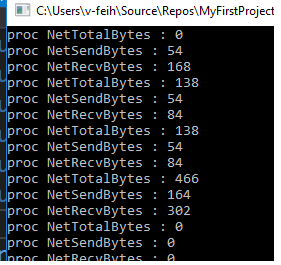
If you have any issues about SharpPcap , you could take reference with the following link.
https://www.codeproject.com/Articles/12458/SharpPcap-A-Packet-Capture-Framework-for-NET
Best regards,
feih-7
MSDN Community Support
Wednesday, July 5, 2017 9:12 PM
I have to make application similar to task manager in c# and I'm stuck on "networking" part.
Question :How can I get informations on processes network usage?How can I show how much data certain process downloaded/uploaded?(Like taskmgr or Resource Manager does it)
Where I got so far,and what I have found while searching on google.
Like i previously said,I have to make c# application similar to task manager;showing and refreshing list of running processes,show their usage of CPU time and RAM,showing how much data did some process download/upload, and give some description about certain process. Im stuck on networking part.All i managed to do is show network adapters,their speed,availability and downloaded/uploaded data per adapter.
So if you have any idea(without writing my own network driver or so) how could i show network usage per process(like taskmgr does that) please let me know,any kind of help is appreciated. Thank you
Wednesday, July 5, 2017 9:45 PM | 2 votes
Resmon uses GetExtendedTcpTable() for network (you can find samples on Google)
Thursday, July 6, 2017 6:02 AM | 1 vote
Hi friend,
We noticed that you've posted same thread in C# forum, according to MSDN forum policy, we're going to merge them. Thanks for your understanding.
Best regards,
Fletcher
MSDN Community Support
Please remember to click "Mark as Answer" the responses that resolved your issue, and to click "Unmark as Answer" if not. This can be beneficial to other community members reading this thread. If you have any compliments or complaints to MSDN Support, feel free to contact [email protected].
Thursday, July 6, 2017 1:53 PM
Duplicate post, merging with original thread.
Thursday, July 6, 2017 2:41 PM
Really helpful,thank you very much!
Thursday, July 6, 2017 10:35 PM
I have to make application similar to task manager in c# and I'm stuck on "networking" part.
Question :How can I get informations on processes network usage?How can I show how much data certain process downloaded/uploaded?(Like taskmgr or Resource Manager does it)
Where I got so far,and what I have found while searching on google.
Like i previously said,I have to make c# application similar to task manager;showing and refreshing list of running processes,show their usage of CPU time and RAM,showing how much data did some process download/upload, and give some description about certain process. Im stuck on networking part.All i managed to do is show network adapters,their speed,availability and downloaded/uploaded data per adapter.
So if you have any idea(without writing my own network driver or so) how could i show network usage per process(like taskmgr does that) please let me know,any kind of help is appreciated. Thank you
Windows itself includes the (under appreciated) Resource Monitor (this first appeared in Vista I think and was a bit buggy and kludgy, its much slicker now).
The Resource Monitor enables you to monitor a host of network stuff, and select the processes you want to monitor.
Just start Resource Monitor, click the Network tab at the top and check whichever processes you want.
Then you'll see multiple sections at the bottom of the window, Network Activity, TCP Connections and Listening Ports.
Does your requirement extend to monitoring processes on other machines?