Note
Access to this page requires authorization. You can try signing in or changing directories.
Access to this page requires authorization. You can try changing directories.
Question
Wednesday, February 22, 2017 11:55 AM
anyone can provide example which show me how we can set time in thread and thread will call routine at that time.
thanks
All replies (3)
Thursday, February 23, 2017 8:27 AM ✅Answered
Hi Mou_inn,
Thank you for posting here.
For your question, you could try Task.Delay. Here is two example in How to run code daily at specific time in C# for reference.
And you could download the source file from How to run code daily at specific time in C# Part 2 in code project.
I hope this would be helpful.
Best Regards,
Wendy
MSDN Community Support
Please remember to click "Mark as Answer" the responses that resolved your issue, and to click "Unmark as Answer" if not. This can be beneficial to other community members reading this thread. If you have any compliments or complaints to MSDN Support, feel free to contact [email protected].
Wednesday, February 22, 2017 11:56 AM
i got one but not tested.
You can set up a timer at 16:00. I've answered a similar question here. That should help you for sure.
private System.Threading.Timer timer;
private void SetUpTimer(TimeSpan alertTime)
{
     DateTime current = DateTime.Now;
     TimeSpan timeToGo = alertTime - current.TimeOfDay;
     if (timeToGo < TimeSpan.Zero)
     {
        return;//time already passed
     }
     this.timer = new System.Threading.Timer(x =>
     {
         this.SomeMethodRunsAt1600();
     }, null, timeToGo, Timeout.InfiniteTimeSpan);
}

private void SomeMethodRunsAt1600()
{
    //this runs at 16:00:00
}
Then set it up using
SetUpTimer(new TimeSpan(16, 00, 00));
Edit: Keep the reference of the Timer as it's subject to garbage collection irrespective of the Timer is active or not.
http://stackoverflow.com/a/18611442/728750
Wednesday, February 22, 2017 1:23 PM
Hi Mou,
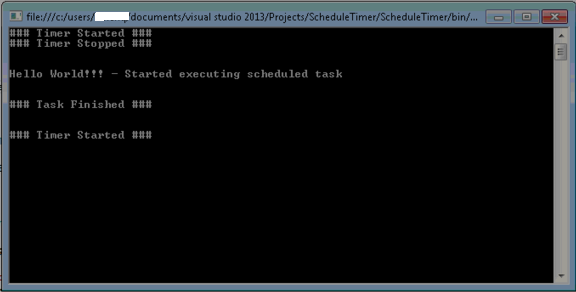
See the below code. What it does is that it checks the current time and compare it with scheduled time to begin the task. Please specify the time and minute in the bolded section on which you want your task to start. What following program do is print "Hello World" in the console in the specified time in bolded section.
using System;
using System.Timers;

namespace ScheduleTimer
{
    class Program
    {
        static Timer timer;

        static void Main(string[] args)
        {
            setup_Timer();
            Console.ReadLine();
        }

        static void setup_Timer()
        {
            Console.WriteLine("### Timer Started ###");

            DateTime nowTime = DateTime.Now;
            DateTime scheduledTime = new DateTime(nowTime.Year, nowTime.Month, nowTime.Day, 8, 36, 0, 0); //Specify your time HH,MM,SS
            if (nowTime > scheduledTime)
                scheduledTime = scheduledTime.AddDays(1);

            double tickTime = (double)(scheduledTime - DateTime.Now).TotalMilliseconds;
            timer = new Timer(tickTime);
            timer.Elapsed += new ElapsedEventHandler(timer_Elapsed);
            timer.Start();
        }

        static void timer_Elapsed(object sender, ElapsedEventArgs e)
        {
            Console.WriteLine("### Timer Stopped ### \n\n");
            timer.Stop();
            Console.WriteLine("Hello World!!! - Started executing scheduled task\n\n");
            Console.WriteLine("### Task Finished ### \n\n");
            setup_Timer();
        }
    }
}
Output:
Thanks,
Sabah Shariq
[If a post helps to resolve your issue, please click the "Mark as Answer" of that post or click  "Vote as helpful" button of that post. By marking a post as Answered or Helpful, you help others find the answer faster. ]