Note
Access to this page requires authorization. You can try signing in or changing directories.
Access to this page requires authorization. You can try changing directories.
Question
Wednesday, May 9, 2018 5:13 AM
I have this:
dynamic status = HttpStatusCode.OK;
switch (status)
{
    case HttpStatusCode.OK:
        Console.WriteLine("This is OK");
        break;
    case HttpStatusCode.NotFound:
        Console.WriteLine("This is NOTFOUND");
        break;
    default:
        Console.WriteLine("This is default");
        break;
}
I got
This is OK
This is default
break; always comes to default. Is this the correct switch behaviour for break; ?
-.- yoz...
All replies (8)
Wednesday, May 9, 2018 5:50 AM
No that's not the correct behavior. Something is wrong.
In fact, I don't know how your code compiled. With status defined as dynamic, I would have expected an error like the one below.
Severity Code Description Project File Line Suppression State
Error CS0151 A switch expression or case label must be a bool, char, string, integral, enum, or corresponding nullable type
Wednesday, May 9, 2018 2:08 PM
Only the first case would execute as of 7.x. Prior to C# 7 it is a compiler error. What version of C# are you using for this project and are you sure the output is coming from the same source that you posted?
Michael Taylor http://www.michaeltaylorp3.net
Wednesday, May 9, 2018 4:16 PM
Why do you use dynamic at all in this code?
It is only created to get parity to Visual Basic.
In .Net VB it is the most advised thing not to use. In VB it is just for backwards compatibility to VB6 and earlier programs. Another name for it is late binding (reflection). If you want the same kind of code without a chance on all kind of unpredictable problems then use the var which is early binding.
Success
Cor
Tuesday, May 15, 2018 11:33 AM
I'm using dotnet core 2.0 which uses .NET Framework 4.7.2
Even if I using dynamic as a string:
dynamic status = "OK"switch (status)
{
    case"OK":
        Console.WriteLine("This is OK");
        break;
    case "NOT OK":
        Console.WriteLine("This is NOTFOUND");
        break;
    default:
        Console.WriteLine("This is default");
        break;
}
It doesn't break; even return is not ok.
Using Visual Studio 2017, version 15.7.0
-.- yoz...
Tuesday, May 15, 2018 11:34 AM
Did you run a test project?
A c# project created in Visual Studio 2017 works.
-.- yoz...
Tuesday, May 15, 2018 11:37 AM
I'm using the flexibility of dictionary and dynamic to compose a return JSON string for a web API mvc app.
Dictionary<string, dynamic> result = new Dictionary<string, dynamic>();
result.Add("Status", HttpStatusCode.OK);
result.Add("Message", "My Message");

return result;
-.- yoz...
Tuesday, May 15, 2018 12:40 PM
I don't get your result.
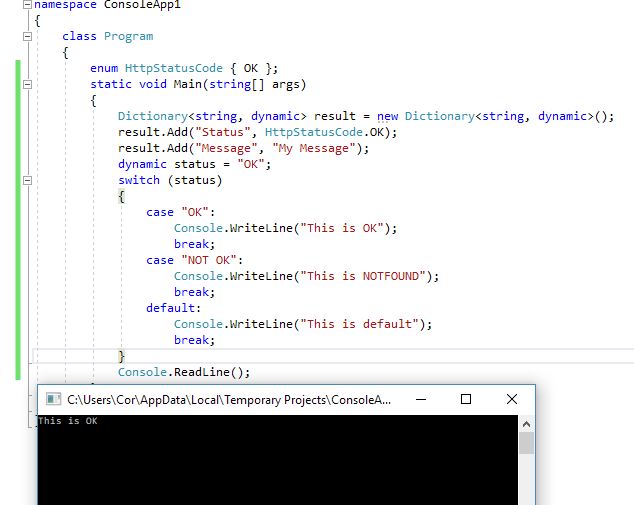
Success
Cor
Tuesday, May 15, 2018 1:43 PM
"I'm using dotnet core 2.0 which uses .NET Framework 4.7.2"
That isn't possible .NET Core and .NET Framework are 2 completely different frameworks. Your app will target one or the other. If it is a class library then you can target .NET Standard which could run on either platform but your app itself has to choose one or the other. .NET Framework 4.7.2 is .NET Standard 2.0 compliant.
The project type doesn't matter when it comes to compiling C# code. The C# compiler compiles the same irrelevant of EXE or class library (which is what a unit test project is). I wonder if you're actually having an issue with your testing framework of choice. What unit test framework are you using?
Just for fun I did create a .NET Core 2.0 MSTest unit test project and pasted your code into a test method. Debugging the unit test and stepping through indicated that it runs properly for me.
Michael Taylor http://www.michaeltaylorp3.net