Note
Access to this page requires authorization. You can try signing in or changing directories.
Access to this page requires authorization. You can try changing directories.
Question
Wednesday, March 2, 2016 6:16 PM
Windows 2012 R2 Hyper-V - Lost VM01 due to hardware issue. VM01 used to store development systems. Restored VM01's VMs from Unitrends backup to VM02 & VM03 (Hyper-V cluster servers running production VMs). Noticed that the VMs that were added have been running checkpoints every day - don't know why; production VMs in the cluster do not and development VMs that were on VM01 didn't when they lived on VM1. I replaced VM01 with new server and now am trying to move the VMs back but can't get rid of the checkpoints - move fails and Export/Import keeps all the checkpoint. The option "Manage Checkpoints" is not in the action menu when I select the VM. I tried to compact and tried to convert the VMs disks but nothing changed. I don't want checkpoints automatically created and I want to get rid of all the existing checkpoints. Thoughts?
Thanks as always
All replies (16)
Thursday, March 24, 2016 2:54 PM ✅Answered
By merging all of the checkpoints manually and then moving the VM manually from one VM server to another one I was able to clear up the checkpoints. A new VM created on the same machine did not display the same issue with "auto" checkpointing. The only thing I can think of would have to do with the combination of the Unitrends backup and restore to a different host server. That should not cause an issue but I don't have any other ideas. The problem has been resolved but I wouldn't say I have an answer to the odd behavior.
Best Regards
Eric
Wednesday, March 2, 2016 9:23 PM | 1 vote
Checkpoints don't happen 'automatically'. Something has to be triggering Hyper-V to take a checkpoint. Maybe there is something running in the VM itself that is telling its Hyper-V host to take a checkpoint?
There is not a 'Manage Checkpoints' option in the Actions menu. There should be a 'Checkpoint' option. All that does is take a checkpoint.
. : | : . : | : . tim
Wednesday, March 2, 2016 9:57 PM
So far the only that has worked is to shutdown the VM, Use "Edit Disk", browse to the newest .avhdx file, select merge, to the parent disk, finish. Once all the .avhdx are rolled up I can move the VM to the restored server. very tedious but seems to work. Don't know what is triggering the checkpoints.
Thx
Thursday, March 3, 2016 1:13 PM
Do the checkpoints appear in the Hyper-V Manager console? If so, you simply delete them there. That is how you 'manage' checkpoints.
Checkpoints have time stamps on them. You may be able to go into the event logs to see if you can track down what is happening at the time the checkpoint is being created.
. : | : . : | : . tim
Thursday, March 3, 2016 2:23 PM | 1 vote
Hi Eburch,
As Tim already said, checkpoints don't happen automatically. If needed you can also try to merge the checkpoints, check the below links on this:
https://blog.workinghardinit.work/2014/08/29/manually-merging-hyper-v-checkpoints/
After that try again to export/import.
Thursday, March 3, 2016 5:10 PM
That is basically what I am doing - manually merging checkpoints and then once complete, moving the VM to the restored server. The checkpoints show up in the hyper-v manager console but delete is not an option. After moving a VM to the restored server there are no checkpoints in the hyper-v manager and no new ones appear, but on the production servers there is a checkpoint run every night between 2:30 and 3:30 am on the VMs that were initially restored from the backup device. Of note, this happens only to these VMs which are not in the cluster. The production VMs that are in the cluster do not checkpoint at night.
Thursday, March 3, 2016 7:17 PM | 1 vote
"The checkpoints show up in the hyper-v manager console but delete is not an option"
What do you mean by this? If you select a checkpoint, Delete Checkpoint... does not appear in the Actions menu? If you right click on a checkpoint, Delete Checkpoint... is not listed?
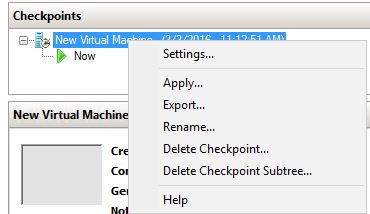
. : | : . : | : . tim
Thursday, March 3, 2016 7:37 PM
Correct - Delete Checkpoint and Delete Checkpoint Subtree are not in the menu
Thursday, March 3, 2016 7:51 PM | 1 vote
What do you see when you right-click on the checkpoint in the Hyper-V Manager console?
. : | : . : | : . tim
Thursday, March 3, 2016 8:29 PM
Only:
"Settings"
"Export"
"Rename"
"Help"
Thursday, March 3, 2016 9:11 PM | 1 vote
"After moving a VM to the restored server there are no checkpoints in the hyper-v manager and no new ones appear, but on the production servers there is a checkpoint run every night between 2:30 and 3:30 am on the VMs that were initially restored from the backup device. "
This is completely weird. Sounds like you need to expedite getting them back onto the restored server. I can't think of any reason for what you are seeing happen.
Is that 2:30-3:30 am slot a time that the backup would generally run? Backups often create AVHDX files, but the backup should be handling them invisibly for you.
. : | : . : | : . tim
Thursday, March 3, 2016 11:04 PM
No - backups on the VMs run before midnight. I don't know of anything that happens in that window. I moved all the VMs after merging the checkpoints and it seems to be working although the folder structure got screwed up with the "Virtual Machines" folder inside a folder named after the virtual machine in a folder named for the virtual machine; the root folder is named Hyper-V - i.e. \Hyper-V\VM01\VM01\Virtual Machines vs \Hyper-V\VM01\Virtual Machines. Don't know if I can fix that. There is no setting for the location of the "Virtual machine" folder that I can see. The snapshot folder is in \Hyper-V\VM01\ where it belongs.
Thx
Friday, March 4, 2016 8:38 AM | 1 vote
Hi Sir,
Could you please run the following command to check the snapshot type for that vm
Get-VMSnapshot -VMName "VMNAME" | fl vmname,snapshottype,creationtime
Also the disk information:
Get-VMHardDiskDrive "VMNAME" | fl vmname,path
If it is possible please post it here .
In addition , I would suggest you to shutdown the VM then backup it .
After accomplishing vm backup , please take a snapshot manualy for that VM then export it .
Try to import it to other hyper-v server and check if these snapshots still exist and can be deleted .
Best Regards,
Elton
Please remember to mark the replies as answers if they help and unmark them if they provide no help. If you have feedback for TechNet Subscriber Support, contact [email protected] .
Friday, March 4, 2016 12:01 PM | 1 vote
You can always use the Move action within Hyper-V manager to move the files associated with a VM to different locations. So if you really want to change the directory structure, it is possible.
It may be time to open a support call with Microsoft to get to the bottom of this.
. : | : . : | : . tim
Friday, March 4, 2016 6:07 PM
Unfortunate when I merged the checkpoints and moved the VMs there are no checkpoints left so I can't check them. The only significant thing that I can think of is that the temporary location for the development VMs was on the production cluster but not in the clustered hyper visor. They were attached to the server itself. I can create a VM and set it up that way again to see if the auto-checkpoint happens. I will let you know
Thursday, March 24, 2016 7:07 AM
Hi Sir,
I would like to check if the issue persists .
Best Regards,
Elton
Please remember to mark the replies as answers if they help and unmark them if they provide no help. If you have feedback for TechNet Subscriber Support, contact [email protected] .