Note
Access to this page requires authorization. You can try signing in or changing directories.
Access to this page requires authorization. You can try changing directories.
Question
Thursday, December 11, 2014 2:58 PM
How to change the border styler of GroupBox?
All replies (5)
Thursday, December 11, 2014 3:18 PM ✅Answered
Hello,
Look at the code in the following thread
EDIT the following link has a solution, a class project with the GroupBox and one forms project to test.
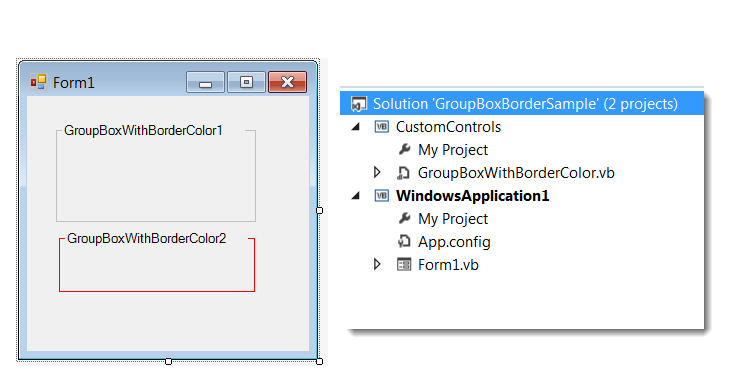
Please remember to mark the replies as answers if they help and unmark them if they provide no help, this will help others who are looking for solutions to the same or similar problem.
Thursday, December 11, 2014 3:17 PM
The below code is from Zhi-Xin Ye from this thread https://social.msdn.microsoft.com/Forums/windows/en-US/cfd34dd1-b6e5-4b56-9901-0dc3d2ca5788/changing-border-color-of-groupbox
Public Class myGroupBox
    Inherits GroupBox

    Private borderColor As Color

    Public Sub New()
        MyBase.New
        Me.borderColor = Color.Black
    End Sub

    Public Property BorderColor As Color
        Get
            Return Me.borderColor
        End Get
        Set
            Me.borderColor = value
        End Set
    End Property

    Protected Overrides Sub OnPaint(ByVal e As PaintEventArgs)
        Dim tSize As Size = TextRenderer.MeasureText(Me.Text, Me.Font)
        Dim borderRect As Rectangle = e.ClipRectangle
        borderRect.Y = (borderRect.Y  _
                    + (tSize.Height / 2))
        borderRect.Height = (borderRect.Height  _
                    - (tSize.Height / 2))
        ControlPaint.DrawBorder(e.Graphics, borderRect, Me.borderColor, ButtonBorderStyle.Solid)
        Dim textRect As Rectangle = e.ClipRectangle
        textRect.X = (textRect.X + 6)
        textRect.Width = tSize.Width
        textRect.Height = tSize.Height
        e.Graphics.FillRectangle(New SolidBrush(Me.BackColor), textRect)
        e.Graphics.DrawString(Me.Text, Me.Font, New SolidBrush(Me.ForeColor), textRect)
    End Sub
End Class
Thursday, December 11, 2014 3:23 PM
If you check properties exposed in the groupbox class:
you'll see that there is no border style of border color property.
Your only option would be to extend the groupbox class yourself and define a border color property, as in this thread:
Thursday, December 11, 2014 5:36 PM
Hi,
You can check out my custom GroupBoxEx class at the link below. You can change the BorderColor among a few other properties. 8)
Custom GroupBox Class (GroupBoxEx)
If you say it can`t be done then i`ll try it
Sunday, December 14, 2014 3:55 PM
Thank´s man