Note
Access to this page requires authorization. You can try signing in or changing directories.
Access to this page requires authorization. You can try changing directories.
Question
Wednesday, January 9, 2019 3:40 PM
Hello,
So I recently made an auto updater for my program but the problem is that when it gets downloaded and launched, it says that the .exe is corrupted and unreadable. It worked fine before. When I download the file from the link manually everything's fine. Maybe Windows thinks my program is a virus and deletes it? If so, please tell me how to get around this. Thanks a ton! ^-^
All replies (19)
Wednesday, January 9, 2019 4:07 PM
When you download a file from the Internet then Windows will mark it as blocked by default. If you use Windows Explorer to look at the file's properties you'll likely see an Unblock button. That means Windows has blocked it and therefore it cannot be executed.
Refer to this link to see if they can help you work around it.
Michael Taylor http://www.michaeltaylorp3.net
Wednesday, January 9, 2019 6:53 PM
Thanks for the reply!
Unfortunately, the file isn't blocked. Another thing I forgot to note, is that after the program gets executed, it says that it's a for a 16-Bit computer and of course, it's unsupported. I got no idea why it's doing this. I've tried 3 different file storage sites and all have the same problem. How the auto updater works, is basically when the program is launched, it checks a pastebin link, and if the text file contains a new version, it launches the auto updater. The auto updater deletes the old .exe file and downloads a new one to the same directory, launches it and closes itself. Again, this just started happening today, after I updated my program.
Wednesday, January 9, 2019 8:15 PM
Did you open the downloaded file to see if it was a valid PE? It sounds like maybe it is partially downloaded so the problem could be your downloader isn't downloading the file completely. Can you post the code?
Michael Taylor http://www.michaeltaylorp3.net
Wednesday, January 9, 2019 10:19 PM
I mean If I download the file manually it works fine, if it's downloaded by the webclient it's corrupted and 16-Bit for some reason. The code is down below.
How the program checks the version:
public partial class Main : Form
    {
        WebClient wClient = new WebClient();
        string curDir = Directory.GetCurrentDirectory();
        public Main()
        {
            InitializeComponent();
        }

        private void Main_Load(object sender, EventArgs e)
        {
            if (wClient.DownloadString("https://pastebin.com/raw/0f432b1a").Contains("1.5.0.0"))
            {
                var result = MessageBox.Show("Update is available. Would you like to update now?", "Auto Updater", MessageBoxButtons.YesNo, MessageBoxIcon.Information);
                if (result == DialogResult.Yes)
                {
                    Process.Start(curDir + "\\updater.exe");
                    Close();
                }
                else
                {
                    MessageBox.Show("It's higly recommended to update, since it might include some important patches and fixes.", "Information", MessageBoxButtons.OK);
                }
            }
        }
    }
And this is how the updater updates, and replaces the original .exe:
public partial class Main : Form
    {
        WebClient c = new WebClient();
        string curDir = Directory.GetCurrentDirectory();
        string exeDir = "\\Frasski.exe";

        public Main()
        {
            InitializeComponent();
        }

        private void Main_Load(object sender, EventArgs e)
        {
            updateLabel.Text = "Updating now...";
            try
            {
                File.Delete(curDir + exeDir);
                c.DownloadFile("https://app.box.com/s/x6t9a01ep7a9xbbbvyfks6kf8hfvpdys", curDir + exeDir);
                updateLabel.Text = "Successfully updated!";
                updateLabel.ForeColor = Color.Lime;
                System.Threading.Thread.Sleep(1000);
                Process.Start(curDir + exeDir);
            }
            catch (Exception)
            {
                updateLabel.Text = "Something went wrong...";
                updateLabel.ForeColor = Color.Red;
                MessageBox.Show("Something went wrong while updating.\n\r\n\rIf you've messed up the directory files, redownload the program.\n\r\n\rIf it still doen't work, please contact Frasski#3540 via discord.", "Information", MessageBoxButtons.OK);
                System.Threading.Thread.Sleep(1000);
                Environment.Exit(0);
            }
        }
    }
Wednesday, January 9, 2019 11:09 PM
DownloadFile is the correct method for WebClient. I wonder if something else is going on. Note that exceptions are ignored inside Load. Can you move this logic to a method that is called after the form loads and see if you're actually getting an exception or something?
I also wonder about encoding of the file but if you go to that URL and it works then it seems correct. But maybe you need to pass some additional headers? I don't know anything about app.box.com so I don't know how they expose things.
Is this code we can run directly or is the URL secure?
Michael Taylor http://www.michaeltaylorp3.net
Thursday, January 10, 2019 8:23 AM
Yes I can try to redo the code a bit. Also, the URL is the direct link to the download, so when you click it, it already starts downloading. The program won't work without a few DLL's. If you try to download it anyways, windows defender will delete it because it thinks it's a virus for some reason. You can try to run the code but it would be too much of a hassle. You would need 2 separate programs since a program cant delete itself. It's just really weird that yesterday I got up and it didn't work anymore. Like when it was working windows still detected it as a virus but now it's not working at all. Also, down below is the output.
'updater.exe' (CLR v4.0.30319: DefaultDomain): Loaded 'C:\WINDOWS\Microsoft.Net\assembly\GAC_32\mscorlib\v4.0_4.0.0.0__b77a5c561934e089\mscorlib.dll'. Skipped loading symbols. Module is optimized and the debugger option 'Just My Code' is enabled.
'updater.exe' (CLR v4.0.30319: DefaultDomain): Loaded 'C:\Users\aitfr\Desktop\Updater Build 1\updater.exe'. Symbols loaded.
'updater.exe' (CLR v4.0.30319: updater.exe): Loaded 'C:\WINDOWS\Microsoft.Net\assembly\GAC_MSIL\System.Windows.Forms\v4.0_4.0.0.0__b77a5c561934e089\System.Windows.Forms.dll'. Skipped loading symbols. Module is optimized and the debugger option 'Just My Code' is enabled.
'updater.exe' (CLR v4.0.30319: updater.exe): Loaded 'C:\WINDOWS\Microsoft.Net\assembly\GAC_MSIL\System\v4.0_4.0.0.0__b77a5c561934e089\System.dll'. Skipped loading symbols. Module is optimized and the debugger option 'Just My Code' is enabled.
'updater.exe' (CLR v4.0.30319: updater.exe): Loaded 'C:\WINDOWS\Microsoft.Net\assembly\GAC_MSIL\System.Drawing\v4.0_4.0.0.0__b03f5f7f11d50a3a\System.Drawing.dll'. Skipped loading symbols. Module is optimized and the debugger option 'Just My Code' is enabled.
'updater.exe' (CLR v4.0.30319: updater.exe): Loaded 'C:\WINDOWS\Microsoft.Net\assembly\GAC_MSIL\System.Configuration\v4.0_4.0.0.0__b03f5f7f11d50a3a\System.Configuration.dll'. Skipped loading symbols. Module is optimized and the debugger option 'Just My Code' is enabled.
'updater.exe' (CLR v4.0.30319: updater.exe): Loaded 'C:\WINDOWS\Microsoft.Net\assembly\GAC_MSIL\System.Core\v4.0_4.0.0.0__b77a5c561934e089\System.Core.dll'. Skipped loading symbols. Module is optimized and the debugger option 'Just My Code' is enabled.
'updater.exe' (CLR v4.0.30319: updater.exe): Loaded 'C:\WINDOWS\Microsoft.Net\assembly\GAC_MSIL\System.Xml\v4.0_4.0.0.0__b77a5c561934e089\System.Xml.dll'. Skipped loading symbols. Module is optimized and the debugger option 'Just My Code' is enabled.
Exception thrown: 'System.ComponentModel.Win32Exception' in System.dll
The program '[10024] updater.exe' has exited with code 0 (0x0).
Thursday, January 10, 2019 8:34 AM
This is what it says when it tries to start:
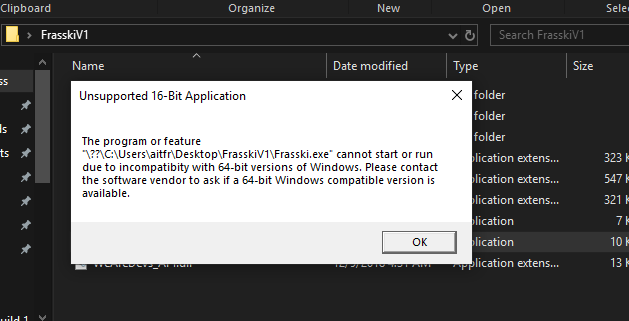
And when you try to start it manually, you get the modern windows popup message saying:
This app can't run on your PC.
To find a version for your PC, check with the publisher.
Thursday, January 10, 2019 2:52 PM
Let's start with the obvious, you're saving to the desktop which is generally not a good idea. Have you tried saving to the temp folder and then seeing if it works? If you disable your AV does it suddenly work?
Michael Taylor http://www.michaeltaylorp3.net
Thursday, January 10, 2019 3:30 PM
I cleaned up your code and moved it to a console app for testing.
class Program
{
    static void Main ( string[] args )
    {
        string curDir = Directory.GetCurrentDirectory();
        string exeDir = "\\Frasski.exe";


        try
        {
            var targetPath = Path.Combine(curDir, exeDir);
            if (File.Exists(targetPath))
                File.Delete(targetPath);

            var client = new WebClient();
            client.DownloadFile("https://app.box.com/s/x6t9a01ep7a9xbbbvyfks6kf8hfvpdys", targetPath);
        } catch (Exception e)
        {
            Console.WriteLine(e.Message);
        }
    }
}
When I run it I get an exception - A required privilege is not held by the client. Can you take the code I posted and run it on your machine and see if it downloads the file?
Michael Taylor http://www.michaeltaylorp3.net
Thursday, January 10, 2019 6:53 PM
It says that program has more then one entry point defined. I am really really tired and school just kinda screwed up my brain for today. Code is below thank you.
namespace updater
{
    public partial class Main : Form
    {
        class Program
        {
            static void Main(string[] args)
            {
                string curDir = Directory.GetCurrentDirectory();
                string exeDir = "\\Frasski.exe";


                try
                {
                    var targetPath = Path.Combine(curDir, exeDir);
                    if (File.Exists(targetPath))
                        File.Delete(targetPath);

                    var client = new WebClient();
                    client.DownloadFile("https://app.box.com/s/x6t9a01ep7a9xbbbvyfks6kf8hfvpdys", targetPath);
                }
                catch (Exception e)
                {
                    Console.WriteLine(e.Message);
                }
            }
        }

        private void Main_Load(object sender, EventArgs e)
        {

        }
    }
}
Thursday, January 10, 2019 7:08 PM
What I sent you was a console application, not to replace your existing code (yet).
Create a new Console Application project in Visual Studio. Then replace the generated Program class code with what I posted. Then run it in the debugger and see if the file downloads correctly or you get an error.
Michael Taylor http://www.michaeltaylorp3.net
Thursday, January 10, 2019 8:21 PM
Oh yeah, sorry. When I run it in debug mode it instantly closes itself. I couldn't even find the .exe downloaded in the debug folder...
'ConsoleApp1.exe' (CLR v4.0.30319: DefaultDomain): Loaded 'C:\WINDOWS\Microsoft.Net\assembly\GAC_32\mscorlib\v4.0_4.0.0.0__b77a5c561934e089\mscorlib.dll'. Skipped loading symbols. Module is optimized and the debugger option 'Just My Code' is enabled.
'ConsoleApp1.exe' (CLR v4.0.30319: DefaultDomain): Loaded 'C:\Users\aitfr\source\repos\ConsoleApp1\ConsoleApp1\bin\Debug\ConsoleApp1.exe'. Symbols loaded.
'ConsoleApp1.exe' (CLR v4.0.30319: ConsoleApp1.exe): Loaded 'C:\WINDOWS\Microsoft.Net\assembly\GAC_MSIL\System\v4.0_4.0.0.0__b77a5c561934e089\System.dll'. Skipped loading symbols. Module is optimized and the debugger option 'Just My Code' is enabled.
'ConsoleApp1.exe' (CLR v4.0.30319: ConsoleApp1.exe): Loaded 'C:\WINDOWS\Microsoft.Net\assembly\GAC_MSIL\System.Configuration\v4.0_4.0.0.0__b03f5f7f11d50a3a\System.Configuration.dll'. Skipped loading symbols. Module is optimized and the debugger option 'Just My Code' is enabled.
'ConsoleApp1.exe' (CLR v4.0.30319: ConsoleApp1.exe): Loaded 'C:\WINDOWS\Microsoft.Net\assembly\GAC_MSIL\System.Core\v4.0_4.0.0.0__b77a5c561934e089\System.Core.dll'. Skipped loading symbols. Module is optimized and the debugger option 'Just My Code' is enabled.
'ConsoleApp1.exe' (CLR v4.0.30319: ConsoleApp1.exe): Loaded 'C:\WINDOWS\Microsoft.Net\assembly\GAC_MSIL\System.Xml\v4.0_4.0.0.0__b77a5c561934e089\System.Xml.dll'. Skipped loading symbols. Module is optimized and the debugger option 'Just My Code' is enabled.
Exception thrown: 'System.Net.WebException' in System.dll
The program '[11080] ConsoleApp1.exe' has exited with code 0 (0x0).
"Exception thrown: 'System.Net.WebException' in System.dll" So I'm assuming something is wrong with the webclient?
Thursday, January 10, 2019 8:58 PM
Sounds like the error I was seeing. Put a breakpoint on the download and then run it in the debugger. You should then be able to step and see the exception.
You said it worked before but suddenly stopped working. Given the error it sounds like a permission has changed on the remote endpoint.
Michael Taylor http://www.michaeltaylorp3.net
Friday, January 11, 2019 1:37 PM
OK, so I ran it in debugger with a break point on the client.DownloadFile line and it launches and nothing happens. No errors or anything either...
'ConsoleApp1.exe' (CLR v4.0.30319: DefaultDomain): Loaded 'C:\WINDOWS\Microsoft.Net\assembly\GAC_32\mscorlib\v4.0_4.0.0.0__b77a5c561934e089\mscorlib.dll'. Skipped loading symbols. Module is optimized and the debugger option 'Just My Code' is enabled.
'ConsoleApp1.exe' (CLR v4.0.30319: DefaultDomain): Loaded 'C:\Users\aitfr\Desktop\test\ConsoleApp1.exe'. Symbols loaded.
'ConsoleApp1.exe' (CLR v4.0.30319: ConsoleApp1.exe): Loaded 'C:\WINDOWS\Microsoft.Net\assembly\GAC_MSIL\System\v4.0_4.0.0.0__b77a5c561934e089\System.dll'. Skipped loading symbols. Module is optimized and the debugger option 'Just My Code' is enabled.
'ConsoleApp1.exe' (CLR v4.0.30319: ConsoleApp1.exe): Loaded 'C:\Program Files (x86)\Microsoft Visual Studio\2017\Community\Common7\IDE\PrivateAssemblies\Runtime\Microsoft.VisualStudio.Debugger.Runtime.dll'. Skipped loading symbols. Module is optimized and the debugger option 'Just My Code' is enabled.
'ConsoleApp1.exe' (CLR v4.0.30319: ConsoleApp1.exe): Loaded 'C:\WINDOWS\Microsoft.Net\assembly\GAC_MSIL\System.Configuration\v4.0_4.0.0.0__b03f5f7f11d50a3a\System.Configuration.dll'. Skipped loading symbols. Module is optimized and the debugger option 'Just My Code' is enabled.
'ConsoleApp1.exe' (CLR v4.0.30319: ConsoleApp1.exe): Loaded 'C:\WINDOWS\Microsoft.Net\assembly\GAC_MSIL\System.Core\v4.0_4.0.0.0__b77a5c561934e089\System.Core.dll'. Skipped loading symbols. Module is optimized and the debugger option 'Just My Code' is enabled.
'ConsoleApp1.exe' (CLR v4.0.30319: ConsoleApp1.exe): Loaded 'C:\WINDOWS\Microsoft.Net\assembly\GAC_MSIL\System.Xml\v4.0_4.0.0.0__b77a5c561934e089\System.Xml.dll'. Skipped loading symbols. Module is optimized and the debugger option 'Just My Code' is enabled.
Friday, January 11, 2019 3:01 PM
You created a brand new console application and pasted that code in over the existing code? It sounds like maybe the entry point wasn't pointing to the Main method you were trying to step into.
When you created a new console application there would have been a single Program.cs file. If you opened this file it would have already had a class Program with a method Main. All you really need to do is copy the contents of the Main method I posted into this file. Then compile and run. If you created a new file or something then the debugger is still using the old entry point. You can have any # of Main methods in a project but only one will execute.
Michael Taylor http://www.michaeltaylorp3.net
Saturday, January 12, 2019 12:16 PM
I created a new console app, in the code I replaced class Program with the code you gave me, saved and ran it in debug mode.
Saturday, January 12, 2019 3:26 PM
Ok, so I was messing around until I came across the file size that the webclient downloaded. It is 7KB out 485KB I believe it was? So that's the problem. It's downloading incomplete files.
Saturday, January 12, 2019 4:13 PM
Turns out that the link in my code was faulty. When you open it, box.com says the file type is not supported and you have to click download again to download it. The problem is that I need a download link that doesn't change and I can update the file on that link. Mediafire doesn't work, because it the link it gives you is to the download page where you have to click download and yes the page link doesn't change but the link in the button to download changes. Do you have any ideas where I could store my .exe and I could update it without changing the download link?
Saturday, January 12, 2019 5:26 PM
Use cloud storage somewhere. If you have OneDrive then put it there and share it. If you use GoogleDocs same thing. There is always Dropbox as well. Worse comes to worse then host it on a public hosting service like WordPress or something.
Note that if you're building an auto-updater note that ClickOnce is designed to solve this problem already. Using ClickOnce you can have your app auto-update without you having to write much code (just the update check). To host ClickOnce all you need is a file share or URL.
Michael Taylor http://www.michaeltaylorp3.net