Note
Access to this page requires authorization. You can try signing in or changing directories.
Access to this page requires authorization. You can try changing directories.
Question
Wednesday, April 17, 2019 1:03 PM
When a user account doesn't have an e-mail (service accounts) I am unable to eroll a certificate for that user. I get the below error.
Active Directory Certificate Services denied request (id) because The EMail name is unavailable and cannot be added to the Subject or Subject Alternate name. 0x80094812. (-2146875374 CERTSRV_E_SUBJECT_EMAIL_REQUIRED). The request was for Domain\user name. Additional information: Denied by Policy Module.
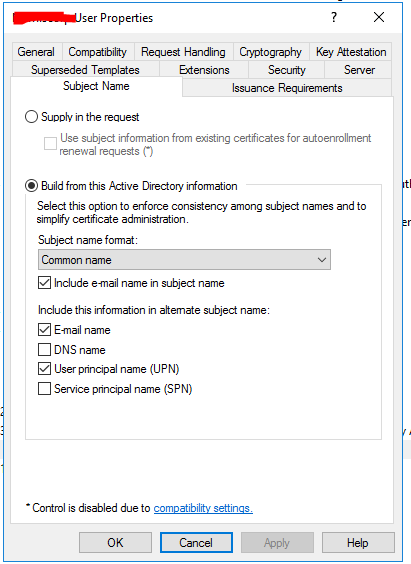
I tried removing the check box for email from the subject name of the tab.
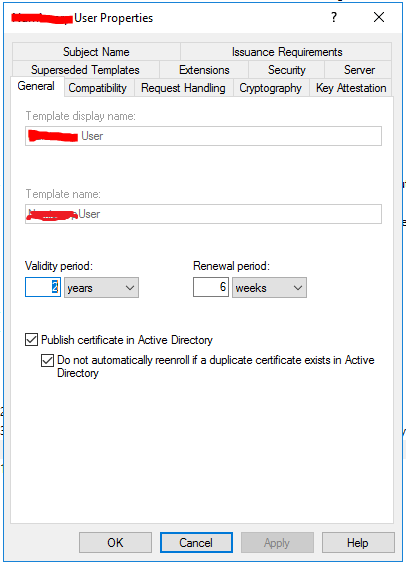
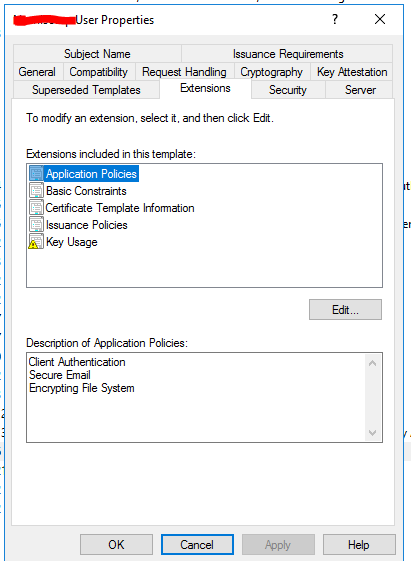
The original template is attached please help.
Should the subject name format be common name /Fully qualified domain name?
All replies (6)
Wednesday, April 17, 2019 2:04 PM | 1 vote
1. Do not use this template as it is based on the User template that combines both signature and encryption (not a good idea)
2. When you removed the Email name check boxes, the change is not immediate, as the object is cached at all DCs in the forest. You can force an update at the issuing CA by unpublishing and re-publishing the certificate template.
3. You cannot include the Secure Email application policy in the template if you remove the E-mail name attribute
so, the big question is "what is the certificate used for" once you provide that information, we can tell you exactly what you need to do.
Brian
Wednesday, April 17, 2019 3:11 PM
Hi Brian, Thank you very much for the quick reply. I am upgrading an inherited CA server from 20018 to 2016 and I literally mirrored everything in there. Now after checking I don't think we use certs for e-mail encryption or signature. I will remove that.
You said "Do not use this template as it is based on the User template that combines both signature and encryption (not a good idea)"; so if there is a future requirement for email signature should I publish another template just for that purpose?
Isn't the Encrypting File System just for file encryption and not e-mail encryption?
Also should the subject name format be common name /Fully qualified domain name?
Thursday, April 18, 2019 7:51 AM | 1 vote
Hi,
Thank you for posting in our TechNet forum.
Here is a similar case Certificate Services Error – ‘The Email name is unavailable and cannot be added to the Subject or Subject Alternate name’, we can refer to the method in the case.
And from How Certificates Work, we can see the difference between three formats of the subject name:
A number of options can be included with the subject name, in addition to specific configuration settings for the subject name when the subject name is built from Active Directory information during the certificate request process. The format of the subject name can be defined as:
None. Does not enforce any name format for this field.
Common name. The CA creates the subject name from the common name (CN) of the requestor obtained from Active Directory. These should be unique within a domain, but might not be unique within an enterprise.
Fully distinguished name. The CA creates the subject name from the fully distinguished name obtained from Active Directory. This guarantees that the name is unique within an enterprise.
Tip: This answer contains the content of a third-party website. Microsoft makes no representations about the content of these websites. We provide this content only for your convenience.
Best Regards,
Daisy Zhou
Please remember to mark the replies as answers if they help.
If you have feedback for TechNet Subscriber Support, contact [email protected].
Monday, April 22, 2019 2:23 AM
Hi,
If this question has any update or is this issue solved? Also, for the question, is there any other assistance we could provide?
Best Regards,
Daisy Zhou
Please remember to mark the replies as answers if they help.
If you have feedback for TechNet Subscriber Support, contact [email protected].
Tuesday, April 23, 2019 11:46 AM
Thank you. All working nicely now.
Tuesday, April 23, 2019 2:52 PM
Hi,
You are welcome! Thank you for your update. I’m very glad that the problem has been solved.
As always, if there is any question in future, we warmly welcome you to post in this forum again. We are happy to assist you!
Have a nice day!
Best Regards,
Daisy Zhou
Please remember to mark the replies as answers if they help.
If you have feedback for TechNet Subscriber Support, contact [email protected].