Note
Access to this page requires authorization. You can try signing in or changing directories.
Access to this page requires authorization. You can try changing directories.
Question
Tuesday, October 23, 2018 12:41 PM
We have a scenario with OneDrive for Business where we want to be able to whitelist certain Windows 10 devices to allow them to sync files to C drive.
Up until recently we were using the 'Allow syncing only on PCs joined to specific domains' setting within the OneDrive for Business Admin Centre, this worked fine but now we have requirement for selected Workgroup computers (non domain joined) to be allowed to sync.
We are registering the workgroup PCs in Azure AD using the 'Connect to Work or School' option.
Are there mechanisms within Intune to enable this type of control? e.g. Restrict OneDrive syncing to a predefined Azure AD Group of devices.
All replies (3)
Wednesday, October 24, 2018 6:02 AM
Hello Alex,
Based on my knowledge, you can achieve it by using Intune and Conditional Access.
1. To use OneDrive for Business, restrict the user from enrolling in Intune by using Conditional Access, otherwise, the user can't use OneDrive for Business.
More details about Conditional Access, just refer to the following article.
/en-us/azure/active-directory/conditional-access/technical-reference
2. Set enrollment restrictions, which can block the personal devices from enrollment. That means if the work group computers are identified as Personal devices by Intune, they are blocked from enrollment. However, if the work group computers are identified as Corporated-owned devices, they are allowed to enroll in Intune.
You can learn more about enrollment restrictions by reading the following article.
/en-us/intune/enrollment-restrictions-set
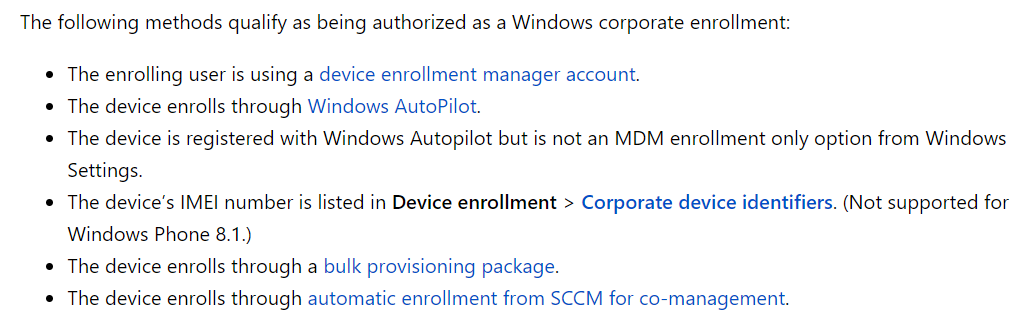
3. You can use the following methods for enrollment, so that the devices can be authorized as a corporate-owned devices. Please note that the method for using the 'Connect to Work or School' option will authorized the devices as a Personal Devices.
Best regards,
Andy Liu
Please remember to mark the replies as answers if they help.
If you have feedback for TechNet Subscriber Support, contact [email protected].
Wednesday, October 24, 2018 6:27 AM
Hi Andy,
Thanks so much for the info. Sounds like its possible from the info you've provided. I will do some testing.
I presume using the 'Connect to Work or School' option will work also, providing an admin goes into the Intune portal and overrides the ownership from personal to corporate for the devices we want to authorise? Is that your understanding too?
Best Regards,
Alex.
Wednesday, October 24, 2018 6:36 AM
Hello Alex,
Since the personal device will be blocked from enrolling in Intune, you don't have a chance to change the ownership. The device item will not show up in the All devices.
As a suggestion, you can consider to use DEM enrollment.
Best regards,
Andy Liu
Please remember to mark the replies as answers if they help.
If you have feedback for TechNet Subscriber Support, contact [email protected].