Note
Access to this page requires authorization. You can try signing in or changing directories.
Access to this page requires authorization. You can try changing directories.
Question
Saturday, January 20, 2018 9:23 AM
Hello Dear Experts
In the following, it is shown Select Case Function that by focusing on each of the case defined for Specific frame(Frame 48), will display another form with unique edits tailored to each selected case.
Part of it is given below:
Private Sub Command80_Click()
        Select Case Frame48
        Case 1
            DoCmd.OpenForm "EFC_RelatedForm1"
            Forms!EFC_RelatedForm1!Text2 = Combo65
            Forms!EFC_RelatedForm1.RecordSource = "PurchaseMain_EFC"
            Forms!EFC_RelatedForm1!Text27.ControlSource = "PDate"

            Form_EFC_RelatedForm1.Combo9.Visible = True
            DoEvents
            Form_EFC_RelatedForm1.Combo9.SetFocus
            DoEvents

           Form_EFC_RelatedForm1.Combo16.Visible = False
            Form_EFC_RelatedForm1.Text32.Visible = False
            Form_EFC_RelatedForm1.Text21.Visible = False
            Form_EFC_RelatedForm1.Text27.Visible = True
            Form_EFC_RelatedForm1.Text17.Visible = False
            Form_EFC_RelatedForm1.Text19.Visible = False
            Form_EFC_RelatedForm1.Label42.Visible = False
            Form_EFC_RelatedForm1.Text00.Visible = False
            Form_EFC_RelatedForm1.Text39.Visible = False
            Form_EFC_RelatedForm1.Label44.Visible = False
            Form_EFC_RelatedForm1.Text47.Visible = False
            Form_EFC_RelatedForm1.Text30.Visible = False
            Form_EFC_RelatedForm1.Text36.Visible = False
            Form_EFC_RelatedForm1.EFC__SaleDetail_subform.Visible = False
            Form_EFC_RelatedForm1.EFC_PurchaseDetail_subform.Visible = True
            Form_EFC_RelatedForm1.EFC_ReturnOfPurchaseTable_subform.Visible = False
            Form_EFC_RelatedForm1.EFC_ReturnOfSaleTable_2_subform.Visible = False

        Case 2
            DoCmd.OpenForm "EFC_RelatedForm1"
            Forms!EFC_RelatedForm1!Text2 = Combo65
            Call EFC_RelatedForm1_Text2_2
            Forms!EFC_RelatedForm1.RecordSource = "SaleMain_EFC"
            Forms!EFC_RelatedForm1!Text21.ControlSource = "SDate"

            Form_EFC_RelatedForm1.Combo16.Visible = True
            DoEvents
            Form_EFC_RelatedForm1.Combo16.SetFocus
            DoEvents

            Form_EFC_RelatedForm1.Combo9.Visible = False
            Form_EFC_RelatedForm1.Text32.Visible = False
            Form_EFC_RelatedForm1.Text27.Visible = False
            Form_EFC_RelatedForm1.Text21.Visible = True
            Form_EFC_RelatedForm1.EFC_PurchaseDetail_subform.Visible = False
            Form_EFC_RelatedForm1.EFC__SaleDetail_subform.Visible = True
            Form_EFC_RelatedForm1.EFC_ReturnOfPurchaseTable_subform.Visible = False
            Form_EFC_RelatedForm1.EFC_ReturnOfSaleTable_2_subform.Visible = False
            Form_EFC_RelatedForm1.Text17.Visible = True
            Form_EFC_RelatedForm1.Text19.Visible = True
            Form_EFC_RelatedForm1.Label42.Visible = False
            Form_EFC_RelatedForm1.Text00.Visible = False
            Form_EFC_RelatedForm1.Text39.Visible = False
            Form_EFC_RelatedForm1.Label44.Visible = False
            Form_EFC_RelatedForm1.Text47.Visible = False
            Form_EFC_RelatedForm1.Text30.Visible = False
            Form_EFC_RelatedForm1.Text36.Visible = False

        Case 3
            DoCmd.OpenForm "EFC_RelatedForm1"
            Forms!EFC_RelatedForm1!Text2 = Combo65
            Forms!EFC_RelatedForm1.RecordSource = "ReturnOfPurchaseTable_2_EFC"

            Form_EFC_RelatedForm1.Text32.Visible = True
            DoEvents
            Form_EFC_RelatedForm1.Text32.SetFocus
            DoEvents

            Form_EFC_RelatedForm1.Combo9.Visible = False
            Form_EFC_RelatedForm1.Combo16.Visible = False
            Form_EFC_RelatedForm1.Text27.Visible = False
            Form_EFC_RelatedForm1.Text21.Visible = False
            Form_EFC_RelatedForm1.EFC_PurchaseDetail_subform.Visible = False
            Form_EFC_RelatedForm1.EFC__SaleDetail_subform.Visible = False
            Form_EFC_RelatedForm1.EFC_ReturnOfPurchaseTable_subform.Visible = True
            Form_EFC_RelatedForm1.EFC_ReturnOfSaleTable_2_subform.Visible = False
            Form_EFC_RelatedForm1.Text17.Visible = False
            Form_EFC_RelatedForm1.Text19.Visible = False
            Form_EFC_RelatedForm1.Label42.Visible = True
            Form_EFC_RelatedForm1.Text00.Visible = True
            Form_EFC_RelatedForm1.Text39.Visible = False
            Form_EFC_RelatedForm1.Label44.Visible = True
            Form_EFC_RelatedForm1.Text47.Visible = True
            Form_EFC_RelatedForm1.Text30.Visible = True
            Form_EFC_RelatedForm1.Text36.Visible = False
            Call Seeking_To_The_Id_From_UnionRePurchaseTable_TotalQty
            Call Seeking_To_The_Id_From_DataCenter_TotalQty_2
        End Select
End Sub
There is no problem with the first and second selected Case, which is setFocus method can be exactly Work, but in the case of the third section it encounters an 2110 error ( Microsoft Access can't move focus to the control Text32)
What is the problem and how is it possible to solve?
Thank you for your attention
All replies (2)
Saturday, January 20, 2018 11:37 AM ✅Answered
There is no problem with the first and second selected Case, which is setFocus method can be exactly Work, but in the case of the third section it encounters an 2110 error ( Microsoft Access can't move focus to the control Text32)
Hi Mazda Z,
Is your control Text32 locked?
You must have a wonderful memory that you can remember what Text32, Text27, Label42, etc. stands for. It really has advantages to give the controls understandable names.
To set the visibility of the controls is better done outside the Select Case statement. In each Case to have to sum up what the visibility will be, With 3 Cases that is three times!
You could also use, outside the Select Case construct, something like:
Form_EFC_RelatedForm1.Text17.Visible = (Frame48 = 2)
Form_EFC_RelatedForm1.Text19.Visible = (Frame48 = 2)
Form_EFC_RelatedForm1.Label42.Visible = (Frame48 = 3)
Form_EFC_RelatedForm1.Text00.Visible = (Frame48 = 3)
Besides, also study the use of "With". It is more efficient, and saves a lot of typing work.
Imb.
Monday, January 22, 2018 2:00 AM ✅Answered
Hi Mazda Z,
I try to make a test on my side.
I find that in normal condition code works correctly, Without producing any error.
Focus also set correctly on Textbox.
I notice that you are setting visibility of the Textbox to True before setting the focus.
But it is possible that you set the 'Enabled=No' for this Textbox.

If the control is not enabled and you try to set focus on that control then you will get an error.
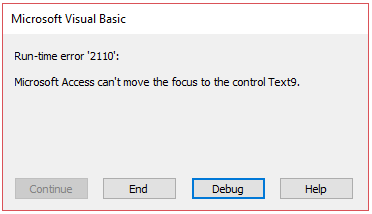
So, Here it looks like the control is not enabled and you are trying to set the focus.
I suggest you to check status of 'Enabled' of that Textbox. If it is not enabled then try to enabled it first before setting the focus.
Try to make a test on your side and let us know about the result.
We will try to provide further suggestions, If needed.
Regards
Deepak
MSDN Community Support
Please remember to click "Mark as Answer" the responses that resolved your issue, and to click "Unmark as Answer" if not. This can be beneficial to other community members reading this thread. If you have any compliments or complaints to MSDN Support, feel free to contact [email protected].