Note
Access to this page requires authorization. You can try signing in or changing directories.
Access to this page requires authorization. You can try changing directories.
Question
Thursday, June 19, 2014 4:45 AM | 1 vote
How can I write to the output window (presumably the "Test" output window) from the body of a TEST_METHOD in a native C++ unit test running within the IDE?
Thanks very much in advance.
Kirk Fertitta
All replies (5)
Friday, June 20, 2014 7:45 AM ✅Answered
Hi Kirk,
Do you mean that you want to display certain information in your output window for your unit test? If so, I think the real issue is not the unit test project issue, it would be related to the issue "how to write to the Output window for VC++".
the OutputDebugString function would be helpful for you.
Reference:
http://stackoverflow.com/questions/1149620/how-to-write-to-the-output-window-in-visual-studio
http://stackoverflow.com/questions/7697842/printing-output-on-the-output-window-in-visual-c-ide
Best Regards,
We are trying to better understand customer views on social support experience, so your participation in this interview project would be greatly appreciated if you have time. Thanks for helping make community forums a great place.
Click HERE to participate the survey.
Wednesday, June 25, 2014 2:22 AM ✅Answered
Hi Kirk,
I just debug my test with the default VS IDE settings. Maybe you could reset your VS settings, debug it again.
In addition, actually I show two ways for this issue, another way is that we could use the "TRACE", but you would change the settings in your project's properties like the following screen shot.
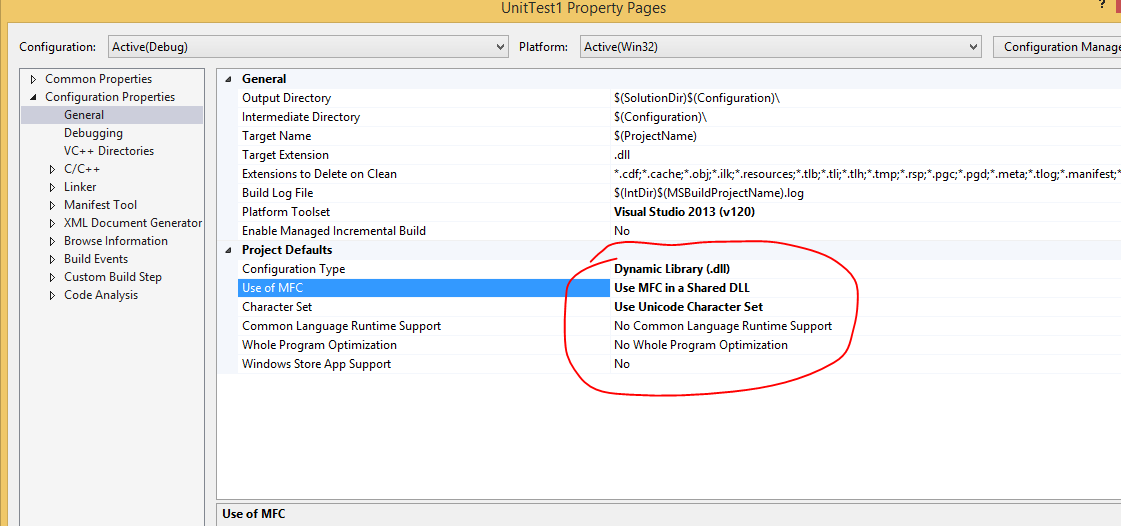
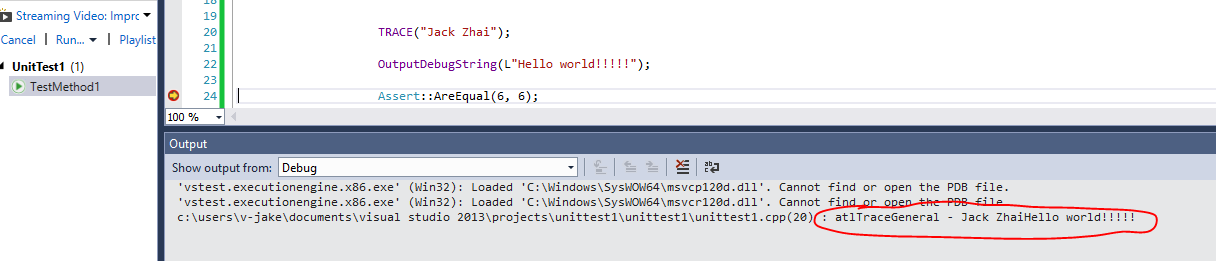
In addition, if you debug your test without a breakpoint, you would get big output message when you debug your test, so my suggestion is that you could add a breakpoint in the code line after the "TRACE" OR "OutputDebugString" function, so it would be easy to find the message when the breakpoint is hit. Anyway, we could make sure that we could show message in the Output window, if it doesn't work for your test project, maybe you could share me a simple sample, but if a simple test like mine still has this issue in your side, and it doesn't work after you reset your VS settings, test it in other machine, maybe it is your VS IDE issue, for example, you could repair it, please also install the VS2013 update 2.
Best Regards,
We are trying to better understand customer views on social support experience, so your participation in this interview project would be greatly appreciated if you have time. Thanks for helping make community forums a great place.
Click HERE to participate the survey.
Monday, June 23, 2014 9:53 PM | 1 vote
Thanks very much for taking the time to reply. I did try the OutputDebugString inside a native C++ unit test method and I do not see any output in either the Debug Output Window or the Tests Output Window. Do you see it working for you?
Kirk Fertitta
Tuesday, June 24, 2014 6:44 AM
Hi Kirk,
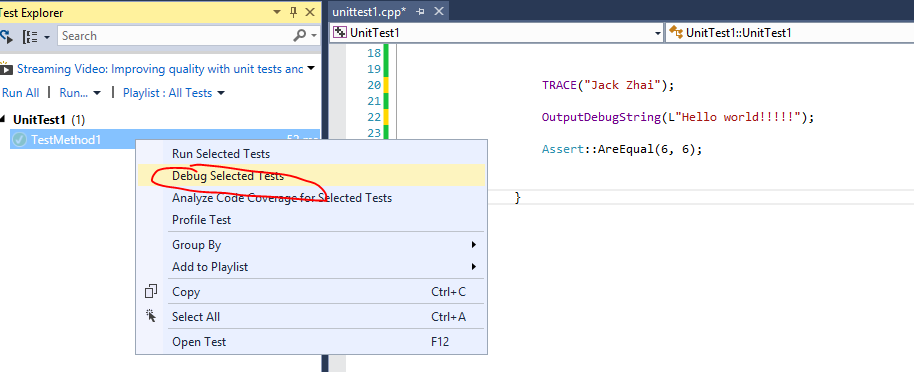
You need to debug the test in test explorer window.
Just a simple sample:
Best Regards,
We are trying to better understand customer views on social support experience, so your participation in this interview project would be greatly appreciated if you have time. Thanks for helping make community forums a great place.
Click HERE to participate the survey.
Tuesday, June 24, 2014 2:02 PM
Hi Jack,
Oh yes, of course I did that. Still didn't see any output in the Debug window somehow. Clearly you are, though, so must be some setting on this particular box. Glad it's this simple after all.
Thanks again.
Kirk Fertitta