Note
Access to this page requires authorization. You can try signing in or changing directories.
Access to this page requires authorization. You can try changing directories.
Question
Tuesday, May 16, 2017 9:31 AM
I want when write date in datetimepicker format short auto Move focus from YYYY to MM to DD
All replies (12)
Tuesday, May 16, 2017 10:22 AM ✅Answered
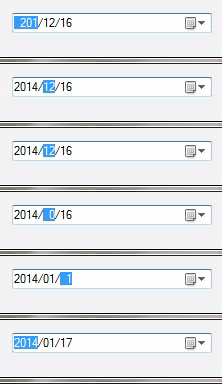
One idea would be to use SendKey.Send("{RIGHT}") in ValueChanged event of the DateTimePicker but this has one issue, say you enter 1 for month or day ValueChanged event will not fire yet if you entered 01 ValueChanged will fire.
Please remember to mark the replies as answers if they help and unmark them if they provide no help, this will help others who are looking for solutions to the same or similar problem. Contact via my Twitter (Karen Payne) or Facebook (Karen Payne) via my MSDN profile but will not answer coding question on either.
VB Forums - moderator
Wednesday, May 17, 2017 6:27 AM ✅Answered
Hi srajmuneer,
You can try to the way below.
 Private Sub DateTimePicker1_ValueChanged(sender As Object, e As EventArgs) Handles DateTimePicker1.ValueChanged
        SendKeys.Send("{Right}")

    End Sub

    Private Sub Form13_Load(sender As Object, e As EventArgs) Handles MyBase.Load
        DateTimePicker1.Format = DateTimePickerFormat.Custom
        DateTimePicker1.CustomFormat = "yyyy-MM-dd"

    End Sub
it is the same as Kareninstructor's response.
Hope it is helpful to you.
Best Regards,
Cherry
MSDN Community Support
Please remember to click "Mark as Answer" the responses that resolved your issue, and to click "Unmark as Answer" if not. This can be beneficial to other community members reading this thread. If you have any compliments or complaints to MSDN Support, feel free to contact [email protected].
Tuesday, May 16, 2017 2:06 PM
I want when write date in datetimepicker format short auto Move focus from YYYY to MM to DD
Hi
Just to make sure that you are aware of the arrow keys function in a DateTimePicker - they will cycle through the fields allowing easy input.
Regards Les, Livingston, Scotland
Tuesday, May 16, 2017 4:38 PM
When you write date in a datetime picker you must not use string data.
You use the value
Be aware that what you show is an ISO date time format, what I show is a kind of general format used in most parts of the world (with exception from the separator).
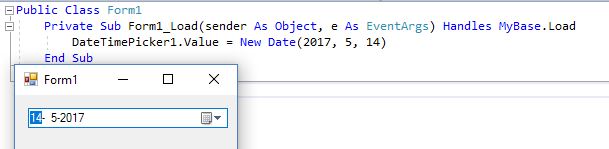
Date notations are weird in the world, as separators are used spaces minus signs slashes dots or whatever.
Therefore the chance that there is something general for this is very very low.
Success
Cor
Tuesday, May 16, 2017 6:00 PM
thanks all ,I want When he writes the last digit of the year he moves directly to the month and when the last digit of the month is written, he goes directly to the day so , without arrow keys
Tuesday, May 16, 2017 6:22 PM
thanks all ,I want When he writes the last digit of the year he moves directly to the month and when the last digit of the month is written, he goes directly to the day so , without arrow keys
There is nothing wrong that you asks that, but sometimes you have to do it than yourself. Probably only somebody which is also in an ISO area can help you with that.
https://en.wikipedia.org/wiki/ISO_8601
As you can see on this page that is mainly in Japan, China and some former Communist countries.
Success
Cor
Tuesday, May 16, 2017 6:42 PM
thanks Cor Ligthertfor help , I try to solve Move focus from year to month to day in datetimepicker and this no problem but I need this in my work to easy move between years to month to day
Tuesday, May 16, 2017 7:39 PM
thanks Cor Ligthertfor help , I try to solve Move focus from year to month to day in datetimepicker and this no problem but I need this in my work to easy move between years to month to day
Hi
You are very confusing.
You say moving from year to month to day is no problem. Then you say you want to do that 'easy'.
What is it that you are trying to do? First it is not a problem and in the next sentence it is a problem?
I think you will need to design your own DateTimePicker and you can make it do what you want.
What is so difficult in using the arrow keys to move between fields?
Regards Les, Livingston, Scotland
Tuesday, May 16, 2017 8:50 PM
thanks leshay , I mean (to easy move between years to month to day) can you moves directly in datetimepicker without arrow keys or can't
same idea:
http://stackoverflow.com/questions/2399954/datetimepicker-automatically-move-to-next-datepart
Tuesday, May 16, 2017 9:05 PM
Hi
If that link illustrates what you want to do, then use it. As stated in that thread, there is no 'inbuilt' way to do it.
Regards Les, Livingston, Scotland
Tuesday, May 16, 2017 10:42 PM
Have you tried my suggestion?
Please remember to mark the replies as answers if they help and unmark them if they provide no help, this will help others who are looking for solutions to the same or similar problem. Contact via my Twitter (Karen Payne) or Facebook (Karen Payne) via my MSDN profile but will not answer coding question on either.
VB Forums - moderator
Wednesday, May 17, 2017 6:40 AM
thanks Kareninstructor for help