Note
Access to this page requires authorization. You can try signing in or changing directories.
Access to this page requires authorization. You can try changing directories.
Question
Thursday, January 29, 2015 2:56 PM | 1 vote
Hello!
Please help me clarify the following:
This post (dated 8th February, 2014)
http://blogs.technet.com/b/heyscriptingguy/archive/2014/02/07/use-powershell-to-find-files-that-have-not-been-accessed.aspx
illustrates how to use LastAccessTime file property for finding out files that are neglected.
On the other hand, according to
LastAccessTime is disabled by default since Windows Vista:
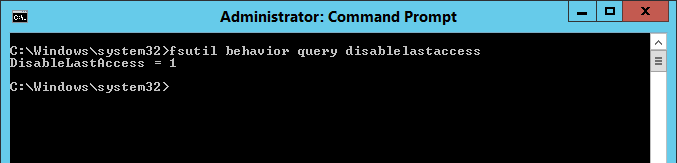
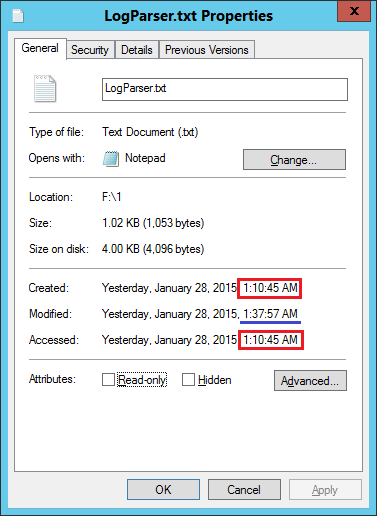
(these screenshots were taken on Windows Server 2012R2)
So either I'm missing something or the script presented in the post would not work correctly...
Thank you in advance,
Michael
All replies (6)
Friday, January 30, 2015 12:13 PM ✅Answered
Hi Michael,
Yes, I think so. To get the exact last access time, we should enable the setting.
Best Regards,
Anna Wang
Please remember to mark the replies as answers if they help and unmark them if they provide no help. If you have feedback for TechNet Support, contact [email protected]
Friday, January 30, 2015 11:35 AM
Hi Michael,
NTFS volumes store a last access timestamp for every file and directory. The NTFS driver automatically updates this timestamp every time a file is accessed, whether for reading or writing.
Refer to:
Registry Tip : Windows NT NTFS Last Access TimeStamp
However, let's test the script below:
Function Get-NeglectedFiles

{

 Param([string[]]$path,

       [int]$numberDays)

 $cutOffDate = (Get-Date).AddDays(-$numberDays)

 Get-ChildItem -Path $path |

 Where-Object {$_.LastAccessTime -le $cutOffDate}

}

Get-NeglectedFiles d:\test -numberDays 90|select fullname, *time
I also run the cmd "fsutil behavior query DisableLastAccess" and the result is 1 on new version, which means NTFS does not update the last-access timestamp of a file when that file is opened.
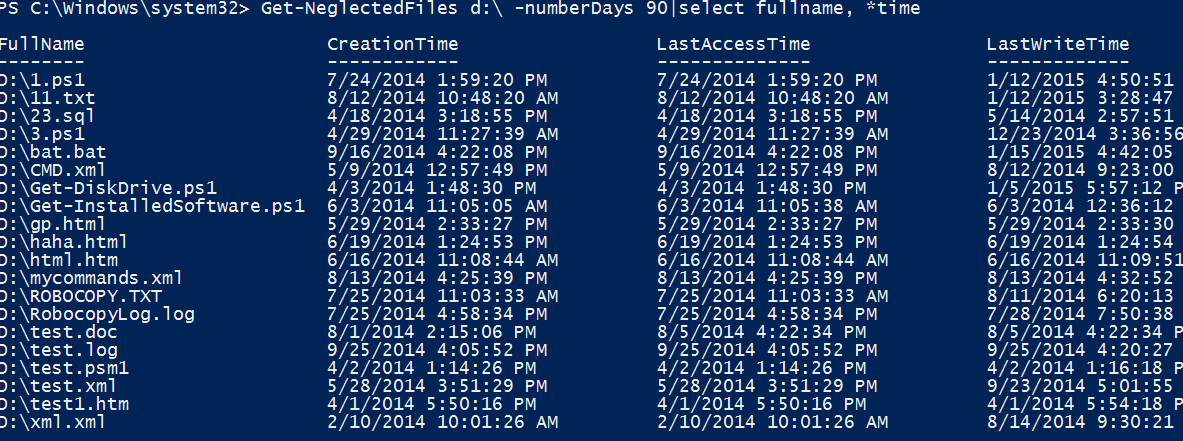
When review the result of the script above, you can find the "lastaccesstime" is always equal to "CreationTime", which is not true, besides, and "lastaccesstime" is also older than "LastWriteTime".
If there is anything else regarding this issue, please feel free to post back.
Best Regards,
Anna Wang
Please remember to mark the replies as answers if they help and unmark them if they provide no help. If you have feedback for TechNet Support, contact [email protected]
Friday, January 30, 2015 11:47 AM
Hi Anna,
Sorry, I didn't understand it: "When review the result of the script above, you can find the "lastaccesstime" is always equal to "CreationTime, which is not true," - why does it NOT true if LastAccessTime does not get updated since Vista as stated in the technet's blog above?
"besides, and "lastaccesstime" is also older than "LastWriteTime" - I've never seen it in Windows 2008/7 and later so I don't understand how that script can work on modern Windows Server operating systems...
Regards,
Michael
Friday, January 30, 2015 11:55 AM
Hi Michael,
Maybe I have trouble in my statement, in summary, I want to say the lastaccesstime property would not update correctly on the new server like win 8.1 in my test, because as you said LastAccessTime is disabled by default.
The second line " and lastaccesstime is also older than "LastWriteTime", if this file is modified, the lastaccesstime should also be updated, it shouldn't older than "LastWriteTime".
My test result:
Best Regards,
Anna Wang
Please remember to mark the replies as answers if they help and unmark them if they provide no help. If you have feedback for TechNet Support, contact [email protected]
Friday, January 30, 2015 12:10 PM
Oh, sorry - that's s my mistake:
""besides, and "lastaccesstime" is also older than "LastWriteTime" - I've never seen it in Windows 2008/7" - of course you're right.
So the script should NOT work?
Friday, January 30, 2015 6:35 PM
Hi Anna,
Thank you very much for your help!
Regards,
Michael