Note
Access to this page requires authorization. You can try signing in or changing directories.
Access to this page requires authorization. You can try changing directories.
Question
Friday, April 15, 2016 4:03 PM
I have been researching on how to write a text string directly to a ZEBRA 105SL Label printer and found a solution that is clean and easy, but I have an issue concerning the SOCKET.
When the code below is ran, I get NO errors, but the printer does not print anything.
Debug shows that the "writer" has a message (shown below) stating that "Write Only Properties are not supported".
I have no idea if this is the issue but it is still suspicious.
Do any of you have any ideas what I should look for or what I can do to get this working?
Thanks in advance.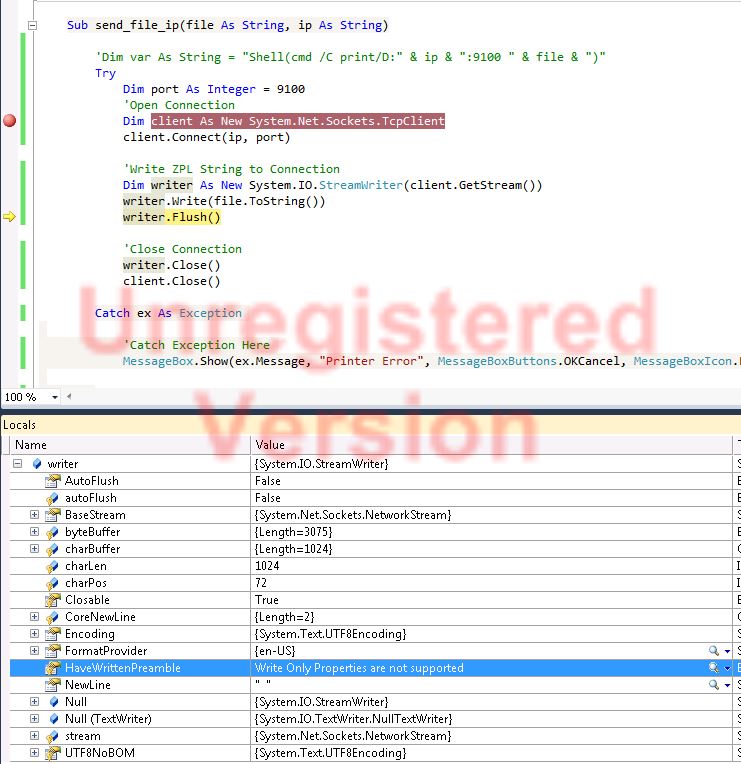
Sub send_file(file As String, ip As String)
        Try
            Dim port As Integer = 9100
            'Open Connection
            Dim client As New System.Net.Sockets.TcpClient
            client.Connect(ip, port)

            'Write ZPL String to Connection
            Dim writer As New System.IO.StreamWriter(client.GetStream())
            writer.Write(file.ToString())
            writer.Flush()

            'Close Connection
            writer.Close()
            client.Close()

        Catch ex As Exception

            'Catch Exception Here
            MessageBox.Show(ex.Message, "Printer Error", MessageBoxButtons.OKCancel, MessageBoxIcon.Error)
        End Try
end sub
All replies (4)
Monday, April 18, 2016 2:53 AM ✅Answered
Hi radi8,
I found the error message is returned from the printer itself. So i think the problem is more related to the printer.
In addition, since our forum is discussing about VS general question like how to set/configure Visual Studio and Visual Studio tools.
If you feel like something is wrong with your code, i suggest you'd better post it to the VB forum for better support.
Thanks for your understanding.
Best Regards,
Lake Xiao
Friday, April 15, 2016 4:53 PM
If you want to transfer the content of the file, then try this:
* client.Conect(ip, port)
Dim ns = client.GetStream()
Using fs = IO.File.Open(file, FileMode.Open, FileAccess.Read)
fs.CopyTo(ns)
End Using
ns.Close()
*
Friday, April 15, 2016 6:02 PM
If you want to transfer the content of the file, then try this:
* client.Conect(ip, port)
Dim ns = client.GetStream()
Using fs = IO.File.Open(file, FileMode.Open, FileAccess.Read)
fs.CopyTo(ns)
End Using
ns.Close()*
It is not really a file, rather the contents of a file in a string. So I am sending a string to the printer.
Friday, April 15, 2016 8:29 PM
The issue was with the string being passed in. My read_file function did not get the entire file and since the printer saw it as a corrupted string, did not process it.
Thanks for the help.