Note
Access to this page requires authorization. You can try signing in or changing directories.
Access to this page requires authorization. You can try changing directories.
Question
Wednesday, October 31, 2018 3:34 AM
Hi,
I bought 10 licenses of Microsoft Office Professional Plus 2016.
I would like to ask, how do we check these 10 licenses belong to which devices? Because I want to know, either this keys have exceed the limit or not. I have called to Microsoft but they unable to check for that.
Please advise, thank you.
Regards,
Nadhrah Nini
Siti.Nadhrah
All replies (5)
Thursday, November 1, 2018 9:20 AM ✅Answered
Hi Nadhrah,
Have you installed these 10 licenses on 10 computer for Office 2016 activation?
If you want to know which license is used on which computer, we can run the following script one by one for twn computers:
- Run as Administrator to open Command Prompt.
- Run the following script to check the license information:
cscript.exe "%ProgramFiles%\Microsoft Office\Office16\ospp.vbs /dstatus - If you are running 32-bit Office 2016 on a 64-bit operating system, the script is:
cscript.exe "%ProgramFiles(x86)%\Microsoft Office\Office16\ospp.vbs /dstatus - In the results, make sure the License Status is Licensed. Then you can collect the last 5 character of installed product key: GF2FF.
- Compare the last characters of your ten licenses to match them with devices.
Best Regards,
Winnie Liang
Please remember to mark the replies as answers if they helped. If you have feedback for TechNet Subscriber Support, contact [email protected].
Click here to learn more. Visit the dedicated forum to share, explore and talk to experts about Microsoft Teams.
Friday, November 2, 2018 8:57 AM ✅Answered
Hi,
Yes, got it! Thank you for your help. However how do check on Windows?
Regards,
Nadhrah Nini
Siti.Nadhrah
Hi Nadhrah,
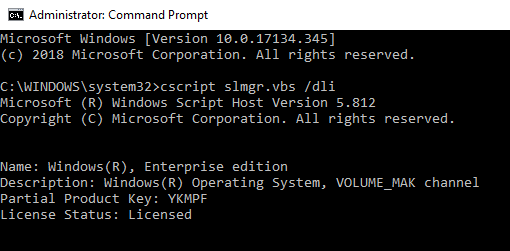
Based on my knowledge, running cscript slmgr.vbs /dli can display license information for Windows.
If you have further question on Windows license checking, it is highly recommended to ask a question in Windows forum for more discussion. Thanks for your understanding :)
Best Regards,
Winnie Liang
Please remember to mark the replies as answers if they helped. If you have feedback for TechNet Subscriber Support, contact [email protected].
Click here to learn more. Visit the dedicated forum to share, explore and talk to experts about Microsoft Teams.
Wednesday, October 31, 2018 6:11 AM
I bought 10 licenses of Microsoft Office Professional Plus 2016.
I would like to ask, how do we check these 10 licenses belong to which devices? Because I want to know, either this keys have exceed the limit or not.
Volume Licensing and Activation, does not care about which devices have consumed the licenses, it only cares that you allowed no more than purchased.
If you utilise MAK activation methods, there are no records except on the client computers.
If you utilise KMS activation methods, you can examine the event logs on your KMShost server and parse those logs to see which KMSclient machines-names have activated to your KMShost.
If you utilise ADBA activation methods, there are no records except on the client computers.
You can utilise VAMT, to scan/discover your networked computers and this will perform inventory of products and product keys and store in the VAMT database for you.
Or you can visit each computer and check using the command:
cscript slmgr.vbs /dli all
Don [doesn't work for MSFT, and they're probably glad about that ;]
Thursday, November 1, 2018 6:48 AM
Hi,
I just run the command. I got the details. However, how do I know this Windows and Office 2016 belongs to the key?
Regards,
Nadhrah Nini
Siti.Nadhrah
Thursday, November 1, 2018 9:39 AM
Hi,
Yes, got it! Thank you for your help. However how do check on Windows?
Regards,
Nadhrah Nini
Siti.Nadhrah