Note
Access to this page requires authorization. You can try signing in or changing directories.
Access to this page requires authorization. You can try changing directories.
Question
Wednesday, April 15, 2015 3:59 PM
Hi there,
I am getting Cannot index into a null array error. I run the script below.
******************************************************
Function check-even ($num) {[bool]!($num%2)}
foreach ($file in (Get-ChildItem -Path c:\Users\rsimmers\desktop\.ini)) {
"Processing file {0}" -f $file
$newfilename = $file.fullname -replace ".ini", ".txt"
$newContent = foreach ($line in (Get-Content $file.fullname)){
$printer = $line -match '\ (.*?)"'
$printerName = $Matches[1]
$printerNum = $printerName.Split("-")[2]
if((check-even $printerNum) -eq $true) {
#even
$line.Replace('Host="ACFILE01"','Host="VJJJRT02"').Replace('Host="effile01"','Host="VJJJRT02"')
}
else {
#odd
$line.Replace('Host="ACFILE01"','Host="VSHHPRT01"').Replace('Host="ACFILE01"','Host="VSHHPRT01"')
}
}
}
$newContent
$newContent | Out-File $newfilename
******************************************************************
Processing file \vfs04\Users$\kaendm\Desktop\Test00E8E627F9C.ini
Cannot index into a null array.
At C:\Powershell\TReplaceIniValues.ps1:12 char:9
- $printerName = $Matches[1]
-
- CategoryInfo : InvalidOperation: (:) [], RuntimeException
- FullyQualifiedErrorId : NullArray
You cannot call a method on a null-valued expression.
At C:\Powershell\TReplaceIniValues.ps1:13 char:9
- $printerNum = $printerName.Split("-")[2]
-
- CategoryInfo : InvalidOperation: (:) [], RuntimeException
- FullyQualifiedErrorId : InvokeMethodOnNull
All replies (10)
Wednesday, April 22, 2015 2:01 AM ✅Answered
Hi Zomba,
Please refer to this script:
foreach ($file in (Get-ChildItem -Path d:\*.ini)) {
    $i=0
    "Processing file {0}" -f $file
    $newfilename = $file.fullname -replace ".ini", ".txt"
    $content  = Get-Content $file.fullname
    foreach ($line in $content){
    #If no match, then skip
        If ($line -match '\| (.*?)"') {

            Write-Verbose ($Matches | Out-String) -Verbose
            $printerName = $Matches[1]
            $printerNum = $printerName.Split("-")[2]
                Write-Host "the original line is $line"
            Write-Host ""
            if((check-even $printerNum) -eq $true) {
                #even
                $content[$i] = $content[$i].Replace('Host="ACFILE01"','Host="VJJJRT02"').Replace('Host="effile01"','Host="VJJJRT02"')
            }
            else {
                #odd
                $content[$i] = $content[$i].Replace('Host="ACFILE01"','Host="VSHHPRT01"').Replace('Host="ACFILE01"','Host="VSHHPRT01"')
            }
        }
            $i++
    }
            $content|out-file $newfilename
}
If there is anything else regarding this issue, please feel free to post back.
Best Regards,
Anna Wang
Please remember to mark the replies as answers if they help and unmark them if they provide no help. If you have feedback for TechNet Support, contact [email protected]
Wednesday, April 22, 2015 6:53 PM ✅Answered
This -
if((check-even $printerNum) -eq $true) {
Should be this:
if($printerNum % 2) -eq 0 ){
\(ツ)_/
Wednesday, April 15, 2015 5:39 PM
It's entirely possible that you are not matching on each line. I would remove the $printer = portion and instead add your -match check into an If statement so if a match occurs, you can proceed with processing it. Of course, this doesn't promise that there will be a second item in the $Matches collection, but at least you can skip anything that isn't a match. I added a Verbose statement to show the matches for easier troubleshooting.
Function check-even ($num) {[bool]!($num%2)}

foreach ($file in (Get-ChildItem -Path c:\Users\rsimmers\desktop\*.ini)) {
    "Processing file {0}" -f $file
    $newfilename = $file.fullname -replace ".ini", ".txt"
    $newContent = foreach ($line in (Get-Content $file.fullname)){
        #If no match, then skip
        If ($line -match '\| (.*?)"') {
            Write-Verbose ($Matches | Out-String) -Verbose
            $printerName = $Matches[1]
            $printerNum = $printerName.Split("-")[2]
            if((check-even $printerNum) -eq $true) {
                #even
                $line.Replace('Host="ACFILE01"','Host="VJJJRT02"').Replace('Host="effile01"','Host="VJJJRT02"')
            }
            else {
                #odd
                $line.Replace('Host="ACFILE01"','Host="VSHHPRT01"').Replace('Host="ACFILE01"','Host="VSHHPRT01"')
            }
        }
    }
}

$newContent
$newContent | Out-File $newfilename
Boe Prox
Blog | Twitter
PoshWSUS | PoshPAIG | PoshChat | PoshEventUI | PoshRSJob
PowerShell Deep Dives Book
Wednesday, April 15, 2015 6:30 PM
You need to test:
if($line -match '\ (.*?)"'){
** # process**
}else{
** # no matches**
}
That is why -match returns true/false
\(ツ)_/
Thursday, April 16, 2015 3:18 PM
Boe,
Thank you very much for your help. When I run the modified script it is not updating/replacing the Host fields as intended. It Also not creating a new txt file.
**Input **
Printer=SMB2 Local Name="Windows Printer | AC-10-170" Host="ACFILE01" Name="AC-10-170" PrinterID="HP LaserJet 4100 Series PCL6" Class="PCL5" Enabled=yes
Output should be:
Printer=SMB2 Local Name="Windows Printer | AC-10-170" Host="VJJJRT02" Name="AC-10-170" PrinterID="HP LaserJet 4100 Series PCL6" Class="PCL5" Enabled=yes
Sunday, April 19, 2015 4:28 PM
Hi Zomba,
I save the input lines yo provided and test the script, and I also modfied the script to observe the input line and output line, and I get the right result:
Function check-even ($num) {[bool]!($num%2)}

foreach ($file in (Get-ChildItem -Path e:\*.ini)) {
    "Processing file {0}" -f $file
    $newfilename = $file.fullname -replace ".ini", ".txt"
    foreach ($line in (Get-Content $file.fullname)){
        #If no match, then skip
        If ($line -match '\| (.*?)"') {
            Write-Verbose ($Matches | Out-String) -Verbose
            $printerName = $Matches[1]
            $printerNum = $printerName.Split("-")[2]
                Write-Host "the original line is $line"
            Write-Host ""
            if((check-even $printerNum) -eq $true) {
                #even
                $line.Replace('Host="ACFILE01"','Host="VJJJRT02"').Replace('Host="effile01"','Host="VJJJRT02"')
            }
            else {
                #odd
                $line.Replace('Host="ACFILE01"','Host="VSHHPRT01"').Replace('Host="ACFILE01"','Host="VSHHPRT01"')
            }
        }
    }
}
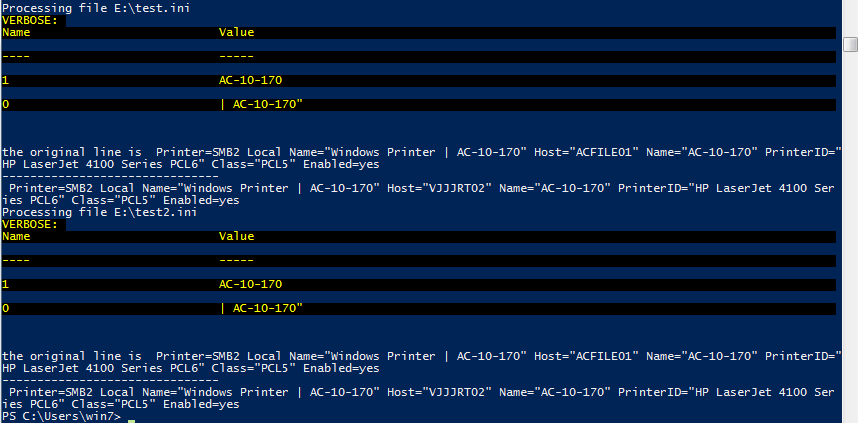
If there is anything else regarding this issue, pease feel free to post back.
Best Regards,
Anna Wang
Please remember to mark the replies as answers if they help and unmark them if they provide no help. If you have feedback for TechNet Support, contact [email protected]
Tuesday, April 21, 2015 6:38 PM
Hi Anna,
Thank you very much for your response this is exact what I wanted to see. When I checked my ini files none of them updated. My only question is how do I get the ini to actually update. What is showing on the screen is exactly what I need to be done.
Wednesday, April 22, 2015 6:44 PM
Hi Anna,
When I run the script above and got the following message, were you able to run it sucessfully.
*****************************************************************************
the original line is Printer=SMB2 Local Name="Windows Printer | AC-3-24" Host="ACFILE01" N
ame="AC-3-24" PrinterID="HP LaserJet 4100 Series PCL6" Class="PCL5" Enabled=yes
***************************************************************************
check-even : The term 'check-even' is not recognized as the name of a cmdlet, function,
script file, or operable program. Check the spelling of the name, or if a path was
included, verify that the path is correct and try again.
At C:\Powershell\TReplaceIniValues.ps1:15 char:8
+ if((check-even $printerNum) -eq $true) {
+ ~~~~~~~~~~
+ CategoryInfo : ObjectNotFound: (check-even:String) [], CommandNotFoundExc
eption
+ FullyQualifiedErrorId : CommandNotFoundException
Wednesday, April 22, 2015 7:52 PM
Thank you very much Anna and JRV this solved my issue.
Friday, April 24, 2015 3:15 PM
Hi
In the script above, what is the best way to create an statement. I also want replace some values which do not have to pass equal to or add test.
***For the following Host names (ZFILE01, WPRINT01) replace the values regardless.
.Replace('Host="ZFILE01"','Host="BKBprt01"').Replace('Host="WPRINT01"','Host="BHHprt01"')
*** For the rest of the Host names perform the (Odd/Even check)
if((check-even $printerNum)-eq $true){
#even
$content[$i]=$content[$i].Replace('Host="ACFILE01"','Host="VJJJRT02"').Replace('Host="effile01"','Host="VJJJRT02"')
}
else{
#odd
$content[$i]=$content[$i].Replace('Host="ACFILE01"','Host="VSHHPRT01"').Replace('Host="ACFILE01"','Host="VSHHPRT01"')
}