Note
Access to this page requires authorization. You can try signing in or changing directories.
Access to this page requires authorization. You can try changing directories.
Question
Monday, August 24, 2015 11:12 PM
I'm trying to embed an external exe (paint) into my program.
After having researched online, I still cannot find a working solution. I am currently trying to embed paint in a panel on another form (Form2) to the one that has the button which will activate the code (Form1).
I was previously thinking that I could just launch paint by using shell("mspaint.exe") or process.start("mspaint.exe"), and use code to hide the taskbar and also to maximize paint. The problems are that I cannot find a way to maximize paint since it is running externally, but also on the event of closing paint, to activate code that would make the taskbar visible again.
If there is a way to either do it via this method just explained or the method that I was previously trying to pursue, that would be great!
All replies (5)
Tuesday, August 25, 2015 7:02 AM ✅Answered
I was previously thinking that I could just launch paint by using shell("mspaint.exe") or process.start("mspaint.exe"), and use code to hide the taskbar and also to maximize paint.
You can start an external application maximised by using a ProcessStartInfo object and specifying the appropriate WindowStyle property enum value.
https://msdn.microsoft.com/en-us/library/system.diagnostics.processstartinfo.windowstyle(v=vs.90).aspx
also on the event of closing paint, to activate code that would make the taskbar visible again.
Configure your external process to raise events and then use the exited event to reset the taskbar.
https://msdn.microsoft.com/en-us/library/system.diagnostics.process.enableraisingevents(v=vs.90).aspx
https://msdn.microsoft.com/en-us/library/system.diagnostics.process.exited(v=vs.90).aspx
Tuesday, August 25, 2015 3:27 AM
Hello,
The following example shows how to store a binary file in an executable and extract it at run time. In the case the file extracted is a MS-Access database but any binary file can be done this way by first storing it under project resources.
Please remember to mark the replies as answers if they help and unmark them if they provide no help, this will help others who are looking for solutions to the same or similar problem. Contact via my webpage under my profile but do not reply to forum questions.
Tuesday, August 25, 2015 3:37 AM
Why would you need to hide MS Paint and make it appear as part of your program? Why not just start the Paint program and let the user know it is MS Paint.
You can use the SetParent Api function to set the parent of the Paint program window to the Panel. That will set the program inside the Panel. Then you can use the MoveWindow or the SetWindowPos Api function to set the location and size of the paint program window so that the titlebar is above the top of the panel and is not visible to the user.
If you say it can`t be done then i`ll try it
Tuesday, August 25, 2015 1:22 PM
If you want to maximize MSPaint (running externally) you can use several API function calls:
http://www.vb-helper.com/howto_maximize_application.html
Paul ~~~~ Microsoft MVP (Visual Basic)
Tuesday, August 25, 2015 5:18 PM
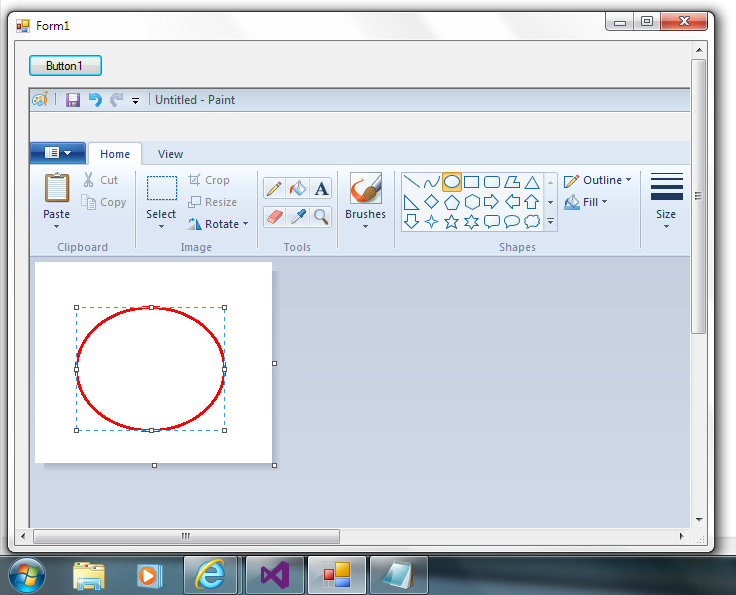
This works for mspaint. It will not work for any or all executables.
There must be a delay between launching an assembly and attempting to embed the assy. Also you can see in the image that Paint is not displayed in the TaskBar.
Option Strict On

Imports System.Runtime.InteropServices

Public Class Form1

    Private Const WM_SYSCOMMAND As Integer = &H112
    Private Const SC_MINIMIZE As Integer = &HF020
    Private Const SC_MAXIMIZE As Integer = &HF030


    <Runtime.InteropServices.DllImport("user32.dll")> _
    Public Shared Function SetParent(ByVal hWndChild As IntPtr, ByVal hWndNewParent As IntPtr) As Integer
    End Function

    <Runtime.InteropServices.DllImport("user32.dll")> _
    Public Shared Function SendMessage(ByVal hWnd As IntPtr, ByVal Msg As Integer, ByVal wParam As Integer, ByVal lParam As Integer) As Integer
    End Function

    <DllImport("user32.dll")> _
    Private Shared Function GetWindowRect(ByVal hWnd As HandleRef, ByRef lpRect As RECT) As Boolean
    End Function

    <StructLayout(LayoutKind.Sequential)> _
    Public Structure RECT
        Public AppsLeft As Integer
        ' x position of upper-left corner
        Public AppsTop As Integer
        ' y position of upper-left corner
        Public AppsRight As Integer
        ' x position of lower-right corner
        Public AppsBottom As Integer
        ' y position of lower-right corner
    End Structure

    Dim rct As RECT


    Private Sub Form1_Load(sender As Object, e As EventArgs) Handles MyBase.Load
        Me.Location = New Point(CInt((Screen.PrimaryScreen.WorkingArea.Width / 2) - (Me.Width / 2)), CInt((Screen.PrimaryScreen.WorkingArea.Height / 2) - (Me.Height / 2)))
        Me.AutoScroll = True
        Panel1.BorderStyle = BorderStyle.Fixed3D
    End Sub

    Private Sub Form1_Resize(sender As Object, e As EventArgs) Handles Me.Resize
        If Not p Is Nothing Then
            SendMessage(p.MainWindowHandle, WM_SYSCOMMAND, SC_MINIMIZE, 0)
            SendMessage(p.MainWindowHandle, WM_SYSCOMMAND, SC_MAXIMIZE, 0)
        End If
    End Sub

    Private Sub Form1_FormClosing(sender As Object, e As EventArgs) Handles Me.FormClosing
        Try
            p.Kill()
        Catch ex As Exception
        End Try
    End Sub

    Dim p As Process

    Private Sub Button1_Click(sender As Object, e As EventArgs) Handles Button1.Click

        p = Process.Start("C:\Windows\system32\mspaint.exe")

        System.Threading.Thread.Sleep(2000)

        SendMessage(p.MainWindowHandle, WM_SYSCOMMAND, SC_MAXIMIZE, 0)

        GetWindowRect(New HandleRef(p, p.MainWindowHandle), rct)
        Panel1.AutoScrollMinSize = New Size(rct.AppsRight - rct.AppsLeft, rct.AppsBottom - rct.AppsTop)
        Panel1.Width = (rct.AppsRight - rct.AppsLeft + 5)
        Panel1.Height = (rct.AppsBottom - rct.AppsTop + 5)

        SetParent(p.MainWindowHandle, Panel1.Handle)
        SendMessage(p.MainWindowHandle, WM_SYSCOMMAND, SC_MAXIMIZE, 0)

    End Sub

End Class
La vida loca