Note
Access to this page requires authorization. You can try signing in or changing directories.
Access to this page requires authorization. You can try changing directories.
Question
Friday, November 22, 2019 2:38 PM
Hello --
We would like to increase the number of simultaneous RDP sessions to one of our Windows 2012 R2 Standard servers from the current number of two, 2, to the larger number of ten, 10, sessions. I have already set up RDP licensing in that the server references a remote RDP license server for seats. I have also added the Remote Desktop Services role to the system. What I am not sure how to do is to increase the number of simultaneous RDP connections.
How would that be done?
Thanks.
All replies (5)
Friday, November 22, 2019 4:20 PM ✅Answered
You can do this by editing group policy of that RDP server.
Computer Configuration > Administrative Templates > Windows Components > Remote Desktop Services > Remote Desktop Session Host > Connections
- Set Restrict Remote Desktop Services user to a single Remote Desktop Services session to Disabled.
- Double click Limit number of connections and set the RD Maximum Connections allowed to 999999.
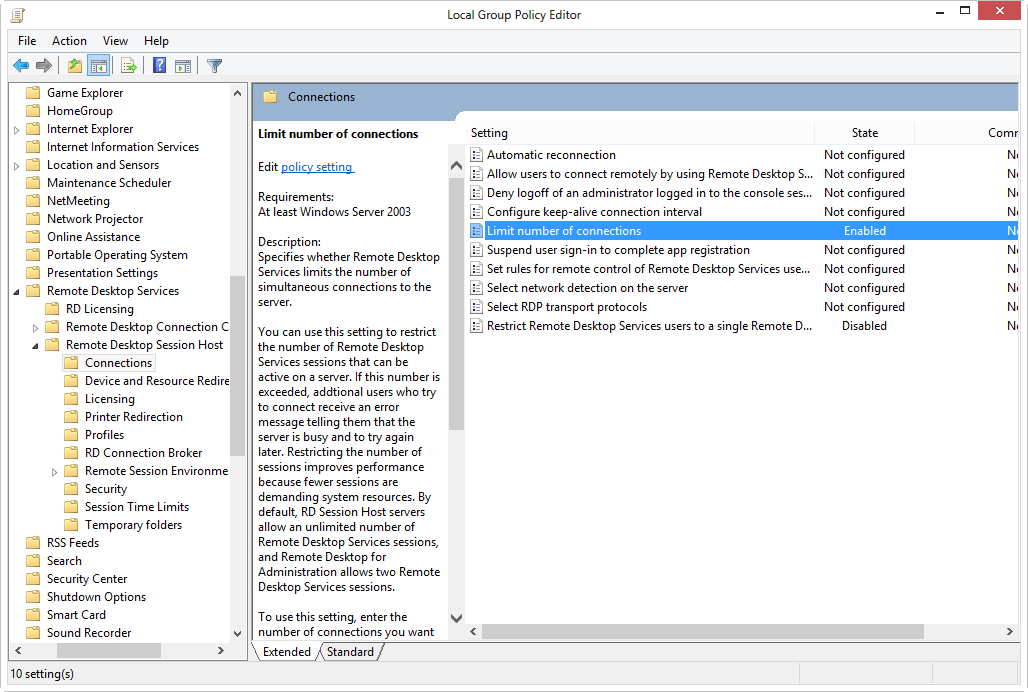
The settings are explained below documents.
This documents also may helpful,
https://www.youtube.com/watch?v=SmV8otVU1Gg
Friday, November 22, 2019 2:43 PM
Something here may help.
/en-us/windows-server/remote/remote-desktop-services/rds-deploy-infrastructure
and also reach out to RDS subject matter experts in dedicated forum over here.
https://social.technet.microsoft.com/Forums/windowsserver/en-US/home?forum=winserverTS
Regards, Dave Patrick ....
Microsoft Certified Professional
Microsoft MVP [Windows Server] Datacenter Management
Disclaimer: This posting is provided "AS IS" with no warranties or guarantees, and confers no rights.
Monday, November 25, 2019 6:46 AM
Hi,
If there is only one server which you used to deploy RDS, if it is Active Directory domain environment, install below server roles on the server system:
- RD Session Host – it holds remote resources, including full desktop and apps. It is the system which your remote user establish remote desktop connection to.
- RD Connection Broker – it provides the UGI for RDS management. And re-direct RDP connection to existing one.
- RD Licensing server – it manage RDS CALs in order to allow multi RDP connections.
Make sure above server roles have been installed. Then, check below configuration:
- Add collection and add your session host to this collection.
- Open Collection Properties, configure and specify the Licensing server and Licensing Mode. Also, complete other collection relate configurations, such as user permission.
- Purchase RDS CALs, either Per user or per device, based on your requirement. Open RD Licensing Management console and install the RDS CALs.
Then, on client, open mstsc.exe and you can establish remote desktop connection to the session host. If you want to provide external/Internal RDP connection, then, RD Gateway is recommended.
If it is workgroup environment, or, you do only want a simplest deployment, then, you can reference “Installing the Remote Desktop Session Host role service on Windows Server without the Connection Broker role service”:
https://support.microsoft.com/en-sg/help/2833839/guidelines-for-installing-the-remote-desktop-session-host-role-service
Best Regards,
Eve Wang
Please remember to mark the replies as answers if they help.
If you have feedback for TechNet Subscriber Support, contact [email protected].
Tuesday, November 26, 2019 6:56 AM
Hi,
How things are going there on this issue?
Please let me know if you would like further assistance.
Best Regards,
Eve Wang
Please remember to mark the replies as answers if they help.
If you have feedback for TechNet Subscriber Support, contact [email protected].
Tuesday, November 26, 2019 2:51 PM
Hello --
The issue has been successfully resolved, and I made sure to mark one of the responses as an answer.