Note
Access to this page requires authorization. You can try signing in or changing directories.
Access to this page requires authorization. You can try changing directories.
Question
Sunday, February 8, 2015 4:20 AM
Hi Expert,
Could you please let me know how can I assign rank based on High and low numbers with VB function. I am using the below code but looks like it is not working.
Public dim Previousvalue as Double
public dim SourceRank as Double
Public Function Rank(sourceValue as Double) As Double
if Previousvalue >sourceValue
SourceRank =SourceRank +1
else
SourceRank =SourceRank
end if
Previousvalue =sourceValue
return SourceRank
End Function
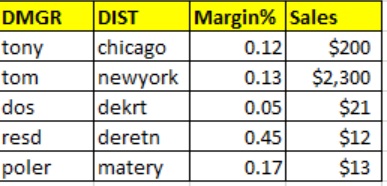
Expected Result:
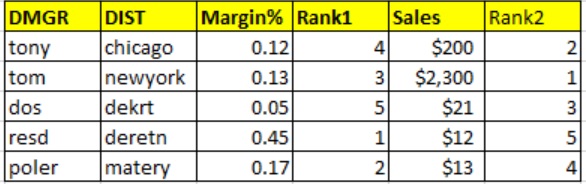
Thanks Chandan
All replies (3)
Sunday, February 8, 2015 5:24 AM ✅Answered
Could you please let me know how can I assign rank based on High and low numbers with VB function. I am using the below code but looks like it is not working.
You can't calculate rankings with a comparison of just two items - any change you make as a result of that comparison may change other rankings.
Ranking is usually calculated by sorting the items by their value and using the index of the sorted collection as the rank.
If you have a source for your data, such as a data table, you can sort that into a temporary list, and assign the list index as the ranking for each item.
Otherwise, you can extract the value and row item into a structure that you can sort by value, and then use the row number to put the sorted collection index back intot he original table. The SortedList class is suitable for this purpose. See:
https://msdn.microsoft.com/en-us/library/ms132319(v=vs.110).aspx
Your example would be a SortedList of decimal (for the value to sort by) and integer (for the row number).
Sunday, February 8, 2015 5:40 AM ✅Answered
A List(Of NumericType) can sort and reverse also. If all the double values are entered into a List(Of Double) then you can sort the list which is ascending order then reverse the list which is descending order.
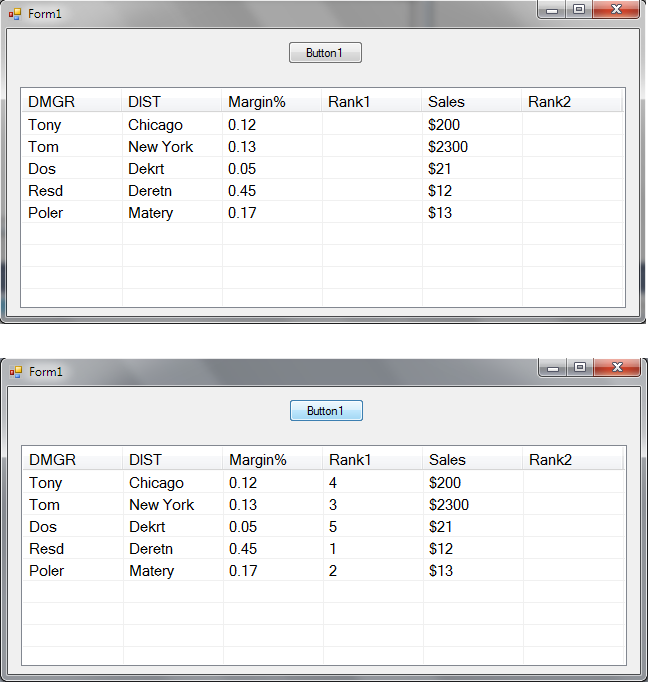
In this instance, for the Margin% Rank those go from highest to lowest. So all those values are added to a List(Of Double). The List(Of Double) is Sorted then Reversed then the highest value will be in Index 0 of the List(Of Double) with the lowest value at the last index in the List(Of Double). How you then use that would be up to you.
Option Strict On

Public Class Form1
    Private Sub Form1_Load(sender As Object, e As EventArgs) Handles MyBase.Load
        Me.Location = New Point(CInt((Screen.PrimaryScreen.WorkingArea.Width / 2) - (Me.Width / 2)), CInt((Screen.PrimaryScreen.WorkingArea.Height / 2) - (Me.Height / 2)))

        ListView1.FullRowSelect = True
        ListView1.MultiSelect = True
        ListView1.GridLines = True
        ListView1.LabelEdit = True
        ListView1.AllowColumnReorder = False
        ListView1.View = View.Details

        ListView1.Columns.Add("DMGR", 100, HorizontalAlignment.Left)
        ListView1.Columns.Add("DIST", 100, HorizontalAlignment.Left)
        ListView1.Columns.Add("Margin%", 100, HorizontalAlignment.Left)
        ListView1.Columns.Add("Rank1", 100, HorizontalAlignment.Left)
        ListView1.Columns.Add("Sales", 100, HorizontalAlignment.Left)
        ListView1.Columns.Add("Rank2", 100, HorizontalAlignment.Left)

        Dim item1 As New ListViewItem("Tony")
        item1.SubItems.Add("Chicago")
        item1.SubItems.Add("0.12")
        item1.SubItems.Add("")
        item1.SubItems.Add("$200")
        item1.SubItems.Add("")
        ListView1.Items.AddRange(New ListViewItem() {item1})

        Dim item2 As New ListViewItem("Tom")
        item2.SubItems.Add("New York")
        item2.SubItems.Add("0.13")
        item2.SubItems.Add("")
        item2.SubItems.Add("$2300")
        item2.SubItems.Add("")
        ListView1.Items.AddRange(New ListViewItem() {item2})

        Dim item3 As New ListViewItem("Dos")
        item3.SubItems.Add("Dekrt")
        item3.SubItems.Add("0.05")
        item3.SubItems.Add("")
        item3.SubItems.Add("$21")
        item3.SubItems.Add("")
        ListView1.Items.AddRange(New ListViewItem() {item3})

        Dim item4 As New ListViewItem("Resd")
        item4.SubItems.Add("Deretn")
        item4.SubItems.Add("0.45")
        item4.SubItems.Add("")
        item4.SubItems.Add("$12")
        item4.SubItems.Add("")
        ListView1.Items.AddRange(New ListViewItem() {item4})

        Dim item5 As New ListViewItem("Poler")
        item5.SubItems.Add("Matery")
        item5.SubItems.Add("0.17")
        item5.SubItems.Add("")
        item5.SubItems.Add("$13")
        item5.SubItems.Add("")
        ListView1.Items.AddRange(New ListViewItem() {item5})

    End Sub

    Private Sub Button1_Click(sender As Object, e As EventArgs) Handles Button1.Click
        Dim Temp1 As New List(Of Double)
        For i = 0 To ListView1.Items.Count - 1
            Temp1.Add(CDbl(ListView1.Items(i).SubItems(2).Text))
        Next
        Temp1.Sort()
        Temp1.Reverse()

        For h = 0 To Temp1.Count - 1
            For i = 0 To ListView1.Items.Count - 1
                If CDbl(ListView1.Items(i).SubItems(2).Text) = Temp1(h) Then
                    ListView1.Items(i).SubItems(3).Text = (h + 1).ToString
                End If
            Next
        Next
    End Sub


End Class
La vida loca
Sunday, February 8, 2015 7:44 AM ✅Answered
Hello Chandan,
Sorting is for me among the weakest part in the .Net program languages. Of course there are persons who know the code likewise I show bellow. However, it is not intuitive for a programmer. It is more likewise the answer from an Inuit, when you ask him how to catch a fish bellow the ice. He will tell you that it is easy because he knows.
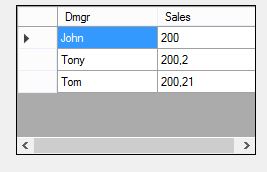
I made a sample for you about one of the ways how to do it.
Public Class Form1
    Private Chandans As New List(Of Chandan)
    Private Sub Form1_Load(sender As Object, e As EventArgs) Handles Me.Load
        Chandans.Add(New Chandan With {.Dmgr = "Tony", .Sales = 200.2D})
        Chandans.Add(New Chandan With {.Dmgr = "Tom", .Sales = 200.21D})
        Chandans.Add(New Chandan With {.Dmgr = "John", .Sales = 200})
        Chandans.Sort(Function(x, y) x.Sales.CompareTo(y.Sales))
        DataGridView1.DataSource = Chandans
    End Sub

    Public Class Chandan
        Public Property Dmgr As String
        Public Property Sales As Decimal
    End Class
End Class
Success
Cor