Note
Access to this page requires authorization. You can try signing in or changing directories.
Access to this page requires authorization. You can try changing directories.
Question
Thursday, October 24, 2019 5:01 PM
Hi,
I'm creating a Windows Deskptop Application in VS2019.
I'm attaching the screenshot of the components I have so far installed.
When I try to add a new form by using Project >> Add New Item, I do not see the UI option.
My goal is to run a C++ project that controls some hardware, currently it is done via command line but I would like to include some GUI for easy interaction.
Could you suggest how I can create a form ?
By the way, can I create a Windows Desktop Application to do this or should I create a different type of project ? I'm fairly new to the VS environment.
All replies (4)
Friday, October 25, 2019 10:58 AM
Hi ArduinoHobbyist,
Welcome to the MSDN forum.
l think you want to create a c++ windows form application. WinForms designer support for C ++ / CLI was removed as early as VS 2012. MS recommends C# for WinForms code. This means that we can create c# winform projects automatically with vs templates, but we can create c++ Winform projects manually. This document also applies to VS2019:
>> Note: For VS2019, you should install this components C++/CLI support for v142 build tools at the begin.
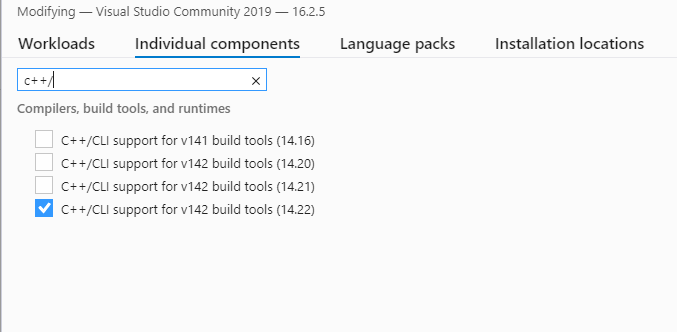
Any feedback will be expected.
Best Regards,
Perry
MSDN Community Support Please remember to click "Mark as Answer" the responses that resolved your issue, and to click "Unmark as Answer" if not. This can be beneficial to other community members reading this thread. If you have any compliments or complaints to MSDN Support, feel free to contact [email protected]
Friday, October 25, 2019 2:13 PM
Hi Perry,
Thanks for the reply.
On adding "Resource" to the project and if find that I can add "buttons", "check box" to this window. Is that the correct approach.
I'm sorry if the terminology I'm using is incorrect, still learning the ropes.
Thanks.
Friday, October 25, 2019 4:24 PM
If your intent is to use unmanaged C++ in a windows desktop application one convenient path is to use the new project wizard to create an MFC dialog-based application. After the wizard completes you will be able to add controls and event handlers to the generated dialog.
Monday, October 28, 2019 2:34 AM
Hi ArduinoHobbyist,
Thanks for your feedback.
Yes, if you just follow my steps and then you can add the UI control into your MyForm.h like this:
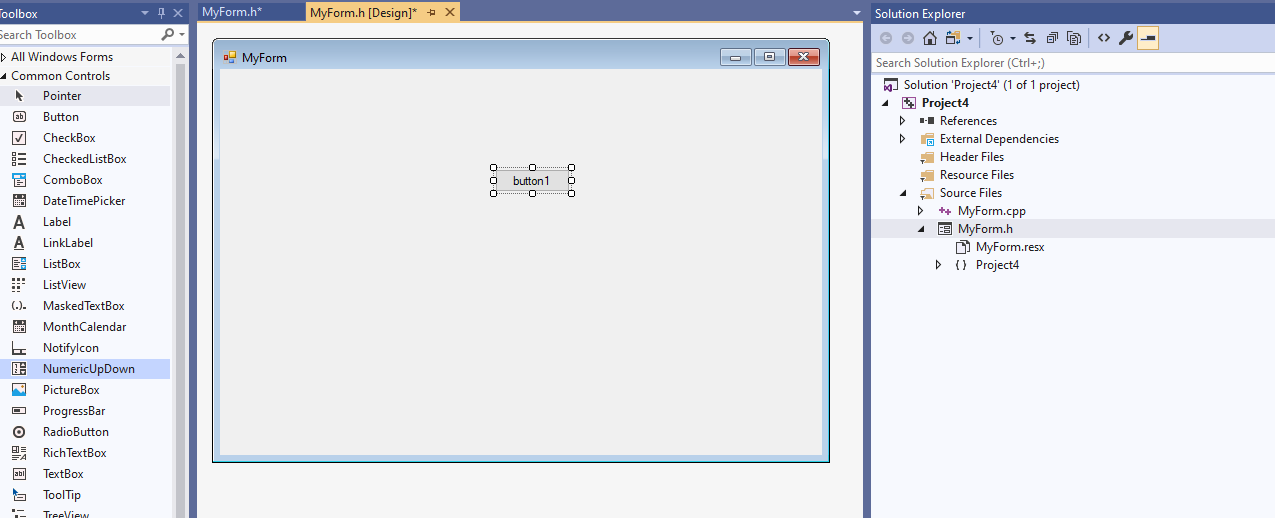
>> Then you can add the UI control from Toolbox.
BTW, you can try to use the C# windows forms app since it automatically creates all templates. Or you can try RLWA32's suggestion to create an MFC dialog-based application.
Best Regards,
Perry
MSDN Community Support Please remember to click "Mark as Answer" the responses that resolved your issue, and to click "Unmark as Answer" if not. This can be beneficial to other community members reading this thread. If you have any compliments or complaints to MSDN Support, feel free to contact [email protected]