Note
Access to this page requires authorization. You can try signing in or changing directories.
Access to this page requires authorization. You can try changing directories.
Question
Wednesday, January 29, 2020 6:26 PM
Hi all,
I have an unusual issue with my AD CS PKI that I haven't had much luck in solving. I've had a case open with Microsoft on this for two months, and they are also unable to figure out what is causing the issue.
The issue is that when I enable the auto-enrollment GPO, computers that it's applied to are enrolling duplicate certificates with the same template. It is happening at random intervals. I am trying to enroll in computer certificates, not user certificates.
The PKI is two-tier with an offline root CA, a subordinate CA, and a web server that hosts the CRL, AIA, and OCSP. All three servers are Windows Server 2016. If I check in PKIView, everything appears to be working.
The GPO setting I am using is the "Certicate Services Client - Auto-Enrollment Properties." It is set to enabled, both check boxes are checked, and the expiry notifications are set to 10%. The GPO is applied to a test OU that only contains my computer.
The template I am using is a copy of the Computer template. I have tried other templates as well, and they all exhibit the same behavior. Read, Enroll, and Autoenroll permissions are set on a security group that contains the machines that I want to autoenroll. I have also tried explicitly applying the permissions to my computer.
I see the same behavior no matter which computers I apply it to or what templates I use.
The Microsoft support technician tried a backup and restore of the PKI, but that didn't solve the issue. He's also tried out a lot of different settings on both the templates and the GPO, which were all unsuccessful.
Any help would be much appreciated.
All replies (16)
Friday, May 29, 2020 4:33 PM ✅Answered
I ended up discovering that the issue was DNS. It was occurring when the subject name format of the template was set to none with the SAN set to DNS.
The workaround I used to fix this was to set the subject name format of the template to DNS with the SAN set to SPN.
Wednesday, January 29, 2020 7:07 PM
In 99% of such cases, the issue is caused by revocation checking failure. I suggest to get the recently enrolled certificate and run
certutil -verify -urlfetch path\issuedcert.cer
and show us the output. Do it as an administrator and try same command under system account (you can use psexec.exe tool to invoke the command under system account).
Also, it would be great if you could tell something about intervals.
Vadims Podāns, aka Crypt32
My weblog: www.sysadmins.lv
PowerShell PKI Module: PSPKI
Check out new: SSL Certificate Verifier
Check out new: ASN.1 Editor tool.
Wednesday, January 29, 2020 8:44 PM
Vadmins,
Here is the output from the administrator account:
C:\Users\alexs\Desktop>certutil -verify -urlfetch testcert.cer
Issuer:
CN=MYDOMAIN Certificate Authority
DC=MYDOMAIN
DC=com
Name Hash(sha1): 8bc6bec4c888f71fab63b0770a8334779f45da00
Name Hash(md5): 79805b5d9bad2be818fd327e72682490
Subject:
EMPTY (DNS Name=AlexS_L.MYDOMAIN.com)
Name Hash(sha1): f944dcd635f9801f7ac90a407fbc479964dec024
Name Hash(md5): a46c3b54f2c9871cd81daf7a932499c0
Cert Serial Number: 1a00000077fd3552bcb3b7d0fa000000000077
dwFlags = CA_VERIFY_FLAGS_CONSOLE_TRACE (0x20000000)
dwFlags = CA_VERIFY_FLAGS_DUMP_CHAIN (0x40000000)
ChainFlags = CERT_CHAIN_REVOCATION_CHECK_CHAIN_EXCLUDE_ROOT (0x40000000)
HCCE_LOCAL_MACHINE
CERT_CHAIN_POLICY_BASE
CERT_CHAIN_CONTEXT
ChainContext.dwInfoStatus = CERT_TRUST_HAS_PREFERRED_ISSUER (0x100)
ChainContext.dwRevocationFreshnessTime: 195 Days, 1 Hours, 26 Minutes, 44 Seconds
SimpleChain.dwInfoStatus = CERT_TRUST_HAS_PREFERRED_ISSUER (0x100)
SimpleChain.dwRevocationFreshnessTime: 195 Days, 1 Hours, 26 Minutes, 44 Seconds
CertContext[0][0]: dwInfoStatus=102 dwErrorStatus=0
Issuer: CN=MYDOMAIN Certificate Authority, DC=MYDOMAIN, DC=com
NotBefore: 1/29/2020 7:58 AM
NotAfter: 1/28/2021 7:58 AM
Subject:
Serial: 1a00000077fd3552bcb3b7d0fa000000000077
SubjectAltName: DNS Name=AlexS_L.MYDOMAIN.com
Template: Test Cert
Cert: d0112947289f833d10594f3d111dcd6a63fab969
Element.dwInfoStatus = CERT_TRUST_HAS_KEY_MATCH_ISSUER (0x2)
Element.dwInfoStatus = CERT_TRUST_HAS_PREFERRED_ISSUER (0x100)
Certificate AIA
Verified "Certificate (0)" Time: 0 ef1af93cb2dffc1832ff21063be2dffb4ec49e8c
[0.0] http://pki.MYDOMAIN.com/pki/aia/MYDOMAIN-ECAMYDOMAIN%20Certificate%20Authority.crt
Certificate CDP
Verified "Base CRL (7f)" Time: 0 968effdfd75269ad923373fb0a6176599c47d50d
[0.0] http://pki.MYDOMAIN.com/pki/cdp/MYDOMAIN-ECA.crl
Verified "Delta CRL (7f)" Time: 0 1a8afabef0fdbf72ac94297954905e1d5cc409cc
[0.0.0] http://pki.MYDOMAIN.com/pki/cdp/MYDOMAIN-ECA+.crl
Base CRL CDP
No URLs "None" Time: 0 (null)
Certificate OCSP
Verified "OCSP" Time: 0 122ed7c89bcc1a7998b7130d82da4044c6485746
[0.0] http://pki.MYDOMAIN.com/ocsp
CRL (null):
Issuer: CN=ProdInternalCDP.MYDOMAIN.com
ThisUpdate: 1/28/2020 2:53 PM
NextUpdate: 1/30/2020 3:13 AM
CRL: 7f88c82204d8b58f40312393ea9a283140f94bcb
Application[0] = 1.3.6.1.5.5.7.3.2 Client Authentication
Application[1] = 1.3.6.1.5.5.7.3.1 Server Authentication
CertContext[0][1]: dwInfoStatus=102 dwErrorStatus=0
Issuer: CN=MYDOMAIN Root Certificate Authority
NotBefore: 9/26/2019 12:00 PM
NotAfter: 9/26/2029 12:10 PM
Subject: CN=MYDOMAIN Certificate Authority, DC=MYDOMAIN, DC=com
Serial: 54000000026177010159fc3cc6000000000002
Template: SubCA
Cert: ef1af93cb2dffc1832ff21063be2dffb4ec49e8c
Element.dwInfoStatus = CERT_TRUST_HAS_KEY_MATCH_ISSUER (0x2)
Element.dwInfoStatus = CERT_TRUST_HAS_PREFERRED_ISSUER (0x100)
Certificate AIA
Verified "Certificate (0)" Time: 0 adc0a5b8e5daff556e538c4b401428be2753183a
[0.0] http://pki.MYDOMAIN.com/pki/aia/MYDOMAIN-ROOTMYDOMAIN%20Root%20Certificate%20Authority.crt
Certificate CDP
Verified "Base CRL (02)" Time: 0 d71ef7bd58f08148512628e7e16f01899f789e25
[0.0] http://pki.MYDOMAIN.com/pki/cdp/MYDOMAIN-ROOT.crl
Base CRL CDP
No URLs "None" Time: 0 (null)
Certificate OCSP
No URLs "None" Time: 0 (null)
CRL 02:
Issuer: CN=MYDOMAIN Root Certificate Authority
ThisUpdate: 7/18/2019 12:07 PM
NextUpdate: 7/19/2039 12:27 AM
CRL: d71ef7bd58f08148512628e7e16f01899f789e25
Issuance[0] = 1.3.6.1.4.1.54100
CertContext[0][2]: dwInfoStatus=10c dwErrorStatus=0
Issuer: CN=MYDOMAIN Root Certificate Authority
NotBefore: 7/18/2019 7:57 AM
NotAfter: 7/18/2039 8:07 AM
Subject: CN=MYDOMAIN Root Certificate Authority
Serial: 332038596604b19549639b9712a6a5f0
Cert: adc0a5b8e5daff556e538c4b401428be2753183a
Element.dwInfoStatus = CERT_TRUST_HAS_NAME_MATCH_ISSUER (0x4)
Element.dwInfoStatus = CERT_TRUST_IS_SELF_SIGNED (0x8)
Element.dwInfoStatus = CERT_TRUST_HAS_PREFERRED_ISSUER (0x100)
Certificate AIA
No URLs "None" Time: 0 (null)
Certificate CDP
No URLs "None" Time: 0 (null)
Certificate OCSP
No URLs "None" Time: 0 (null)
Exclude leaf cert:
Chain: 53766bf497bf37e36eda382b740d6c1393e31702
Full chain:
Chain: bcdb576cea2b68ec6385b92f8251aad7715849c2
Verified Issuance Policies: None
Verified Application Policies:
1.3.6.1.5.5.7.3.2 Client Authentication
1.3.6.1.5.5.7.3.1 Server Authentication
Leaf certificate revocation check passed
CertUtil: -verify command completed successfully.
And here is the output from the system account:
C:\Users\alexs\Desktop>whoami
nt authority\system
C:\Users\alexs\Desktop>certutil -verify -urlfetch testcert.cer
Issuer:
CN=MYDOMAIN Certificate Authority
DC=MYDOMAIN
DC=com
Name Hash(sha1): 8bc6bec4c888f71fab63b0770a8334779f45da00
Name Hash(md5): 79805b5d9bad2be818fd327e72682490
Subject:
EMPTY (DNS Name=AlexS_L.MYDOMAIN.com)
Name Hash(sha1): f944dcd635f9801f7ac90a407fbc479964dec024
Name Hash(md5): a46c3b54f2c9871cd81daf7a932499c0
Cert Serial Number: 1a00000077fd3552bcb3b7d0fa000000000077
dwFlags = CA_VERIFY_FLAGS_CONSOLE_TRACE (0x20000000)
dwFlags = CA_VERIFY_FLAGS_DUMP_CHAIN (0x40000000)
ChainFlags = CERT_CHAIN_REVOCATION_CHECK_CHAIN_EXCLUDE_ROOT (0x40000000)
HCCE_LOCAL_MACHINE
CERT_CHAIN_POLICY_BASE
CERT_CHAIN_CONTEXT
ChainContext.dwInfoStatus = CERT_TRUST_HAS_PREFERRED_ISSUER (0x100)
ChainContext.dwRevocationFreshnessTime: 195 Days, 1 Hours, 31 Minutes, 54 Seconds
SimpleChain.dwInfoStatus = CERT_TRUST_HAS_PREFERRED_ISSUER (0x100)
SimpleChain.dwRevocationFreshnessTime: 195 Days, 1 Hours, 31 Minutes, 54 Seconds
CertContext[0][0]: dwInfoStatus=102 dwErrorStatus=0
Issuer: CN=MYDOMAIN Certificate Authority, DC=MYDOMAIN, DC=com
NotBefore: 1/29/2020 7:58 AM
NotAfter: 1/28/2021 7:58 AM
Subject:
Serial: 1a00000077fd3552bcb3b7d0fa000000000077
SubjectAltName: DNS Name=AlexS_L.MYDOMAIN.com
Template: Test Cert
Cert: d0112947289f833d10594f3d111dcd6a63fab969
Element.dwInfoStatus = CERT_TRUST_HAS_KEY_MATCH_ISSUER (0x2)
Element.dwInfoStatus = CERT_TRUST_HAS_PREFERRED_ISSUER (0x100)
Certificate AIA
Verified "Certificate (0)" Time: 0 ef1af93cb2dffc1832ff21063be2dffb4ec49e8c
[0.0] http://pki.MYDOMAIN.com/pki/aia/MYDOMAIN-ECAMYDOMAIN%20Certificate%20Authority.crt
Certificate CDP
Verified "Base CRL (7f)" Time: 0 968effdfd75269ad923373fb0a6176599c47d50d
[0.0] http://pki.MYDOMAIN.com/pki/cdp/MYDOMAIN-ECA.crl
Verified "Delta CRL (7f)" Time: 0 1a8afabef0fdbf72ac94297954905e1d5cc409cc
[0.0.0] http://pki.MYDOMAIN.com/pki/cdp/MYDOMAIN-ECA+.crl
Base CRL CDP
No URLs "None" Time: 0 (null)
Certificate OCSP
Verified "OCSP" Time: 0 122ed7c89bcc1a7998b7130d82da4044c6485746
[0.0] http://pki.MYDOMAIN.com/ocsp
CRL (null):
Issuer: CN=ProdInternalCDP.MYDOMAIN.com
ThisUpdate: 1/28/2020 2:53 PM
NextUpdate: 1/30/2020 3:13 AM
CRL: 7f88c82204d8b58f40312393ea9a283140f94bcb
Application[0] = 1.3.6.1.5.5.7.3.2 Client Authentication
Application[1] = 1.3.6.1.5.5.7.3.1 Server Authentication
CertContext[0][1]: dwInfoStatus=102 dwErrorStatus=0
Issuer: CN=MYDOMAIN Root Certificate Authority
NotBefore: 9/26/2019 12:00 PM
NotAfter: 9/26/2029 12:10 PM
Subject: CN=MYDOMAIN Certificate Authority, DC=MYDOMAIN, DC=com
Serial: 54000000026177010159fc3cc6000000000002
Template: SubCA
Cert: ef1af93cb2dffc1832ff21063be2dffb4ec49e8c
Element.dwInfoStatus = CERT_TRUST_HAS_KEY_MATCH_ISSUER (0x2)
Element.dwInfoStatus = CERT_TRUST_HAS_PREFERRED_ISSUER (0x100)
Certificate AIA
Verified "Certificate (0)" Time: 0 adc0a5b8e5daff556e538c4b401428be2753183a
[0.0] http://pki.MYDOMAIN.com/pki/aia/MYDOMAIN-ROOTMYDOMAIN%20Root%20Certificate%20Authority.crt
Certificate CDP
Verified "Base CRL (02)" Time: 0 d71ef7bd58f08148512628e7e16f01899f789e25
[0.0] http://pki.MYDOMAIN.com/pki/cdp/MYDOMAIN-ROOT.crl
Base CRL CDP
No URLs "None" Time: 0 (null)
Certificate OCSP
No URLs "None" Time: 0 (null)
CRL 02:
Issuer: CN=MYDOMAIN Root Certificate Authority
ThisUpdate: 7/18/2019 12:07 PM
NextUpdate: 7/19/2039 12:27 AM
CRL: d71ef7bd58f08148512628e7e16f01899f789e25
Issuance[0] = 1.3.6.1.4.1.54100
CertContext[0][2]: dwInfoStatus=10c dwErrorStatus=0
Issuer: CN=MYDOMAIN Root Certificate Authority
NotBefore: 7/18/2019 7:57 AM
NotAfter: 7/18/2039 8:07 AM
Subject: CN=MYDOMAIN Root Certificate Authority
Serial: 332038596604b19549639b9712a6a5f0
Cert: adc0a5b8e5daff556e538c4b401428be2753183a
Element.dwInfoStatus = CERT_TRUST_HAS_NAME_MATCH_ISSUER (0x4)
Element.dwInfoStatus = CERT_TRUST_IS_SELF_SIGNED (0x8)
Element.dwInfoStatus = CERT_TRUST_HAS_PREFERRED_ISSUER (0x100)
Certificate AIA
No URLs "None" Time: 0 (null)
Certificate CDP
No URLs "None" Time: 0 (null)
Certificate OCSP
No URLs "None" Time: 0 (null)
Exclude leaf cert:
Chain: 53766bf497bf37e36eda382b740d6c1393e31702
Full chain:
Chain: bcdb576cea2b68ec6385b92f8251aad7715849c2
Verified Issuance Policies: None
Verified Application Policies:
1.3.6.1.5.5.7.3.2 Client Authentication
1.3.6.1.5.5.7.3.1 Server Authentication
Leaf certificate revocation check passed
CertUtil: -verify command completed successfully.
The validity period of the cert is 1 year, and the renewal period is 6 weeks. Are there any other settings I should share to help in troubleshooting this issue?
Thursday, January 30, 2020 3:59 AM
Hello,
Thank you for posting in our TechNet forum.
According to "computers that it's applied to are enrolling duplicate certificates with the same template.", do we mean we get multiple certificates with different **Thumbprints **using the same certificate template?
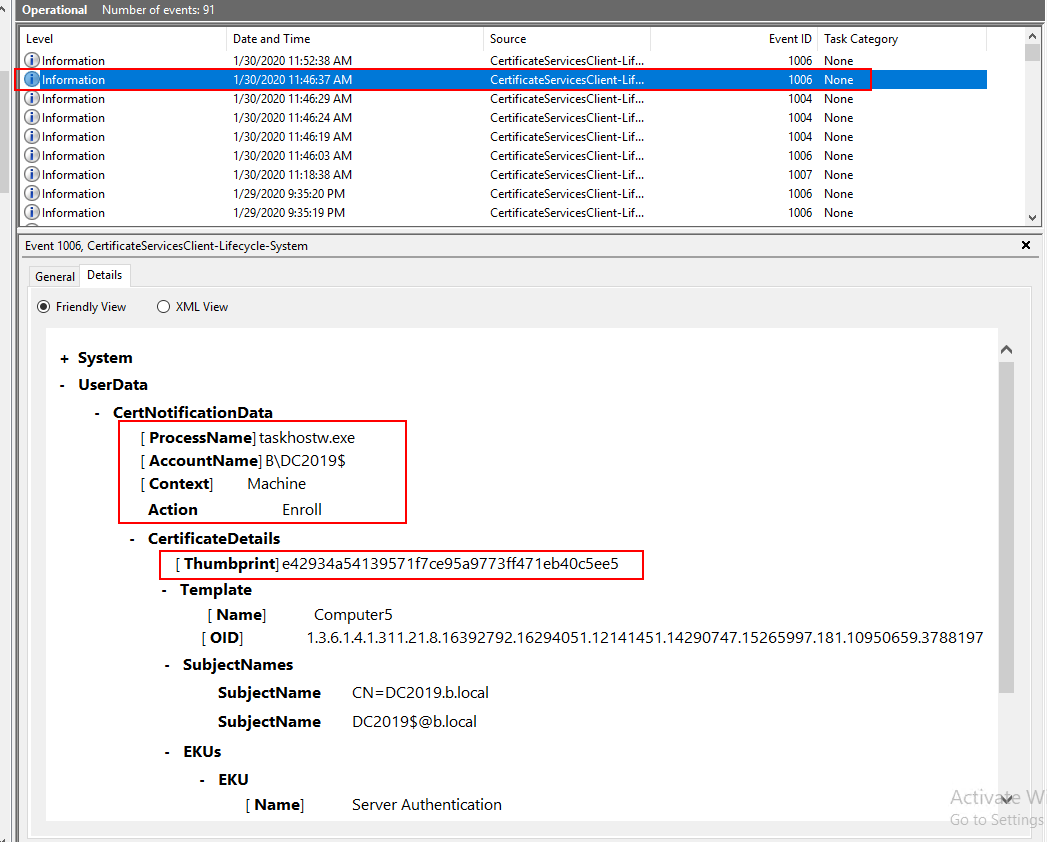
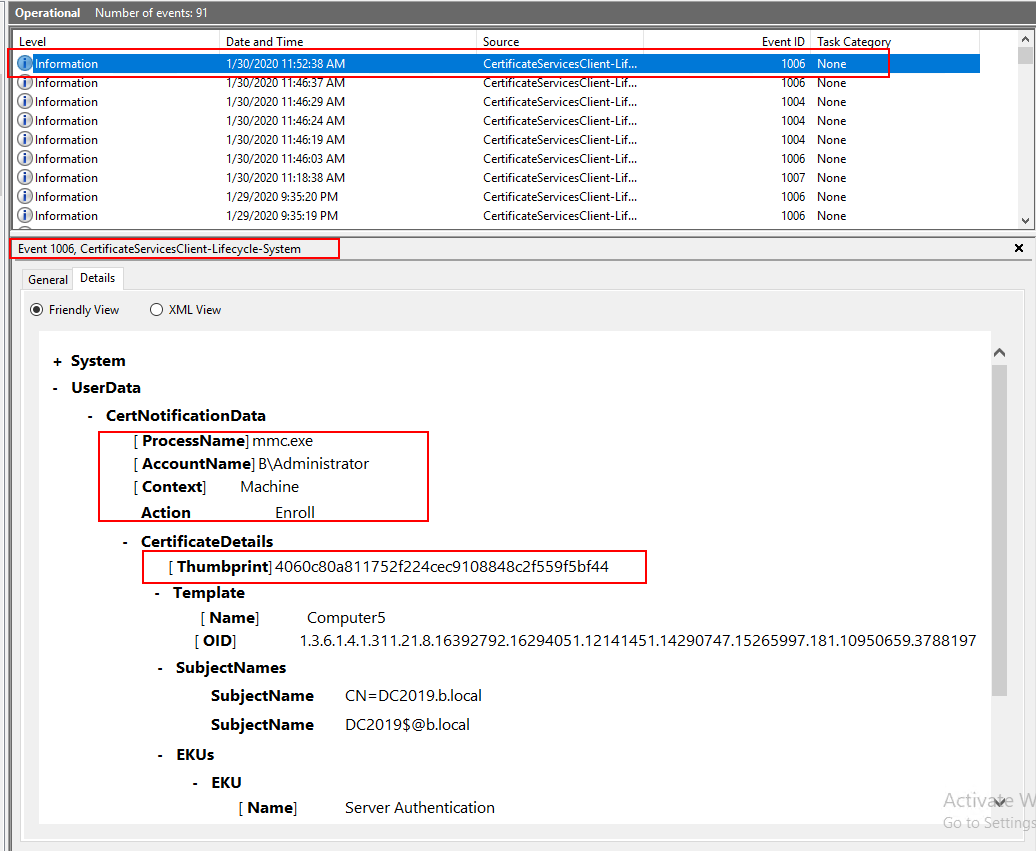
On one problematic client, open **Event Viewer->Applications and Services Logs->Microsoft->Windows->CertificateServicesClient-Lifecycle-System->Operational
**We can check event ID 1006.
Process Name
Account Name
Here is an autornrolled computer certificate after I run gpupdate /force command.
And here is a computer certificate I requested manually.
Best Regards,
Daisy Zhou
Please remember to mark the replies as answers if they help.
If you have feedback for TechNet Subscriber Support, contact [email protected].
Saturday, February 1, 2020 10:07 AM
I see suspicious policies. Can you confirm the value of Certificate Policies extension in root CA, intermediate CA and leaf certificates.
Vadims Podāns, aka Crypt32
My weblog: www.sysadmins.lv
PowerShell PKI Module: PSPKI
Check out new: SSL Certificate Verifier
Check out new: ASN.1 Editor tool.
Monday, February 3, 2020 6:46 AM
Hi,
I just want to confirm the current situations.
Please feel free to let us know if you need further assistance.
Best Regards,
Daisy Zhou
Please remember to mark the replies as answers if they help.
If you have feedback for TechNet Subscriber Support, contact [email protected].
Tuesday, February 4, 2020 3:42 PM
Vadims,
Here is the info from the Certificate Policies extension on each of the three certificates.
Root CA Certificate:
The root certificate doesn't seem to have the Certificate Policies extension.
Intermediate CA Certificate:
[1]Certificate Policy:
Policy Identifier=1.3.6.1.4.1.54100
[1,1]Policy Qualifier Info:
Policy Qualifier Id=CPS
Qualifier:
http://pki.mydomain.com/pki/cps.html
Leaf Certificate:
The leaf certificate also doesn't seem to have the Certificate Policies extension.
Tuesday, February 4, 2020 3:43 PM
Daisy,
Yes, the certificates have different thumbprints but are using the same template.
Wednesday, February 5, 2020 3:52 AM
Hi,
Would you please tell us these certificates are enrolled automatically or manually?
We can check the Event ID 1006 on the problematic machine.
If we enroll certificate manually, we can enroll multiple certificates with different thumbprints use the same certificate template.
Best Regards,
Daisy Zhou
Please remember to mark the replies as answers if they help.
If you have feedback for TechNet Subscriber Support, contact [email protected].
Wednesday, February 5, 2020 3:06 PM
Daisy,
These certificates are enrolled automatically via GPO.
My goal is to have the machines automatically enroll in certificates and only receive one certificate per template until it's time to renew the certificate.
Thursday, February 6, 2020 10:16 AM
Hi,
If we can delete or remove the group policy settings and reconfigure it, we can try it.
Best Regards,
Daisy Zhou
Please remember to mark the replies as answers if they help.
If you have feedback for TechNet Subscriber Support, contact [email protected].
Thursday, February 6, 2020 3:06 PM
Okay, I tried this. It may take a few days for me to see if it worked or not.
Friday, February 7, 2020 4:07 AM
Hi,
First, we'd better evaluate that this operation will not have any impact on your production environment, and then we can try.
I am looking forward to your reply.
Best Regards,
Daisy Zhou
Please remember to mark the replies as answers if they help.
If you have feedback for TechNet Subscriber Support, contact [email protected].
Friday, February 7, 2020 8:32 PM
Daisy,
I already implemented the change because I knew it wouldn't impact production.
It looks like the changes didn't solve the issue. It is still exhibiting the same behavior.
Tuesday, February 11, 2020 10:16 AM
Hi,
Maybe the problem is a little complex. We suggest we can wait for Microsoft to see if they will provide the further help.
Best Regards,
Daisy Zhou
Please remember to mark the replies as answers if they help.
If you have feedback for TechNet Subscriber Support, contact [email protected].
Tuesday, February 11, 2020 2:10 PM
Daisy,
I already implemented the change because I knew it wouldn't impact production.
It looks like the changes didn't solve the issue. It is still exhibiting the same behavior.
this behavior suggests that autoenrollment fails to validate existing certificate and initiates reenrollment. It is hard to tell what exactly is wrong, because it requires deep investigation. Potential issues that are just under the ground are not showing. As a last resort, I would suggest to open the ticket with Microsoft Support. No MSFT engineer (as far as I know) monitors this forum, so barely you can get anything else from here.
Vadims Podāns, aka Crypt32
My weblog: www.sysadmins.lv
PowerShell PKI Module: PSPKI
Check out new: SSL Certificate Verifier
Check out new: ASN.1 Editor tool.