Note
Access to this page requires authorization. You can try signing in or changing directories.
Access to this page requires authorization. You can try changing directories.
Question
Monday, January 28, 2019 11:08 PM
Hi All, I have facing issue for unexpected reboot, reason checked in the event logs it is showing as below
The process C:\Windows\CCM\CcmExec.exe (server name) has initiated the restart of computer server name on behalf of user NT AUTHORITY\SYSTEM for the following reason: No title for this reason could be found
Reason Code: 0x80020001
Shutdown Type: restart
Comment: Your computer will restart at 01/28/2019 09:58:55 AM to complete the installation of applications and software updates.
Also checked the Configure Automatic update is disabled on group policy at machine side but still not identify the exact cause for reboot
Checked maintenace coordinators logs which showing some error and ADR rule which we customized for pushing updates
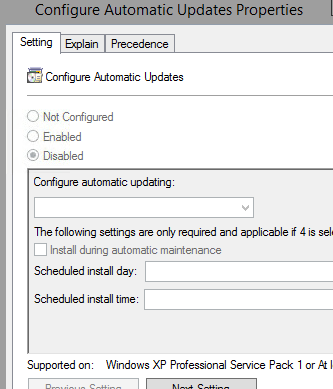
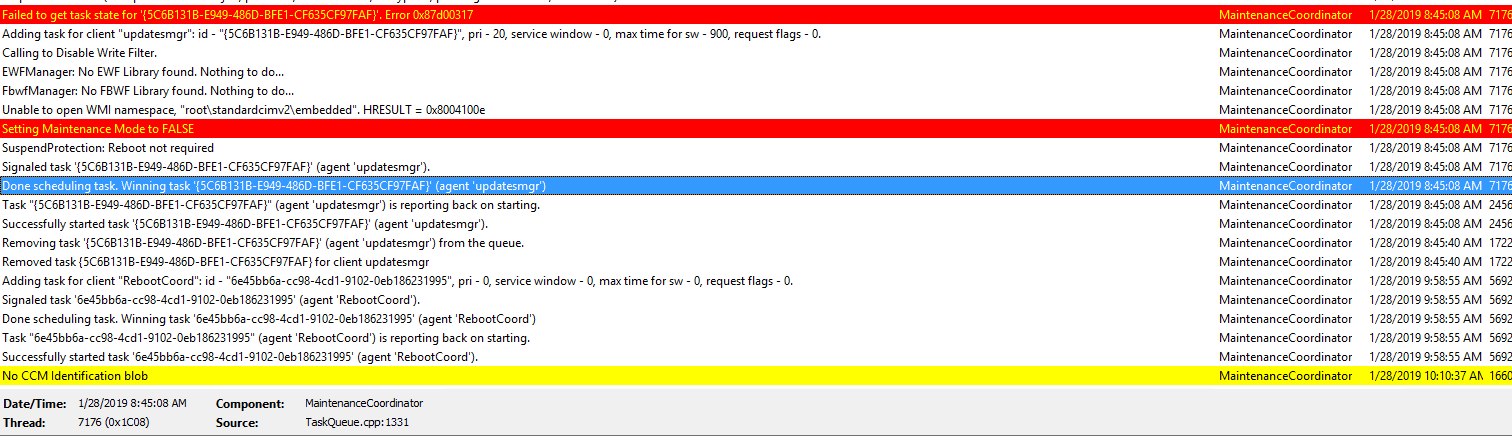
Depolyement settings for patches in ADR
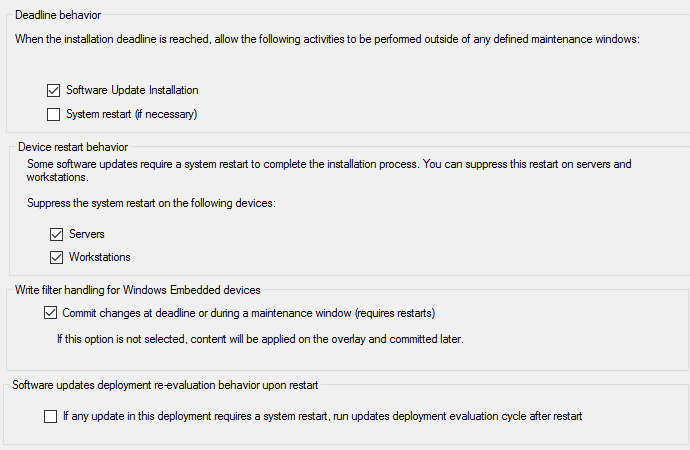
All replies (5)
Tuesday, January 29, 2019 2:52 AM
Are you sure that there are no other deployments targeted at the systems in question (either updates or applications)?
Have you reviewed RebootCoordinator.log on the clients (MaintenanceCoordinator.log is unrelated to reboots)?
Are you sure that this reboot wasn't manually initiated from the console (check CcmNotificationAgent.log on the clients)?
On a side note, it looks like you are running ConfigMgr CB (at least 1610) but this is a 2012 forum. In the future, you should post to a CB forum.
Jason | https://home.configmgrftw.com | @jasonsandys
Tuesday, January 29, 2019 3:25 PM
Hi ,
Yes, I have cross verified no other deployement except only updates are pushed on 23/01 and few system reboot on 28/01 , below is reboot cordinator logs and yes there is no manual reboot pushed and no such thing found anonymous in CCMNotificationagent logsApologiz,
Mistankenly, check on SCCM 2012 forum I will ensure in future
User S-1-5-21-1454471165-73586283-725345543-8683 is getting pending reboot information... RebootCoordinator 1/28/2019 6:51:25 AM 9680 (0x25D0)
CRebootCoordinator::GetPendingRebootInfo, Get NotifyUI = True RebootCoordinator 1/28/2019 6:51:25 AM 9680 (0x25D0)
CRebootRequest::GetPendingRebootInfo, Get NotifyUI = True RebootCoordinator 1/28/2019 6:51:25 AM 9680 (0x25D0)
User S-1-5-21-1454471165-73586283-725345543-8683 is getting pending reboot information... RebootCoordinator 1/28/2019 6:51:25 AM 9680 (0x25D0)
CRebootCoordinator::GetPendingRebootInfo, Get NotifyUI = True RebootCoordinator 1/28/2019 6:51:25 AM 9680 (0x25D0)
CRebootRequest::GetPendingRebootInfo, Get NotifyUI = True RebootCoordinator 1/28/2019 6:51:25 AM 9680 (0x25D0)
Entered ScheduleRebootImpl - requested from 'UpdatesDeploymentAgent'. set Rebootby = 0. set NotifyUI = True. set PreferredRebootWindowType = 4 RebootCoordinator 1/28/2019 8:40:24 AM 5860 (0x16E4)
An earlier reboot was already scheduled, only taken into account new parameters RebootCoordinator 1/28/2019 8:40:24 AM 5860 (0x16E4)
User S-1-5-21-1454471165-73586283-725345543-8683 is requesting a reboot... RebootCoordinator 1/28/2019 9:58:33 AM 15568 (0x3CD0)
MTC task does not exist. Creating new request. RebootCoordinator 1/28/2019 9:58:33 AM 15568 (0x3CD0)
MTC allowed us to reboot RebootCoordinator 1/28/2019 9:58:33 AM 15568 (0x3CD0)
MTC task for reboot 'd5fea233-84cd-428f-9f29-8dba4b6be33d'. Checking if it can run now... RebootCoordinator 1/28/2019 9:58:33 AM 15568 (0x3CD0)
MTC allowed us to reboot RebootCoordinator 1/28/2019 9:58:33 AM 15568 (0x3CD0)
System reboot request succeeded. RebootCoordinator 1/28/2019 9:58:33 AM 15568 (0x3CD0)
Closed ccmstore sqlce database. RebootCoordinator 1/28/2019 9:58:33 AM 15568 (0x3CD0)
Reboot initiated RebootCoordinator 1/28/2019 9:58:33 AM 15568 (0x3CD0)
User logoff notification received RebootCoordinator 1/28/2019 9:58:36 AM 7636 (0x1DD4)
Retry resuming bit-locker TPM PIN protector. Retry count 1 RebootCoordinator 1/28/2019 10:11:20 AM 18172 (0x46FC)
Didn't suspended bit-locker. Do nothing and return. RebootCoordinator 1/28/2019 10:11:20 AM 18172 (0x46FC)
User S-1-5-21-1454471165-73586283-725345543-4224 is getting pending reboot information... RebootCoordinator 1/28/2019 10:30:44 AM 15376 (0x3C10)
User S-1-5-21-1454471165-73586283-725345543-8635 is getting pending reboot information... RebootCoordinator 1/28/2019 10:35:09 AM 6856 (0x1AC8)
User S-1-5-21-1454471165-73586283-725345543-7873 is getting pending reboot information... RebootCoordinator 1/28/2019 11:18:38 AM 2452 (0x0994)
Reboot Coordinator received a SERVICEWINDOWEVENT START Event RebootCoordinator 1/28/2019 10:00:00 PM 12716 (0x31AC)
User S-1-5-21-1454471165-73586283-725345543-8208 is getting pending reboot information... RebootCoordinator 1/28/2019 10:12:44 PM 14220 (0x378C)
Reboot Coordinator received a SERVICEWINDOWEVENT END Event RebootCoordinator 1/29/2019 5:00:00 AM 16480 (0x4060)
Tuesday, January 29, 2019 4:28 PM
The log above clearly shows that the reboot was initiated due to a software update deployment. The only conclusion here is that either another deployment caused this or the current deployment had its settings changed after these clients enforced the deployment policy. For the other deployment scenario, it's possible that the deployment was deleted or that the clients were previously in another collection targeted by a different deployment or something along those lines. Unfortunately, I don't think the source of a reboot is explicitly tracked so it may be impossible to discover the exact deployment that initiated this reboot.
Jason | https://home.configmgrftw.com | @jasonsandys
Tuesday, January 29, 2019 7:14 PM
What may cause the reason for reboot because in same collection we have 9 machines in which 3 are rebooted rest are not rebooted so must some malfunction on client machine which not comunicate with maintenance coordinator and reboot itself. So can you help what we can suspect on client side to troubleshoot further.
Tuesday, January 29, 2019 9:21 PM
As noted, these systems could be or have been in another collection. I don't see any evidence of any type of "malfunction" and there's no reason to believe that there was one.
As noted, I don't believe the deployment causing the reboot is tracked by ConfigMgr explicitly so I don't think there's a way to know what exactly caused the reboot.
If I had to guess, as noted, it would be some other deployment (that may no longer exist) targeted at these systems, a deployment targeted to a collection (which may not exist anymore) that systems system are or used to be in, or a configuration change on an existing deployment.
Jason | https://home.configmgrftw.com | @jasonsandys