Note
Access to this page requires authorization. You can try signing in or changing directories.
Access to this page requires authorization. You can try changing directories.
Question
Wednesday, March 8, 2017 11:01 PM
My WSUS stop working when I installed kb3159706 and ran the post install so I can deploy Windows 10 Anniversary Update. Has anyone ran into this same problem? Below is my log.
The WSUS administration console was unable to connect to the WSUS Server via the remote API.
Verify that the Update Services service, IIS and SQL are running on the server. If the problem persists, try restarting IIS, SQL, and the Update Services Service.
The WSUS administration console has encountered an unexpected error. This may be a transient error; try restarting the administration console. If this error persists,
Try removing the persisted preferences for the console by deleting the wsus file under %appdata%\Microsoft\MMC\
System.IO.IOException -- The handshake failed due to an unexpected packet format.
Source
System
Stack Trace:
at System.Net.Security.SslState.StartReadFrame(Byte[] buffer, Int32 readBytes, AsyncProtocolRequest asyncRequest)
at System.Net.Security.SslState.StartReceiveBlob(Byte[] buffer, AsyncProtocolRequest asyncRequest)
at System.Net.Security.SslState.ForceAuthentication(Boolean receiveFirst, Byte[] buffer, AsyncProtocolRequest asyncRequest)
at System.Net.Security.SslState.ProcessAuthentication(LazyAsyncResult lazyResult)
at System.Threading.ExecutionContext.RunInternal(ExecutionContext executionContext, ContextCallback callback, Object state, Boolean preserveSyncCtx)
at System.Threading.ExecutionContext.Run(ExecutionContext executionContext, ContextCallback callback, Object state, Boolean preserveSyncCtx)
at System.Threading.ExecutionContext.Run(ExecutionContext executionContext, ContextCallback callback, Object state)
at System.Net.TlsStream.ProcessAuthentication(LazyAsyncResult result)
at System.Net.TlsStream.Write(Byte[] buffer, Int32 offset, Int32 size)
at System.Net.ConnectStream.WriteHeaders(Boolean async)
** this exception was nested inside of the following exception **
System.Net.WebException -- The underlying connection was closed: An unexpected error occurred on a send.
Source
Microsoft.UpdateServices.Administration
Stack Trace:
at Microsoft.UpdateServices.Administration.AdminProxy.CreateUpdateServer(Object[] args)
at Microsoft.UpdateServices.UI.SnapIn.Scope.ServerSummaryScopeNode.GetUpdateServer(PersistedServerSettings settings)
at Microsoft.UpdateServices.UI.SnapIn.Scope.ServerSummaryScopeNode.ConnectToServer()
at Microsoft.UpdateServices.UI.SnapIn.Scope.ServerSummaryScopeNode.get_ServerTools()
All replies (21)
Thursday, March 9, 2017 2:12 AM | 20 votes
Hi Jason.nguyen,
After installing KB3159706, please check if you run
"C:\Program Files\Update Services\Tools\wsusutil.exe" postinstall /servicing
Check if "HTTP Activation" is installed.
If SSL is enabled on the WSUS server, we also need to do the steps list in the KB:
If all the steps are all done successfully, while the WSUS console still crash, please increase the Private Memory Limit:
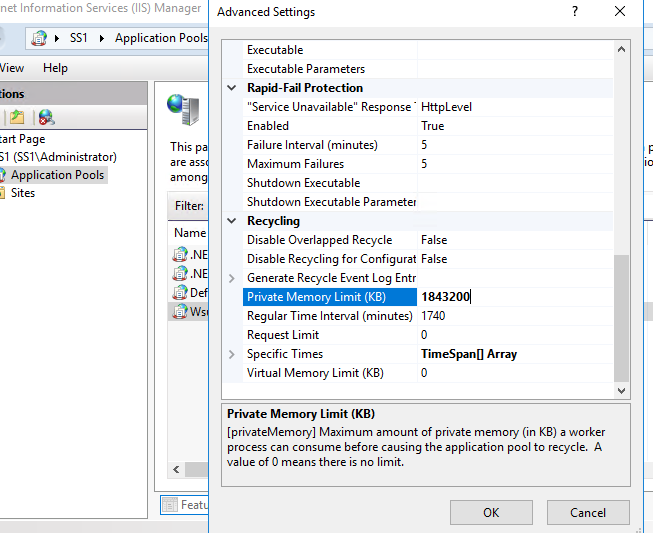
Best Regards,
Anne
Please remember to mark the replies as answers if they help.
If you have feedback for TechNet Subscriber Support, contact [email protected].
Monday, March 13, 2017 9:37 AM
Hi,
Just to check if the above reply could be of help? If yes, you may mark useful as answer, if not, welcome to feedback.
Best Regards,
Anne
Please remember to mark the replies as answers if they help.
If you have feedback for TechNet Subscriber Support, contact [email protected].
Friday, April 21, 2017 7:20 PM | 1 vote
this worked for about 5-10 minutes before the error returned. Any other suggestions?
Friday, May 5, 2017 7:42 PM
This was the exact problem I was having, and increasing the memory and it worked for me immediately. I tripled the default amount of 1843200 to 5529600. So far so good.
This had been driving me nuts! I had even completely rebuilt my WSUS to Server 2016. It worked for a couple days and failed again.
I am willing to bet this was the same problem I had on the other server.
Thank you Anne!
Friday, May 5, 2017 7:43 PM
Try increasing the memory more.
Wednesday, May 17, 2017 7:00 PM
Hi brothers,
It worked very well for my scenario the memory increase in IIS.
Regards,
Sergio Roberto Jr.
It
worked very well for my scenario the memory increase in IIS.
Tuesday, June 6, 2017 6:03 PM
Thanks Anne - This worked for me :)
Wednesday, June 21, 2017 10:34 PM | 1 vote
Anne, new SCCM 2012R2 Current Branch 1702 has been running flawlessly for almost a month. Getting all devices imported from a 2008R2 SCCM 2012 R2 1610. This morning, for some reason, I encountered the issue described in this post. I increased the wsus app pool private memory from 1843200 to 5529600 and it's been running fine all day. Thanks so much for your insight into this issue.
Tuesday, July 4, 2017 4:17 PM
Great script, my wsus mmc interface was not responding and also the wsus directory size was out of control. This gave me the opportunity to start again without re installing everything
Thanks again
Monday, September 11, 2017 1:49 PM | 4 votes
Increasing the Private memory Limit from 1843200 to 5529600 worked great, thank you so much!
Friday, February 16, 2018 3:10 PM | 2 votes
I had the same problem and it was because the WSUSPool had stopped running in IIS. Once I started it, I could open the WSUS console.
Thursday, March 1, 2018 11:13 PM
Increasing the private memory limit worked for me too. Thank you!
Thursday, April 19, 2018 12:44 PM
Increase Private Memory worked. Thanks
Thursday, July 12, 2018 12:55 PM
This solution worked for me thanks!
Tuesday, September 18, 2018 10:32 AM
After installing KB3159706, please check if you run
"C:\Program Files\Update Services\Tools\wsusutil.exe" postinstall /servicing
it looks like we have to run "<g class="gr_ gr_17 gr-alert gr_spell gr_inline_cards gr_run_anim ContextualSpelling ins-del multiReplace" data-gr-id="17" id="17">postinstall</g>" after any updates. The same works for WS 2016... Thank you!
Thursday, February 7, 2019 12:29 AM
This worked straight away! Thank you. This should be THE first check as it is so simple!!
Friday, May 10, 2019 7:12 AM
How to deal with? I don't want to broke always-on after each patching.
[wsus1]: PS C:\ & "C:\Program Files\Update Services\Tools\WsusUtil.exe" postinstall /servicing
Log file is located at C:\Users\hpmmatuska\AppData\Local\Temp\tmp1DD9.tmp
Post install is starting
Fatal Error: The operation cannot be performed on database "SUSDB" because it is involved in a database mirroring session or an availability group. Some operations are not allowed on a database that is participating in a database mirroring session or in an availability group.
ALTER DATABASE statement failed.
Martin
Friday, May 10, 2019 1:42 PM
Have you made sure you've done all the required steps after KB3159706 (if that's installed)?
Are you performing the proper WSUS maintenance including but not limited to running the Server Cleanup Wizard (SCW), declining superseded updates, running the SQL Indexing script, etc.?
https://www.ajtek.ca/wsus/how-to-setup-manage-and-maintain-wsus-part-8-wsus-server-maintenance/
You have WSUS Setup with a DAG? What's your reasoning? HA?
Adam Marshall, MCSE: Security
https://www.ajtek.ca
Microsoft MVP - Windows and Devices for IT
Monday, June 17, 2019 8:34 AM
This was the exact problem I was having, and increasing the memory and it worked for me immediately. I tripled the default amount of 1843200 to 5529600. So far so good.
This had been driving me nuts! I had even completely rebuilt my WSUS to Server 2016. It worked for a couple days and failed again.
I am willing to bet this was the same problem I had on the other server.
Thank you Anne!
I must register to thank you! It worked for me.
Friday, October 11, 2019 4:03 PM
This worked for me, on a windows server 2019 server
Thank you.
Friday, December 6, 2019 11:06 PM
I got this issue too
increase memory did not help still does it
anything else I can try