Note
Access to this page requires authorization. You can try signing in or changing directories.
Access to this page requires authorization. You can try changing directories.
Question
Wednesday, August 28, 2019 3:23 PM
visual studio professional 2019
version 16.2.3
c++ console application
file -> new project -> [c++ console app]
builds just fine for x86
toggle to x64 : combase.pdb contains the debug information required to find the source for the module combase.dll
All replies (2)
Thursday, August 29, 2019 6:00 AM
Hi nekopczynski,
Welcome to the MSDN forum.
Did you choose the Symbol files in the Tools-->Options-->Debugging-->Symbols before you build your project?
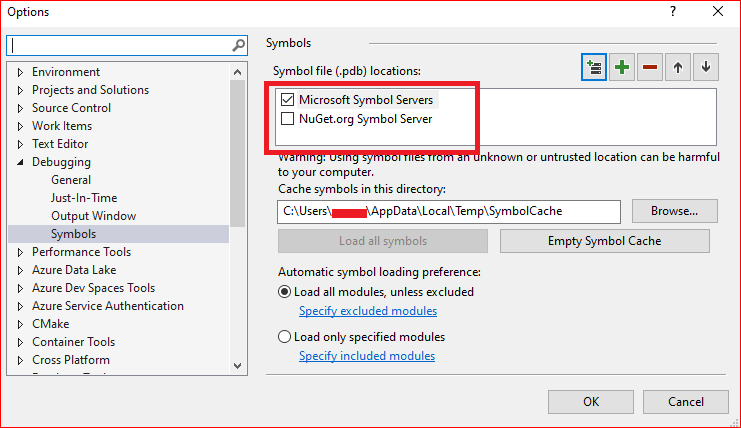
The Visual Studio will download the pdb files automatically. But it will take a while to load these files.
The pdb files are debug information files used by Visual Studio. l think these files which reports were not found in your project are system dlls which you do not have debug symbols for. In fact, they are harmless, and you don't have to worry about these files, they will not have any impact on your project.
You can ignore them.
BTW, if you are upset that it takes too long to load these files, you can choose to turn off the information.
1. Open VS and select menu Tools- ->Options- ->Debugging- ->Output Window- ->Module Load Messages- ->Off
More information you can refer to this:
https://stackoverflow.com/questions/28381361/cannot-find-or-open-the-pdb-file-visual-studio-c-2013
Any feedback will be expected.
Best Regards,
Perry
MSDN Community Support Please remember to click "Mark as Answer" the responses that resolved your issue, and to click "Unmark as Answer" if not. This can be beneficial to other community members reading this thread. If you have any compliments or complaints to MSDN Support, feel free to contact [email protected]
Friday, August 30, 2019 8:36 AM
Hi nekopczynski,
Did your issue solve or did you try my steps to troubleshoot your issue?
If my reply is helpful for you to solve your issue, please remember to mark it as answer.
If your issue still persists, please feel free to let us know. We are willing to help you further.
Thanks for your understanding.
Best Regards,
Perry
MSDN Community Support Please remember to click "Mark as Answer" the responses that resolved your issue, and to click "Unmark as Answer" if not. This can be beneficial to other community members reading this thread. If you have any compliments or complaints to MSDN Support, feel free to contact [email protected]