Note
Access to this page requires authorization. You can try signing in or changing directories.
Access to this page requires authorization. You can try changing directories.
Question
Thursday, July 23, 2020 5:40 PM
Hello Everyone,
If someone could help me solve the mystery of the error mentioned in the title I would be really thankful. I can see the following errors in the smsts.log:
reply has no message header marker 7/23/2020 4:47:00 AM
Failed to request policy assignments (Code 0x80004005) 7/23/2020 4:47:00 AM
Failed to initialize policy from Management Point 7/23/2020 4:47:00 AM
Failed to run from PXE in WinPE 7/23/2020 4:47:00 AM
Exiting with return code 0x80004005 7/23/2020 4:47:00 AM
Execution complete. 7/23/2020 4:47:00 AM
RegOpenKeyExW is unsuccessful for Software\Microsoft\SMS\Task Sequence 7/23/2020 4:47:00 AM
GetTsRegValue() is unsuccessful. 0x80070002. 7/23/2020 4:47:00 AM
This happens after booting into PXE and before i would be able to select task sequences deployed to unknown computers.
I checked the BIOS time...certificates...the component status messages of the management point it connects to and downloads policy and i cant see the client guid refused. I stuck a bit here and I dont really know what else should i look for.
Any help appriciated,
David
All replies (11)
Thursday, July 23, 2020 7:50 PM
Providing just the errors from a log is not valuable for troubleshooting as all context and additional info is lost.
Please post the entire smsts.log (scrub any confidential info as needed).
Jason | https://home.configmgrftw.com | @jasonsandys
Thursday, July 23, 2020 9:33 PM
Makes sense... please see here:
Used smsts.ini to set logging settings. 7/23/2020 4:46:00 AM
==============================[ TSBootShell.exe ]============================== 7/23/2020 4:46:00 AM
Debug shell is enabled 7/23/2020 4:46:00 AM
RAM Disk Boot Path: NET(0)\STE014C6.WIM 7/23/2020 4:46:00 AM
Booted from network (PXE) 7/23/2020 4:46:00 AM
Network(PXE) path: X:\sms\data\ 7/23/2020 4:46:00 AM
Found config path X:\sms\data\ 7/23/2020 4:46:00 AM
Booting from removable media, not restoring bootloaders on hard drive 7/23/2020 4:46:00 AM
X:\sms\data\WinPE does not exist. 7/23/2020 4:46:00 AM
X:\SmsTsWinPE\WinPE does not exist. 7/23/2020 4:46:00 AM
Executing command line: wpeinit.exe -winpe 7/23/2020 4:46:00 AM
The command completed successfully. 7/23/2020 4:46:02 AM
Setting offline Windows drive and OS root directory to Task Sequence environment. 7/23/2020 4:46:02 AM
Processing volume D:\ 7/23/2020 4:46:02 AM
Volume D:\ is not a local hard drive. 7/23/2020 4:46:02 AM
Processing volume C:\ 7/23/2020 4:46:02 AM
Volume C:\ is a valid volume with Windows system root at C:\WINDOWS. 7/23/2020 4:46:03 AM
Setting offline Windows drive and OS root directory to boot shell environment variables 7/23/2020 4:46:03 AM
_OSDDetectedWinDrive='C:\, _OSDDetectedWinDir='C:\WINDOWS' 7/23/2020 4:46:03 AM
Starting DNS client service. 7/23/2020 4:46:03 AM
Executing command line: X:\sms\bin\x64\TsmBootstrap.exe /env:WinPE /configpath:X:\sms\data\ 7/23/2020 4:46:03 AM
The command completed successfully. 7/23/2020 4:46:03 AM
==============================[ TSMBootStrap.exe ]============================== 7/23/2020 4:46:03 AM
Command line: X:\sms\bin\x64\TsmBootstrap.exe /env:WinPE /configpath:X:\sms\data\ 7/23/2020 4:46:03 AM
Current OS version is 10.0.19041.0 7/23/2020 4:46:04 AM
In WinPE starting tsmbootstrap.exe version 5.0.8968.1000 from location 'X:\sms\bin\x64\TsmBootstrap.exe' 7/23/2020 4:46:04 AM
Adding SMS bin folder "X:\sms\bin\x64" to the system environment PATH 7/23/2020 4:46:04 AM
In PXE boot starting tsmsbootstrap.exe version 5.0.8968.1000 from location 'X:\sms\bin\x64\TsmBootstrap.exe' 7/23/2020 4:46:04 AM
PXE Boot with Root = X:\ 7/23/2020 4:46:04 AM
Executing from PXE in WinPE 7/23/2020 4:46:04 AM
Used smsts.ini to set logging settings. 7/23/2020 4:46:04 AM
Device has PXE booted 7/23/2020 4:46:04 AM
Variable Path: SMSTemp\0000000006.var 7/23/2020 4:46:04 AM
Variable Key Len: 69 7/23/2020 4:46:04 AM
Successfully added firewall rule for Tftp 7/23/2020 4:46:04 AM
Attempt: 1. 7/23/2020 4:46:04 AM
Executing: X:\sms\bin\x64\smstftp.exe get 10.146.36.36 SMSTemp\0000000006.var X:\sms\data\variables.dat 7/23/2020 4:46:04 AM
Executing command line: "X:\sms\bin\x64\smstftp.exe" get 10.146.36.36 SMSTemp\0000000006.var X:\sms\data\variables.dat with options (0, 0) 7/23/2020 4:46:04 AM
Process completed with exit code 14 7/23/2020 4:46:04 AM
Unable to download PXE variable file. Exit code=14. Will retry after 15 sec ... 7/23/2020 4:46:04 AM
Attempt: 2. 7/23/2020 4:46:19 AM
Executing: X:\sms\bin\x64\smstftp.exe get 10.146.36.36 SMSTemp\0000000006.var X:\sms\data\variables.dat 7/23/2020 4:46:19 AM
Executing command line: "X:\sms\bin\x64\smstftp.exe" get 10.146.36.36 SMSTemp\0000000006.var X:\sms\data\variables.dat with options (0, 0) 7/23/2020 4:46:19 AM
Process completed with exit code 0 7/23/2020 4:46:19 AM
Successfully downloaded PXE variable file. 7/23/2020 4:46:19 AM
Booted using PXE 7/23/2020 4:46:19 AM
Booted using PXE and using a generated password 7/23/2020 4:46:19 AM
Loading Media Variables from "X:\sms\data\variables.dat" 7/23/2020 4:46:19 AM
Verifying media password. 7/23/2020 4:46:19 AM
Loading Media Variables from "X:\sms\data\variables.dat" 7/23/2020 4:46:19 AM
Found network adapter "Intel(R) Ethernet Connection (6) I219-LM" with IP Address XX.XX.XX.xxx. 7/23/2020 4:46:19 AM
Loading Media Variables from "X:\sms\data\variables.dat" 7/23/2020 4:46:19 AM
Environment scope successfully created: Global\51A016B6-F0DE-4752-B97C-54E6F386A912} 7/23/2020 4:46:19 AM
Environment scope successfully created: Global\BA3A3900-CA6D-4ac1-8C28-5073AFC22B03} 7/23/2020 4:46:19 AM
If current logging settings specify more logging details to be preserved, update these settings in Task Sequence environment. 7/23/2020 4:46:19 AM
Current LogMaxSize is saved to Task Sequence environment since it has not been saved before. 7/23/2020 4:46:19 AM
Current LogMaxHistory is saved to Task Sequence environment since it has not been saved before. 7/23/2020 4:46:19 AM
Current LogLevel is saved to Task Sequence environment since it has not been saved before. 7/23/2020 4:46:19 AM
Current LogEnabled is saved to Task Sequence environment since it has not been saved before. 7/23/2020 4:46:19 AM
Current LogDebug is saved to Task Sequence environment since it has not been saved before. 7/23/2020 4:46:19 AM
Setting to TS environemnt _OSDDetectedWinDrive=C:\ 7/23/2020 4:46:19 AM
Setting to TS environemnt _OSDDetectedWinDir=C:\WINDOWS 7/23/2020 4:46:19 AM
UEFI: true 7/23/2020 4:46:19 AM
SecureBootState: Disabled 7/23/2020 4:46:19 AM
Loading variables from the Task Sequencing Removable Media. 7/23/2020 4:46:19 AM
Loading Media Variables from "X:\sms\data\variables.dat" 7/23/2020 4:46:19 AM
Importing certificates to root store... 7/23/2020 4:46:19 AM
Importing certificates to root store 7/23/2020 4:46:19 AM
Support Unknown Machines: 0 7/23/2020 4:46:19 AM
Custom hook from X:\TSConfig.INI is cmd /c StartDot3.cmd 7/23/2020 4:46:19 AM
Custom hook source is SMS10000 7/23/2020 4:46:19 AM
Finding package: C:\SMS\PKG\SMS10000 7/23/2020 4:46:19 AM
Finding package: D:\SMS\PKG\SMS10000 7/23/2020 4:46:19 AM
Finding package: X:\SMS\PKG\SMS10000 7/23/2020 4:46:19 AM
FindPackageFolder found: X:\SMS\PKG\SMS10000 7/23/2020 4:46:19 AM
Using path: X:\SMS\PKG\SMS10000 7/23/2020 4:46:19 AM
Successfully registered Task Sequencing COM Interface. 7/23/2020 4:46:19 AM
Executing command line: cmd /c StartDot3.cmd with options (1, 1) 7/23/2020 4:46:19 AM
Executing command line: X:\Windows\system32\cmd.exe /k 7/23/2020 4:46:25 AM
The command completed successfully. 7/23/2020 4:46:25 AM
Successfully launched command shell. 7/23/2020 4:46:25 AM
Executing command line: X:\Windows\system32\cmd.exe /k 7/23/2020 4:46:25 AM
The command completed successfully. 7/23/2020 4:46:25 AM
Successfully launched command shell. 7/23/2020 4:46:25 AM
Executing command line: X:\Windows\system32\cmd.exe /k 7/23/2020 4:46:26 AM
The command completed successfully. 7/23/2020 4:46:26 AM
Successfully launched command shell. 7/23/2020 4:46:26 AM
Process completed with exit code 0 7/23/2020 4:46:52 AM
Successfully unregistered Task Sequencing Environment COM Interface. 7/23/2020 4:46:52 AM
Authenticator from the environment is empty. 7/23/2020 4:46:52 AM
Need to create Authenticator Info using PFX 7/23/2020 4:46:52 AM
Current time info: . 7/23/2020 4:46:52 AM
Getting MP time information 7/23/2020 4:46:52 AM
Requesting client identity 7/23/2020 4:46:52 AM
SSL, using authenticator in request. 7/23/2020 4:46:52 AM
In SSL, but with no client cert. 7/23/2020 4:46:52 AM
-60 -60 7/23/2020 4:46:55 AM
Server time zone info: 360, , [0 11 0 1 2 0 0 0], 0, , [0 3 0 2 2 0 0 0], -60 7/23/2020 4:46:55 AM
Client Identity: 7/23/2020 4:46:55 AM
Netbios name: 7/23/2020 4:46:55 AM
Current time: 2020-07-23 12:46:55.743 TZ:Pacific Standard Time Bias:0480 7/23/2020 4:46:55 AM
Time zone: 480,0,0,0,0,0,0,0,0,0,0,0,0,0,0,0,0,0,0,Pacific Standard Time, 7/23/2020 4:46:55 AM
Adjusting the system time: -10798.388 seconds 7/23/2020 4:46:55 AM
Time zone: 360,0,-60,0,11,0,1,2,0,0,0,0,3,0,2,2,0,0,0,, 7/23/2020 7:46:55 AM
New time: 2020-07-23 09:46:57.354 7/23/2020 4:46:57 AM
Current time: 2020-07-23 09:46:57.354 TZ: Bias:0360 7/23/2020 4:46:57 AM
Set media certificate in transport 7/23/2020 4:46:57 AM
SSL, using authenticator in request. 7/23/2020 4:46:57 AM
In SSL, but with no client cert. 7/23/2020 4:46:57 AM
New MP settings: 7/23/2020 4:46:58 AM
site=SS1,SS1, MP=https://SSS.com, ports: http=712,https=443 7/23/2020 4:46:58 AM
certificates are received from Management Point. 7/23/2020 4:46:58 AM
Unknown machine GUIDs: f9b9ef3d-a541-424a-9edc-c9cea3384d43 5aa1b8fe-6d18-4d29-a5fd-a695b5e8822e 7/23/2020 4:46:58 AM
Downloading policy from https://SSSS.com. 7/23/2020 4:46:58 AM
Initializing HTTP transport. 7/23/2020 4:46:58 AM
Preparing Client Identity Request. 7/23/2020 4:46:58 AM
Executing Client Identity Request. 7/23/2020 4:46:58 AM
Requesting client identity 7/23/2020 4:46:58 AM
SSL, using authenticator in request. 7/23/2020 4:46:58 AM
In SSL, but with no client cert. 7/23/2020 4:46:58 AM
-60 -60 7/23/2020 4:46:59 AM
Server time zone info: 360, , [0 11 0 1 2 0 0 0], 0, , [0 3 0 2 2 0 0 0], -60 7/23/2020 4:46:59 AM
Client Identity: 7/23/2020 4:46:59 AM
Netbios name: 7/23/2020 4:46:59 AM
Client GUID = , Netbios name = , State = Known 7/23/2020 4:46:59 AM
SMSTSUser: 7/23/2020 4:46:59 AM
Client Identity is not yet defined. 7/23/2020 4:46:59 AM
Using unknown machine GUID: 5aa1b8fe-6d18-4d29-a5fd-a695b5e8822e 7/23/2020 4:46:59 AM
GetSystemEnclosureChassisInfo: IsFixed=TRUE, IsLaptop=TRUE 7/23/2020 4:46:59 AM
Computed HardwareID=SSSSSS
Win32_SystemEnclosure.SerialNumber=SSSS
Win32_SystemEnclosure.SMBIOSAssetTag=<empty>
Win32_BaseBoard.SerialNumber=SSSSS
Win32_BIOS.SerialNumber=SSSSS
Win32_NetworkAdapterConfiguration.MACAddress=<Not used on laptop> 7/23/2020 4:46:59 AM
Hardware ID: SSSSS 7/23/2020 4:46:59 AM
Preparing the Client DDR Message 7/23/2020 4:46:59 AM
Sending the Client DDR message. 7/23/2020 4:46:59 AM
SSL, using authenticator in request. 7/23/2020 4:46:59 AM
In SSL, but with no client cert. 7/23/2020 4:46:59 AM
Submitted new client identity: GUID:a492222a-3e4c-413b-8ab7-e371543f44bc 7/23/2020 4:47:00 AM
_SMSTSClientIdentity=GUID:a492222a-3e4c-413b-8ab7-e371543f44bc 7/23/2020 4:47:00 AM
Preparing Policy Assignment Request. 7/23/2020 4:47:00 AM
Executing Policy Assignment Request. 7/23/2020 4:47:00 AM
SSL, using authenticator in request. 7/23/2020 4:47:00 AM
In SSL, but with no client cert. 7/23/2020 4:47:00 AM
reply has no message header marker 7/23/2020 4:47:00 AM
Failed to request policy assignments (Code 0x80004005) 7/23/2020 4:47:00 AM
Failed to initialize policy from Management Point 7/23/2020 4:47:00 AM
Failed to run from PXE in WinPE 7/23/2020 4:47:00 AM
Exiting with return code 0x80004005 7/23/2020 4:47:00 AM
Execution complete. 7/23/2020 4:47:00 AM
RegOpenKeyExW is unsuccessful for Software\Microsoft\SMS\Task Sequence 7/23/2020 4:47:00 AM
GetTsRegValue() is unsuccessful. 0x80070002. 7/23/2020 4:47:00 AM
End program: 7/23/2020 4:47:00 AM
Finalizing logs to root of first available drive 7/23/2020 4:47:00 AM
LOGGING: Setting log directory to "C:\SMSTSLog". 7/23/2020 4:47:00 AM
Friday, July 24, 2020 2:34 AM
What version of ConfigMgr are you running?
Based on the log, the MP is using HTTPS:
New MP settings: 7/23/2020 4:46:58 AM
site=SS1,SS1, MP=https://SSS.com, ports: http=712,https=443
However, there is no client cert to use: "In SSL, but with no client cert."
Have you validated that cert configured on the properties of the DP is a valid client auth cert and that the CRL is accessible for this cert and the cert assigned to the MP?
Has this ever worked in the site?
Jason | https://home.configmgrftw.com | @jasonsandys
Friday, July 24, 2020 3:28 AM
Hi,
Thanks for posting in TechNet.
Agree with Jason, it seems that there is no certificate in the DP. We could check it by following picture:
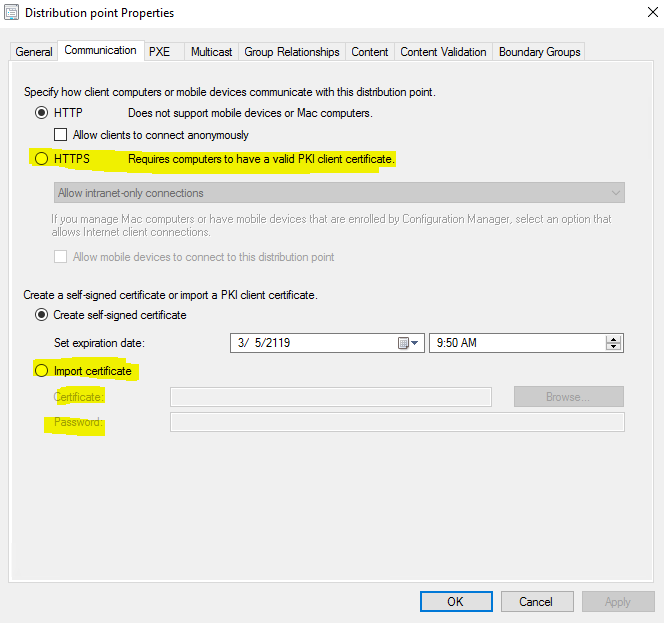
It authenticates the distribution point to an HTTPS-enabled management point before the distribution point sends status messages.
When the Enable PXE support for clients distribution point option is selected, the certificate is sent to computers. If task sequences in the operating system deployment process include client actions like client policy retrieval or sending inventory information, the client computers can connect to a HTTPS-enabled management point during the deployment of the operating system.
Thanks for your time.
Best regards,
Amanda You
Please remember to mark the replies as answers if they help.
If you have feedback for TechNet Subscriber Support, contact [email protected].
Friday, July 24, 2020 5:31 AM
Yes, this is worked before, the certs are valid and configured. We have other DPs configured this way and showing the same message anyway, but they are functioning fine, however the configuration of the the DP looks like this. The same cert has been installed on the servers like provided here in the communication tab, but without the selection of HTTPS...once i was wondering how it can function without selecting it here....i am not working here for so long.
The MP also has a fine cert, we have installed computers on the site communicating with it in PKI mode.
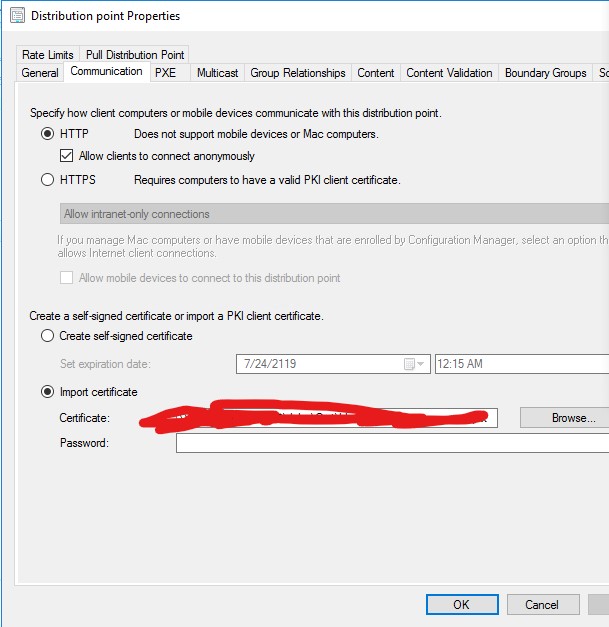
The version is on 2002.
Friday, July 24, 2020 9:08 AM
Hi,
Thanks for posting your reply.
Once the certificate is imported, we could check if the Client Certificate is deployed correctly for Windows Computers.
Here is the article we could refer to:
Deploying The Client Certificate For Windows Computers
Note: the above links are not from MS, and just for your reference.
Besides, we could check if there is any error in the MP_GetAuth.log, it records client authorization activity.
Thanks for your time.
Best regards,
Amanda You
Please remember to mark the replies as answers if they help.
If you have feedback for TechNet Subscriber Support, contact [email protected].
Friday, July 24, 2020 2:29 PM
What version of ConfigMgr specifically are you running?
Are there multiple MPs with at least one running in HTTP mode and one running in HTTPS mode?
Jason | https://home.configmgrftw.com | @jasonsandys
Friday, July 24, 2020 4:43 PM
Site version is 5.0.2002.1083.2000
Turned out to be a cert issue...
I have created a dynamic boot ISO and installed a computer with it. I can see in the successfully installed computer SMSTS.log, that the client downloads the list of management points, selects the one having HTTPS connection and tries to connect but fails with a cert issue. The reason it installs successfully is because it falls back to another MP in the site, but thats only HTTP enabled. PXE not doing this, simply errors out with that generic error. This is the error:
[TSMESSAGING] AsyncCallback(): WINHTTP_CALLBACK_STATUS_SECURE_FAILURE Encountered TSMBootstrap 7/23/2020 11:25:21 PM 1804 (0x070C)
[TSMESSAGING] : dwStatusInformationLength is 4
TSMBootstrap 7/23/2020 11:25:21 PM 1804 (0x070C)
[TSMESSAGING] : *lpvStatusInformation is 0x8
TSMBootstrap 7/23/2020 11:25:21 PM 1804 (0x070C)
[TSMESSAGING] : WINHTTP_CALLBACK_STATUS_FLAG_INVALID_CA is set
TSMBootstrap 7/23/2020 11:25:21 PM 1804 (0x070C)
[TSMESSAGING] AsyncCallback(): TSMBootstrap 7/23/2020 11:25:21 PM 1804 (0x070C)
Sending with winhttp failed; 80072f8f TSMBootstrap 7/23/2020 11:25:21 PM 1804 (0x070C)
End of retries TSMBootstrap 7/23/2020 11:25:21 PM 1804 (0x070C)
failed to send the request TSMBootstrap 7/23/2020 11:25:21 PM 1804 (0x070C)
Failed to get client identity (80072f8f) TSMBootstrap 7/23/2020 11:25:21 PM 1804 (0x070C)
Failed to read client identity (Code 0x80072f8f) TSMBootstrap 7/23/2020 11:25:21 PM 1804 (0x070C)
Now this is interesting because the DP has a valid certificate installed on it. I exported and imported again and modified the unc path on DP configuration page. I can test it on monday only unfortunately. If its not working my other idea is to issue a brand new for the server. All in all it looks like the DP gives a wrong cert to the client and then the mp denies the connection
Friday, July 24, 2020 5:04 PM
> 5.0.2002.1083.2000
That's not a valid version of Configmgr.
Are you running 2002?
Jason | https://home.configmgrftw.com | @jasonsandys
Saturday, July 25, 2020 11:12 AM
Yes I do.
Ahh thats the console version, sorry i mixed up: 5.0.8948.1000
Sunday, July 26, 2020 12:54 AM
> All in all it looks like the DP gives a wrong cert to the client and then the mp denies the connection
Not sure what you mean by this. There's only one cert for ConfigMgr to hand out. You need to 100% validate that the cert configured is a trusted client auth cert and that the CRL is accessible by the MP and by non-domain joined systems.
Jason | https://home.configmgrftw.com | @jasonsandys