Note
Access to this page requires authorization. You can try signing in or changing directories.
Access to this page requires authorization. You can try changing directories.
Question
Tuesday, January 29, 2019 8:27 AM
My scenario:
- I may/may not have caused my sent emails to be automatically rooted to "Bin"
- Recently, in my attempt to clean up and purge my mail accounts, i may/may not have accidentally clicked delete too many times or somehow caused my sent messages to be instantly directed to the bin.
- My "sent messages" folder is permanently empty (but only for the aforementioned gmail account). I have 2 other mail accounts which retain the "Sent messages" folder just fine.
- I am able to search for these messages under "All Outlook items" - such messages are shown to be in "Bin"
Troubleshooting done so far:
- /clearviews
- reinstalled the entire office suite by "Repairing Office programmes"
- deleted and set up the entire mail accounts in Outlook again
What I think the possible solution is:
- To stop Outlook from automatically sending my "sent messages" to "Bin"
However, I have no idea how to re-route my sent messages for this particular IMAP account. It was this particular IMAP account that in my haze, I have caused to delete all sent messages to the Bin.
Please advise.
All replies (5)
Friday, February 1, 2019 4:38 AM ✅Answered
Hi,
If we click Ctrl +6 to show all hidden folders, will you find "Bin"?
We can also set “Inbox” as the Root folder path to see the result. To do this, please go to File > Account Settings > Account Settings. Double click your IMAP account and click More Settings. Under Advanced tab, type “Inbox” as the root folder path.
In addition to removing and re-adding your account, we can create a new profile and configure this account to see if sent items display correctly. (Please don't delete your original profile)
Any updates, please feel free to post back.
Regards,
Perry
Please remember to mark the replies as answers if they helped. If you have feedback for TechNet Subscriber Support, contact [email protected].
Click here to learn more. Visit the dedicated forum to share, explore and talk to experts about Microsoft Teams.
Wednesday, January 30, 2019 3:09 AM
Hi stuckinajam,
Do you mean sent messages were automatically moved to Deleted folder or Trash folder? Can you manually move them back?
Can you see sent items display correctly in Sent folder on the web mail?
Normally, we can change where sent email messages are saved. To find the setting, please go to File > Options > Mail. Under Save messages section, make sure the Save copies of messages in the Sent Items folder check box is selected.
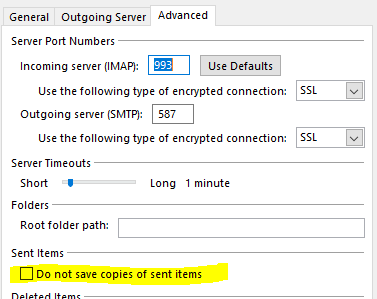
For IMAP account, please also go to File > Account Settings > Account Settings. Double click your IMAP account and click More Settings. Under Advanced tab, do not select “Do not save copies of sent items” check box to test the result.
To narrow down this issue, we can also exit Outlook client and send messages on the web mail to see if sent items still go to Deleted folder.
Any updates, please feel free to post back.
Regards,
Perry
Please remember to mark the replies as answers if they helped. If you have feedback for TechNet Subscriber Support, contact [email protected].
Click here to learn more. Visit the dedicated forum to share, explore and talk to experts about Microsoft Teams.
Wednesday, January 30, 2019 5:59 AM
Hi Perry,
Thanks for the reply.
Do you mean sent messages were automatically moved to Deleted folder or Trash folder? Can you manually move them back?
- yes i meant that, but i can't seem to manually move them back. What i meant by "Bin" was that when my mouse hovers on the search results on "All Outlook items", i'm able to see that it is in the bin. It is however nowhere to be found in any folders, not even "[Google Mail] Bin".
Can you see sent items display correctly in Sent folder on the web mail?
- yes i can, to be specific - the sent messages are all in the "sent messages" tab on webmail. I am however, unable to find the sent messages on the client except in the search bar with "All outlook items" selected.
Normally, we can change where sent email messages are saved. To find the setting, please go to File > Options > Mail. Under Save messages section, make sure the Save copies of messages in the Sent Items folder check box is selected.
- Did this the first time round, and have done this once more for good measure. No results.
For IMAP account, please also go to File > Account Settings > Account Settings. Double click your IMAP account and click More Settings. Under Advanced tab, do not select “Do not save copies of sent items” check box to test the result.
- Did this the first time round, and have done this once more for good measure. No results.
To narrow down this issue, we can also exit Outlook client and send messages on the web mail to see if sent items still go to Deleted folder.
- I have done this, the email sent on webmail goes to the "sent items" folder on my webmail (this is the default setting, nothing has been changed).
My webmail is working like it should, it's just that Outlook does not save my sent items and it goes directly into "Bin" (nowhere to be found). Whereas whatever I've sent on the client, appears in the "sent items" in my webmail (working just fine).
Thank you very much, any more help would be much appreciated.
Friday, February 1, 2019 5:05 AM
For one reason or another, everything is back in place today. Thank you for your assistance so far.
Friday, February 1, 2019 5:11 AM
Thank you for your update. If you have other questions, please feel free to ask here~
Please remember to mark the replies as answers if they helped. If you have feedback for TechNet Subscriber Support, contact [email protected].
Click here to learn more. Visit the dedicated forum to share, explore and talk to experts about Microsoft Teams.