Note
Access to this page requires authorization. You can try signing in or changing directories.
Access to this page requires authorization. You can try changing directories.
Question
Tuesday, May 22, 2018 8:08 AM
Hey guys,
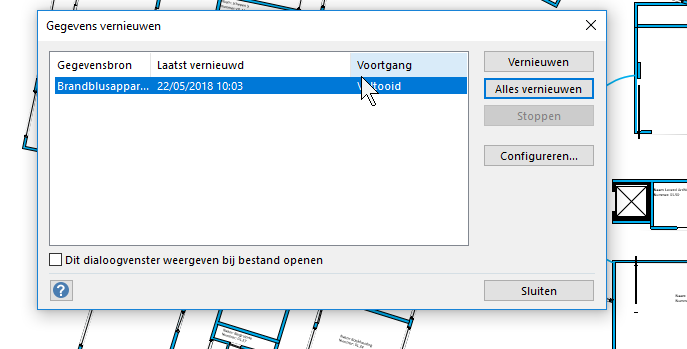
I was experimenting and testing Visio with datasources. Now i cannot seem to delete an existing datasource within Visio. In this window i see my datasource (fire extinguishers, a table in Sharepoint Online) - but i cannot find anywhere where i can delete the link with that datasource.
I ask this, because everytime i start Visio 2016 it shows the window External Data. If i hide it, save the diagram en reopen, the External Data window reappears.
Any suggestions please?
All replies (2)
Tuesday, May 22, 2018 8:09 AM
By the way: don't reply me with "Delete the link from shapes"... that is not the same as deleting a link with a datasource itself. Deleting from shapes works, but the datasource still exists.
Wednesday, May 23, 2018 9:15 AM | 1 vote
Hi Sven,
To remove the data source in Visio, please display the External Data Window, then right-click it, select Data Source > Remove.
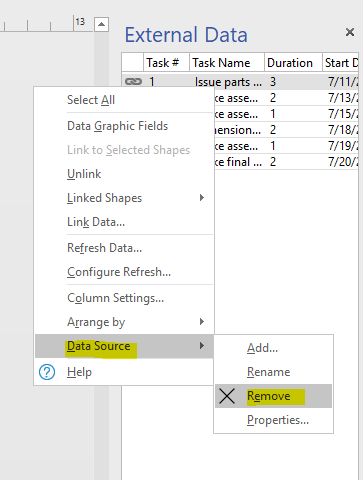
Click OK to confirm removing. Then save as this file to desktop, close and reopen the saved file, check if the data source is removed.
Best Regards,
Winnie Liang
Please remember to mark the replies as answers if they helped. If you have feedback for TechNet Subscriber Support, contact [email protected].
Click here to learn more. Visit the dedicated forum to share, explore and talk to experts about Microsoft Teams.