Note
Access to this page requires authorization. You can try signing in or changing directories.
Access to this page requires authorization. You can try changing directories.
Question
Wednesday, August 2, 2017 11:16 PM
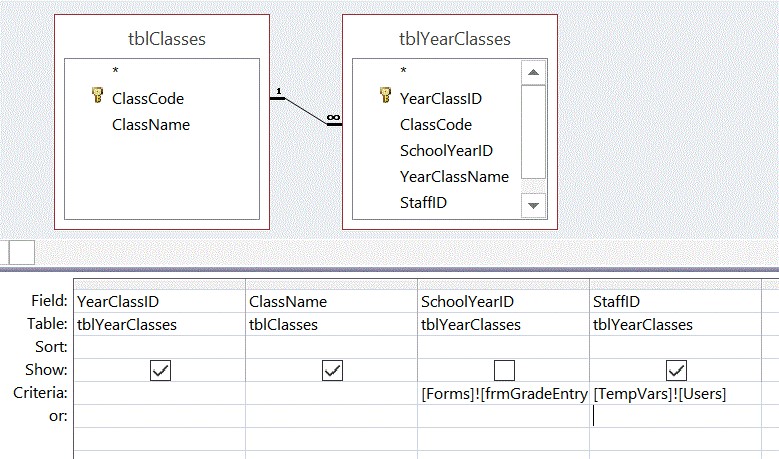
I am trying to use TempVars in Select Query. So far I am not getting the result I want. I will like to get some assistance insolving this problem. This is the query:
All replies (4)
Thursday, August 3, 2017 8:28 AM ✅Answered
Hi Gordon,
>> So far I am not getting the result I want.
Where did it not work? Could you share us the source data for these two table?
If you remove Forms criteria, will the query work with TempVars?
I made a simple test for TempVars in query, it works correctly.
1. Create a table like below
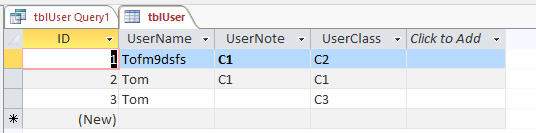
2. Run code to populate TempVar by TempVars.Add, it only support a string expression or a numeric expression
Sub AddTemp()
Application.TempVars.Add "User", "Tom"
End Sub
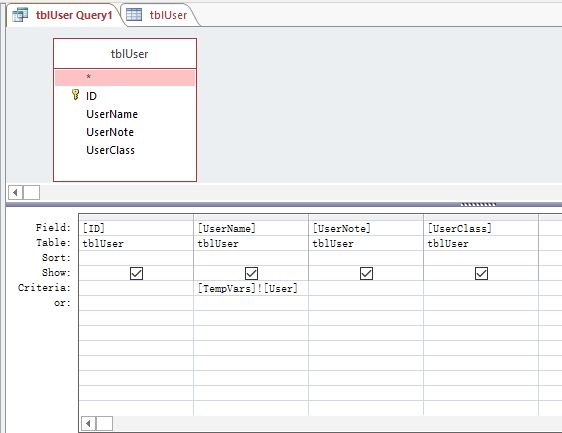
3. Design the query like below
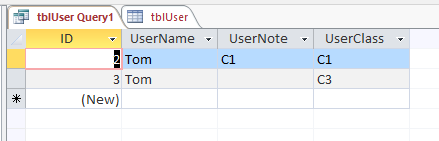
4. This is the result.
In addition, I found you posted multiple threads which is not answered and you did not follow up.
Have below threads resolved? If you have, I would suggest you mark the helpful reply as answer which is the way to close a thread here. If not, please feel free to follow up, we will keep to provide help.
Best Regards,
Edward
MSDN Community Support
Please remember to click "Mark as Answer" the responses that resolved your issue, and to click "Unmark as Answer" if not. This can be beneficial to other community members reading this thread. If you have any compliments or complaints to MSDN Support, feel free to contact [email protected].
Thursday, August 3, 2017 3:55 AM
Hi, What is happening instead? You're also using a Form reference as a criteria, is it working? How did you populate the TempVar?
Thursday, August 3, 2017 4:22 AM
TempVars!Users seems to indicate more than one user. Access cannot handle that so easily.
-Tom. Microsoft Access MVP
Thursday, August 3, 2017 10:56 AM
Thank you. I realized my mistake. I was using [TempVars]![Users] instead of [TempVars]![User]