Note
Access to this page requires authorization. You can try signing in or changing directories.
Access to this page requires authorization. You can try changing directories.
Question
Thursday, May 7, 2020 10:37 AM
Hi everyone,
I've installed a two-tier PKI on Windows Server 2019, consisting of an offline root CA, two online issuing CAs and two web servers with an ocsp array and crl http locations behind a NLB (just the two web servers, not the CAs). The PKI itself is working as I'd expect it to - I can issue certificates based on the templates I've created and the certificates work fine, the entire certificate chain checks out ok, CRLs can be found in the http locations and the OCSP configuration is also working without a problem. CRL publishing to all locations works fine as well. Services run with a certificate are working fine (web servers, workstation authentication, server authentication, OCSP). The Web enrollment site works as expected as well.
However, when I check the PKIView I get a bad status for the root CA. Despite having configured http AIA and CDP locations on the root and having published the root CA crt, crl and cer to Active Directory and the issuing CAs local store respectively, only a file path shows up for the root CAs AIA and CDP locations which looks like this:
file:////RootCAHostName/CertEnroll/RootCACert.crt
file:////RootCAHostName/CertEnroll/RootCACRL.crl
Here's a screenshot:

I would have expected to see the http locations there instead. I've found tutorials and forum posts suggesting that publishing the root certificate and crl as "certutil -f -dspublish MyRootCACert.crt MyRootCAHostName" instead of "certutil -f -dspublish MyRootCACert.crt RootCA" would remediate, however on Server 2019 I get the following error when substituting RootCA for the root CA hostname:
CertUtil: -dsPublish command FAILED: 0x80070057 (WIN32: 87 ERROR_INVALID_PARAMETER)
CertUtil: The parameter is incorrect.
The same command works fine if I keep RootCA at the end. It works with the hostname for the CRL though, but it doesn't change the PKIView status.
Does anyone know where I could look or what I need to do to change this and get the root CA to a healthy status n PKIView? In general it's working fine, but I want it in mint condition and I currently have the concern that this could backfire down the road if I don't change it now.
Cheers,
Fred
All replies (9)
Thursday, May 7, 2020 11:52 AM
I'm afraid to say you this, but you have to rebuild all CAs from scratch. At least, all issuing CAs -- it is inevitable.
> I've found tutorials and forum posts suggesting that publishing the root certificate and crl as "certutil -f -dspublish MyRootCACert.crt MyRootCAHostName"
don't read such tutorials anymore, they are completely wrong and misleading.
for some reasons you enabled "Include in the CDP extension of issued certificates" for CDP location and similar checkbox for AIA extension on Root CA. I don't know how you configured your root CA, via MMC or using script, but it is not possible to fix this easily, because these URLs are included in issued certificates and you can't fix this by just running a cmd command. The situation is almost unsalvageable, so I wouldn't bother with attempts to fix issue on existing CAs. Instead, I would decommission all CAs and reinstall from scratch.
Before installing new PKI, I would strongly suggest to read my blog post on how to design CDP/AIA extensions for CAs: Designing CRL Distribution Points and Authority Information Access locations.
Vadims Podāns, aka Crypt32
My weblog: www.sysadmins.lv
PowerShell PKI Module: PSPKI
Check out new: SSL Certificate Verifier
Check out new: ASN.1 Editor tool.
Thursday, May 7, 2020 12:22 PM
I'm afraid to say you this, but you have to rebuild all CAs from scratch. At least, all issuing CAs -- it is inevitable.
> I've found tutorials and forum posts suggesting that publishing the root certificate and crl as "certutil -f -dspublish MyRootCACert.crt MyRootCAHostName"
don't read such tutorials anymore, they are completely wrong and misleading.
for some reasons you enabled "Include in the CDP extension of issued certificates" for CDP location and similar checkbox for AIA extension on Root CA. I don't know how you configured your root CA, via MMC or using script, but it is not possible to fix this easily, because these URLs are included in issued certificates and you can't fix this by just running a cmd command. The situation is almost unsalvageable, so I wouldn't bother with attempts to fix issue on existing CAs. Instead, I would decommission all CAs and reinstall from scratch.
Before installing new PKI, I would strongly suggest to read my blog post on how to design CDP/AIA extensions for CAs: Designing CRL Distribution Points and Authority Information Access locations.
Vadims Podāns, aka Crypt32
My weblog: www.sysadmins.lv
PowerShell PKI Module: PSPKI
Check out new: SSL Certificate Verifier
Check out new: ASN.1 Editor tool.
Hi Vadims,
thank you for your quick reply. I will no longer pay heed to those tutorials :-)
I was however successful in finding the root cause of my problem, and as in 99% of all cases it related to PEBKAC.
While going through the configuration once more and I noticed I had forgotten to check one thing - the SubCA certs issued by the root. Low and behold, the SubCA certs did not include the http location but the file paths seen in the screenshot above. Please correct me if my observation is wrong - the PKIView for the root CA gets its AIA and CDP paths from the AIA and CDP entries included in the SubCA certificates issued by the RootCA, is that correct?
I then went and checked my documentation of the RootCA installation and there it was - I had forgotten to restart the certsvc after adding the AIA and CDP http paths and then requested the SubCA certs which of course couldn't contain the proper AIA and CDP paths as the service hadn't noticed the change yet.
In order to remediate, I renewed the SubCA certificates, revoked the old ones and any certificates that had already been issued by the SubCAs. I then issued new certificates from the SubCAs to web servers, clients and OCSP and distributed the new Root and SubCA CRLs. With the new SubCA certificates issued by the (now restarted) RootCA and the new certificates issued by the SubCAs, PKIView is clean and all services are running fine. Here's a screenshot of the current status:

Would you say this is a valid solution for this very specific case, or would you still recommend rebuilding from scratch? In any case, I'm happy to have learned more about how a PKI works :-)
Cheers,
Fred
Thursday, May 7, 2020 4:34 PM
> the PKIView for the root CA gets its AIA and CDP paths from the AIA and CDP entries included in the SubCA certificates issued by the RootCA, is that correct?
yes, that's correct.
> I then went and checked my documentation of the RootCA installation and there it was - I had forgotten to restart the certsvc after adding the AIA and CDP http paths
yest. Microsoft CA reads confiburation on service start. Any changes while CA is running won't be applied until you restart CA.
> Would you say this is a valid solution for this very specific case
it depends on a number of factors. For example, did you create new key pair for CAs during renewals, or reused existing key pair? And having mess in the beggining of PKI deployment never was a great idea. How look like your CDP and AIA extensions on root and issuing CAs?
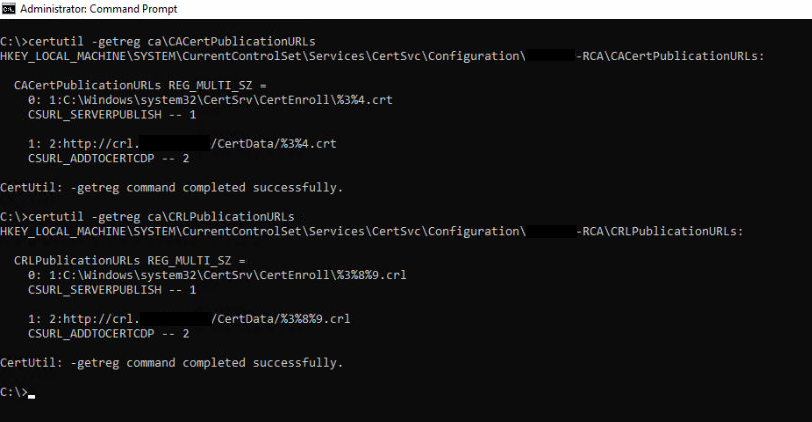
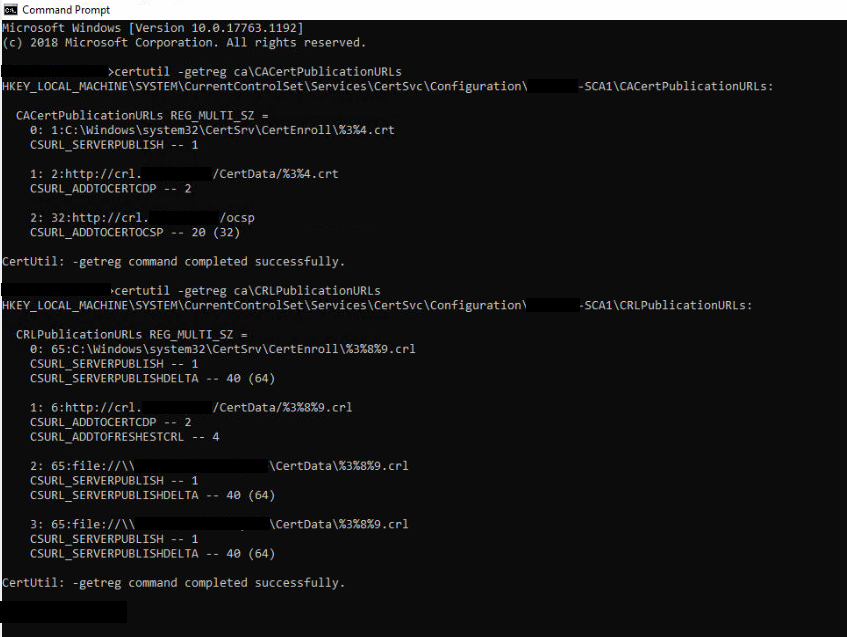
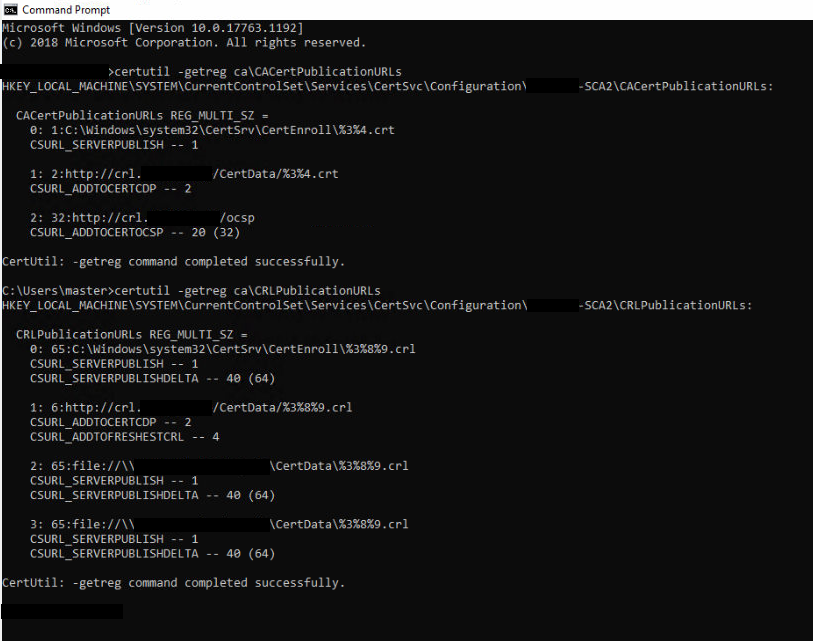
certutil -getreg ca\CACertPublicationURLs
certutil -getreg ca\CRLPublicationURLs
can you post output for these two commands executed on each CA?
Vadims Podāns, aka Crypt32
My weblog: www.sysadmins.lv
PowerShell PKI Module: PSPKI
Check out new: SSL Certificate Verifier
Check out new: ASN.1 Editor tool.
Friday, May 8, 2020 6:48 AM
Hi Vadims,
will do. I'm currently waiting for remote access to the environment, might take a couple of hours but I'll post as soon as I have the results.
Thanks & Cheers,
Fred
Friday, May 8, 2020 8:05 AM
Hi Vadims,
looks ok to me on first glance.
Root:
First CA:
Second CA:
Cheers,
Fred
Friday, May 8, 2020 8:35 AM
Looks ok. Your problem wasn't that bad. CDP/AIA extensions are configured properly on every CA and your fault was only forgotten CA service restart. In most cases we see totally broken cert extensions which are hard to fix without some solid knowledge.
Just one question (I asked before): did you generate new key pair for CAs during renewals or not?
Vadims Podāns, aka Crypt32
My weblog: www.sysadmins.lv
PowerShell PKI Module: PSPKI
Check out new: SSL Certificate Verifier
Check out new: ASN.1 Editor tool.
Friday, May 8, 2020 8:45 AM
Hi Vadims,
sorry forgot that one - no I did not generate new key pairs for the CAs.
Cheers,
Fred
Friday, May 8, 2020 8:56 AM
Hi Vadims,
sorry forgot that one - no I did not generate new key pairs for the CAs.
Cheers,
Fred
this is bad decision. You should NEVER reuse key pairs for CAs and generate new key pair EVERY time you renew them. When you renew certificates using existing key pair, certificate chaining engine can select wrong chain (using old and incorrect CA certificates) and fail validation. Microsoft already had similar flaws in the past. You can read on implications of renewals using existing and new key pairs in my blog post: Root CA certificate renewal
Vadims Podāns, aka Crypt32
My weblog: www.sysadmins.lv
PowerShell PKI Module: PSPKI
Check out new: SSL Certificate Verifier
Check out new: ASN.1 Editor tool.
Friday, May 8, 2020 9:08 AM
Hi Vadim,
thanks for clarification. I will keep this in mind for future implementations and change our internal documentation to include the procedure of generating new key pairs when renewing CA certificates. So much more to learn :-)
Cheers,
Fred