Note
Access to this page requires authorization. You can try signing in or changing directories.
Access to this page requires authorization. You can try changing directories.
Question
Monday, May 13, 2013 4:44 AM
Hi,
We have a internal application developed using VB.NET. Before we were creating a shortcut of application in all users PCs and we pass argument to shortcut like "D:\desktop\coding_files\bin\Global.exe" ?/?Tasklist?/? where tasklist is a database name we pass as argument to application**.** Now we are looking forward to use clickone application and i tried to pass argument to clickone application shortcut but it doesn't seems to responded to arguments. Is there an way to do it?What to do?
Thank you
All replies (10)
Tuesday, May 14, 2013 8:50 AM
Hi IT researcher,
Yes it is possible.
If it is a online-only application, you can directly use a question mark (?) to include the information.
http://msdn.microsoft.com/en-us/library/ms172242(v=vs.110).aspx
For offline applications, it is possible to pass command-line arguments to shortcut file with the .APPREF-MS extension since .NET Framework 3.5 SP1. For more information about how to pass arguments to an offline ClickOnce application, you can refer to Robin's blog:
Best regards,
This response contains a reference to a third party World Wide Web site. Microsoft is providing this information for your convenience. Microsoft does not control these sites and has not tested any software or information found on these sites; therefore, Microsoft cannot make any representations regarding the quality, safety, or suitability of any software or information found there. There are inherent dangers in the use of any software found on the Internet, and Microsoft cautions you to make sure that you completely understand the risk before retrieving any software from the Internet.
Chester Hong
MSDN Community Support | Feedback to us
Develop and promote your apps in Windows Store
Please remember to mark the replies as answers if they help and unmark them if they provide no help.
Tuesday, May 14, 2013 9:50 AM
Hi IT researcher,
Yes it is possible.
If it is a online-only application, you can directly use a question mark (?) to include the information.
http://msdn.microsoft.com/en-us/library/ms172242(v=vs.110).aspx
For offline applications, it is possible to pass command-line arguments to shortcut file with the .APPREF-MS extension since .NET Framework 3.5 SP1. For more information about how to pass arguments to an offline ClickOnce application, you can refer to Robin's blog:
Best regards,
This response contains a reference to a third party World Wide Web site. Microsoft is providing this information for your convenience. Microsoft does not control these sites and has not tested any software or information found on these sites; therefore, Microsoft cannot make any representations regarding the quality, safety, or suitability of any software or information found there. There are inherent dangers in the use of any software found on the Internet, and Microsoft cautions you to make sure that you completely understand the risk before retrieving any software from the Internet.
Chester Hong
MSDN Community Support | Feedback to us
Develop and promote your apps in Windows Store
Please remember to mark the replies as answers if they help and unmark them if they provide no help.
Thanks for reply
I am using .NET 3.5 and my application has extension .application.What you mean 'shortcut file with the .APPREF-MS extension'? If i use .NET 3.5 sp1 extension automatically changes?
Wednesday, May 15, 2013 7:33 AM | 1 vote
Hi IT researcher,
.application file is the deployment manifest. After you install the application, a .APPREF-MS extension shortcut will be created in Start Menu 's Programs folder. You can also try the code snippet from Robin's blog:
StringBuilder sb = new StringBuilder();
sb.Append(Environment.GetFolderPath(Environment.SpecialFolder.Programs));
sb.Append("\\");
//publisher name is Nightbird
sb.Append("Nightbird");
sb.Append("\\");
//product name is TestRunningWithArgs
sb.Append("TestRunningWithArgs.appref-ms ");
string shortcutPath = sb.ToString();
Best regards,
Chester Hong
MSDN Community Support | Feedback to us
Develop and promote your apps in Windows Store
Please remember to mark the replies as answers if they help and unmark them if they provide no help.
Wednesday, May 15, 2013 8:20 AM
Hi IT researcher,
.application file is the deployment manifest. After you install the application, a .APPREF-MS extension shortcut will be created in Start Menu 's Programs folder. You can also try the code snippet from Robin's blog:
StringBuilder sb = new StringBuilder();
sb.Append(Environment.GetFolderPath(Environment.SpecialFolder.Programs));
sb.Append("\\");
//publisher name is Nightbird
sb.Append("Nightbird");
sb.Append("\\");
//product name is TestRunningWithArgs
sb.Append("TestRunningWithArgs.appref-ms ");
string shortcutPath = sb.ToString();
Best regards,
Chester Hong
MSDN Community Support | Feedback to us
Develop and promote your apps in Windows Store
Please remember to mark the replies as answers if they help and unmark them if they provide no help.
Thanks for the reply
I found the shortcut,but how can i pass argument to it? Here is the property of shortcut
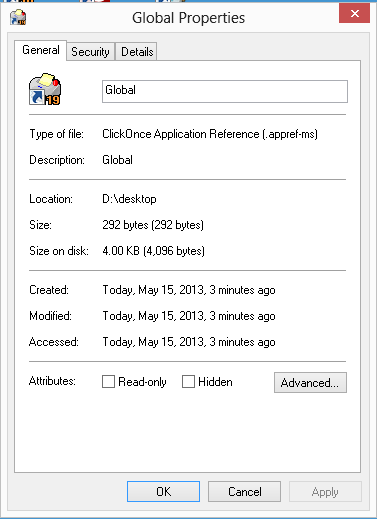
I also noticed this by Robin's blog:
Here’s how you call the application and pass the arguments:
System.Diagnostics.Process.Start(shortcutPath, argsToPass);
That means i cant pass argument directly to shortcut?
Thursday, May 16, 2013 1:57 AM
Yes, you can pass arguments to the application using the shortcut path.
And then receive the argument strings using:
string[] activationData = AppDomain.CurrentDomain.SetupInformation.ActivationArguments.ActivationData;
Best regards,
Chester Hong
MSDN Community Support | Feedback to us
Develop and promote your apps in Windows Store
Please remember to mark the replies as answers if they help and unmark them if they provide no help.
Thursday, May 16, 2013 4:30 AM
Yes, you can pass arguments to the application using the shortcut path.
And then receive the argument strings using:
string[] activationData = AppDomain.CurrentDomain.SetupInformation.ActivationArguments.ActivationData;Best regards,
Chester Hong
MSDN Community Support | Feedback to us
Develop and promote your apps in Windows Store
Please remember to mark the replies as answers if they help and unmark them if they provide no help.
Thanks for reply
I am sorry i am bit confused about using the shortcut path.
Is it possible to give argument in properties window of shortcut?
Can you please explain?
Thursday, May 16, 2013 10:06 AM
Hi IT researcher,
Unlike the general .lnk shortcut, I'm afraid .appref-ms shortcut doesn't allow us to add argument through properties window.
Best regards,
Chester Hong
MSDN Community Support | Feedback to us
Develop and promote your apps in Windows Store
Please remember to mark the replies as answers if they help and unmark them if they provide no help.
Friday, May 31, 2013 5:39 AM
Hi IT researcher,
Unlike the general .lnk shortcut, I'm afraid .appref-ms shortcut doesn't allow us to add argument through properties window.
Best regards,
Chester Hong
MSDN Community Support | Feedback to us
Develop and promote your apps in Windows Store
Please remember to mark the replies as answers if they help and unmark them if they provide no help.
Hi,
I have created a application for passing arguments to clickone application using following code
Imports VB = Microsoft.VisualBasic
Public Class Form1
    Dim argsToPass As String = VB.Command
    Dim shortcutPath As String = "\\pc127\d\desktop\Global.appref-ms"
    Private Sub Button1_Click(ByVal sender As System.Object, ByVal e As System.EventArgs) Handles Button1.Click
               System.Diagnostics.Process.Start(shortcutPath, argsToPass)
    End Sub
End Class
And i pass arguments to shortcut of this application.
I have used this code to receive arguments in clickone application
Dim activationData() As String = AppDomain.CurrentDomain.SetupInformation.ActivationArguments.ActivationData
arg = activationData(0)
I passed argument like **?/?customer?/? **to my initial app and it is receiving as **?\customer?\ **in clickone application(In arg = activationData(0) statement)!!. What made to change / to \ while receiving argument? pls help
Friday, May 31, 2013 9:52 AM
Hi IT Researcher,
Unfortunately I cannot reproduce this problem. What I passed and received are the same "?/?customer?/?".
Could you please tell us which version of .NET Framework are you targeting? Is this a console application or WinForms application? We need some more information to reproduce this issue.
Best regards,
Chester Hong
MSDN Community Support | Feedback to us
Develop and promote your apps in Windows Store
Please remember to mark the replies as answers if they help and unmark them if they provide no help.
Friday, May 31, 2013 10:40 AM
Hi IT Researcher,
Unfortunately I cannot reproduce this problem. What I passed and received are the same "?/?customer?/?".
Could you please tell us which version of .NET Framework are you targeting? Is this a console application or WinForms application? We need some more information to reproduce this issue.
Best regards,
Chester Hong
MSDN Community Support | Feedback to us
Develop and promote your apps in Windows Store
Please remember to mark the replies as answers if they help and unmark them if they provide no help.
Thanks for reply
My application is winform application and targeted to .NET Framework 3.5. I have two mesage boxes,one before passing argument to app (before System.Diagnostics.Process.Start(shortcutPath, argsToPass)) and after recieving argument(after Dim activationData() As String = AppDomain.CurrentDomain.SetupInformation.ActivationArguments.ActivationData
arg = activationData(0). Both resulting different values by changing / to \!. If possible please check for .NET Framework 2.0 also