Note
Access to this page requires authorization. You can try signing in or changing directories.
Access to this page requires authorization. You can try changing directories.
Question
Wednesday, April 13, 2016 1:44 PM
We have seven Windows 2012 R2 nodes in a Hyper-V cluster. They are all identical hardware (HP BladeSystem). For a while, we had only six nodes, and there were no problems.
Recently, we added the seventh node, and the status keeps reverting to "paused". I can't find any errors that directly point to why this is happening - either in the System or Application log of the server, in the various FailoverClustering logs, or in the Cluster Event logs. I created a cluster.log using the get-clusterlog command, but if it explains why this is happening, I can't figure it out (it's also a very large file - 150 MB, so it's difficult to determine what lines are the important ones).
As far as I can tell, everything on this new node is the same as the previous ones - the software versions, network settings, etc. The Cluster Validation report also doesn't give me anything helpful.
Any ideas on how to go about investigating this? Even before I can solve the problem, I'd like to at least know when and why the status reverts to paused.
Thanks,
David
All replies (13)
Wednesday, January 11, 2017 9:07 PM ✅Answered | 2 votes
Ok, so I use SCVMM 2012 R2, I shut down the System Center Virtual Machine Manager and the Pausing condition stopped. Note: Node was "NOT" in Maintenance Mode
I had one vm on this node as a test and saw it stayed online when I was viewing through the Hyper-V Manager.
It didn't live migrate to another host.
It was just a hunch, I haven't brought my VMM console backup up yet, but this appears to be the culprit.
Wednesday, April 13, 2016 2:14 PM
The validation wizard is a useful debugging tool you can run against a running cluster. Have you run a cluster validation report against the cluster? Any warnings or informational messages that are helpful?
In order to ensure you don't move VMs around during the running of the wizard, select to run the disk test only against your witness volume, if you have a witness volume. Do not run it against disks used for VMs, or that will cause the VMs to be moved as the disk is tested for failure. All other tests can be safely run.
. : | : . : | : . tim
Tuesday, July 26, 2016 1:06 PM
This remained an issue, and we were not able to find the cause of the problem.
We formatted the server, reinstalled it from scratch, and it continues to revert to paused.
Nothing in the validation wizard seems to point to any problem. It lists some VMs that are offline, and the like.
Any further ideas?
Tuesday, July 26, 2016 9:25 PM
How often does is go into a paused state? Is there a specific time it happens? If it happens at a specific time, or you can watch it go into a paused state, you should be able to extract all event messages around that period of time to see if you can figure it out.
Random issues like this generally come down to some sort of local configuration issue and it is pretty hard to diagnose through a technical forum. You would most likely be better served by opening a case with Microsoft so they can walk you through a debugging process unique to your particular configuration. Without more information, we are just going to be spending a lot of time guessing.
. : | : . : | : . tim
Sunday, July 31, 2016 7:49 AM
The server generally goes into the paused state 5-10 minutes after we return it to the cluster.
We've looked through the logs, but haven't had luck finding the relevant cause (see my original post in this thread). Is there a way to pinpoint the error relating to the cause of the paused state?
Tuesday, January 10, 2017 8:49 PM
Hello Curwin
Did you ever get this resolved? I am having the exact same problem. I see you rebuilt the server and that still didn't fix it.
Please let me know if you have a resolution.
Thank you,
Pat
Wednesday, January 11, 2017 9:21 PM | 3 votes
What happened to me was I had a three node 2012 R2 cluster and I was adding a fourth node.
When I added the node it was automatically discovered in SCVMM.
I figured out that every time SCVMM did a refresh of the cluster or this particular added node, it put the Node into a paused state
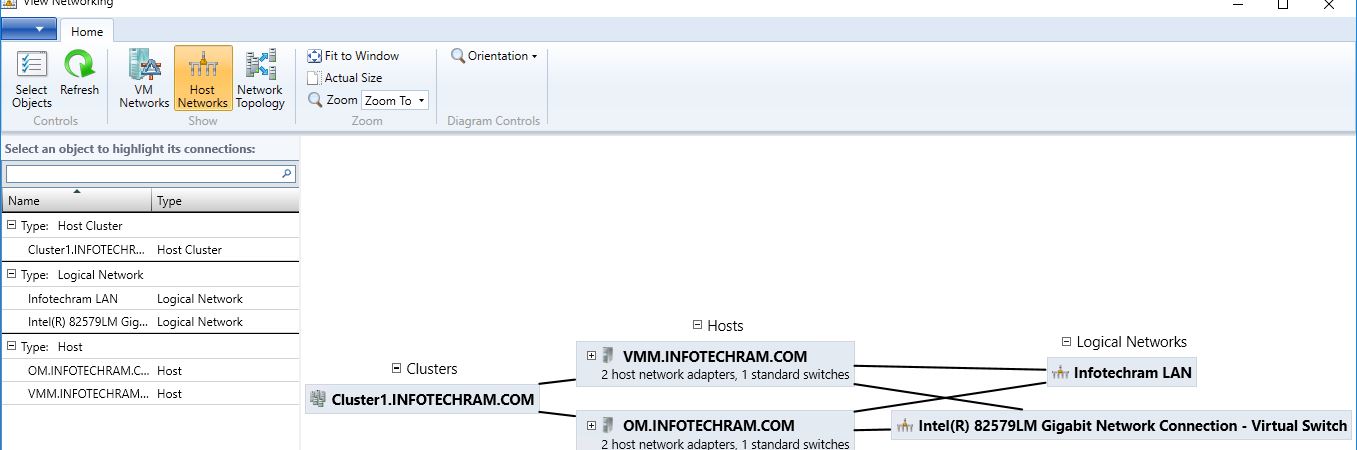
My mistake was I had a logical network for this cluster and missed going into the Hardware Config on SCVMM and assigning a logical network to the NIC being used for the Virtual Switch on this node.
I assigned the logical network to the Nic/Virtual Switch for this newly added node and that corrected the problem.
The only place where I saw the error was in the jobs history.
No where else were there any events or indicators of a problem.
Sunday, January 15, 2017 12:35 PM
Thank you for that suggestion. We noticed that a few weeks ago the problem disappeared, but we didn't make the connection. In fact, we had upgraded the SCVMM server since then, and it is very likely that solved the problem.
Friday, February 17, 2017 8:29 PM
Same thing I found in my in my hyper-V cluster as well. The Logical switch was added to the host from the VMM, but the NICs on the host were not attached to the logical switch.
Saturday, June 24, 2017 1:21 PM
Hi Sharma - I did the same as per your instruction and my cluster is running all the time. No more PAUSED state.
Below is my network configuration screen shot.
Monday, May 21, 2018 10:28 AM | 2 votes
Hello!
Thank you, everyone, here. I had the exact same issue. I resolved my problem through the following steps:
1. Uninstalled the SCVMM Agent from the faulty node.
2. Evicted the faulty node from HA.
3. Removed the faulty node from SCVMM Console.
4. Restarted the node.
5. Reinstalled the SCVMM Agent on the node.
6. Added the node again to the HA.
Regards,
Hasan
Tuesday, January 22, 2019 8:40 PM
Hello!
Thank you, everyone, here. I had the exact same issue. I resolved my problem through the following steps:
1. Uninstalled the SCVMM Agent from the faulty node.
2. Evicted the faulty node from HA.
3. Removed the faulty node from SCVMM Console.
4. Restarted the node.
5. Reinstalled the SCVMM Agent on the node.
6. Added the node again to the HA.
Regards,
Hasan
This was the solution for me. Having installed over 150 cluster nodes and used SCVMM as a management tool I had not seen this issue before until today when I installed two 2016 nodes.
Monday, January 28, 2019 11:18 AM
Thank you Dhirendra, this saved me a lot of trouble! I use SCVMM 2016, the problem was exactly the same. As soon as I corrected the network config, my problem disappeared.