Note
Access to this page requires authorization. You can try signing in or changing directories.
Access to this page requires authorization. You can try changing directories.
Question
Tuesday, June 26, 2018 5:24 PM
Hello,
I'm getting this error in event viewer for two servers that no longer exist. Any suggestions? Thanks.
DCOM was unable to communicate with the computer mail1.my.domain using any of the configured protocols; requested by PID 79a8 (C:\Windows\system32\taskhost.exe).
All replies (3)
Wednesday, June 27, 2018 5:39 AM
Hi,
Event ID 10028 with source Microsoft-Windows-DistributedCOM, it seems that current system try to establish connection to remote/another system which specified in the event and no longer exists.
As far as I know, Taskhost.exe is Host Process for Windows Tasks. In general, we can use Task Manager – Processes and Details to check running process and its PID, however, in order to find more detail sub process/operation about Taskhost.exe, we may need tool, such as Process Monitor to capture detail information on your system, in order to find out the actual operation behind the process.
Process Monitor v3.50:
/en-us/sysinternals/downloads/procmon
Besides, below suggestion can be consider as reference:
- Check available scheduled tasks and confirm that if any task has communication to these systems.
- Clear stable DNS record on your DNS zone.
- Clean local DNS cache.
- Re-start system in Clean Boot with 3rd party process disable, and confirm that if the error event will generate again.
Best Regards,
Eve Wang
Please remember to mark the replies as answers if they help.
If you have feedback for TechNet Subscriber Support, contact [email protected].
Tuesday, July 10, 2018 2:43 PM
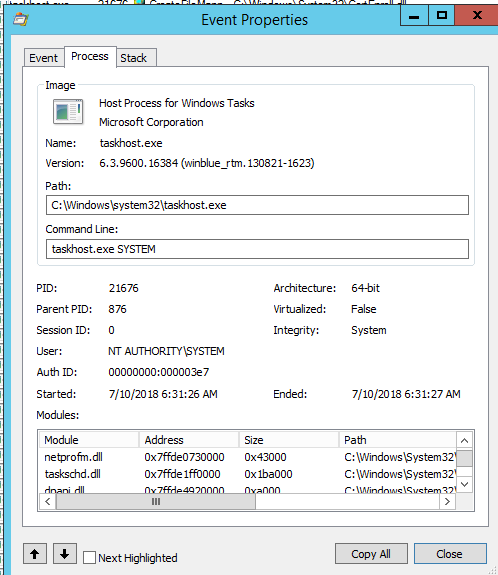
Could this be what's causing it? I got several of these name "Name not found" results showing up in process manager from taskhost.exe at the time that these DCOM errors showed up.
Tuesday, July 10, 2018 2:56 PM
Or could it be something to do with my anti-virus program?