Note
Access to this page requires authorization. You can try signing in or changing directories.
Access to this page requires authorization. You can try changing directories.
Question
Friday, March 27, 2015 12:06 PM
In my MP Control log I'm getting message from a client SMSID = GUID:ABC123.....
I can find this GUID in the ClientKeyData table, but that table has no computer name column, so I don't know which machine this is.
I cannot find this GUID in the system_disc table. That table does match a computer name to a GUID.
How can I figure out which machine this is coming from? Thank you.
Ben JohnsonWY
All replies (19)
Monday, March 30, 2015 12:49 PM ✅Answered
Why don't you review the IIS log to see what IP address is talking to your MP. this might take some time but at least you will know who is talking to you MP.
Garth Jones | My blogs: Enhansoft and Old Blog site | Twitter: @GarthMJ
Friday, March 27, 2015 12:19 PM
When you're looking in the database look at v_R_System.SMS_Unique_Identifier0 for that information.
My Blog: http://www.petervanderwoude.nl/
Follow me on twitter: pvanderwoude
Friday, March 27, 2015 12:31 PM
In there I see two columns that have these GUIDs: Previous_SMS_UUID0 and SMS_Unique_Identifier0 BUT neither of those columns have this particular GUID, I've only found it in clientkeydata so far, so I still don't know which machine this is.
These messages say the client is blocked, but if you go to the admin console and look at the blocked column, nothing is marked as blocked.
Ben JohnsonWY
Friday, March 27, 2015 1:31 PM
Friday, March 27, 2015 1:44 PM
Thanks, but as I mentioned above, I already found that table and column and didn't see the GUID in question. So I ran the query in that link you provided and it didn't find that GUID either. I manually searched through that table again too. It's simply not there. Sigh. Where on earth is this message coming from?
Ben JohnsonWY
Saturday, March 28, 2015 10:20 AM
In my MP Control log I'm getting message from a client SMSID = GUID:ABC123.....
I can find this GUID in the ClientKeyData table, but that table has no computer name column, so I don't know which machine this is.
I cannot find this GUID in the system_disc table. That table does match a computer name to a GUID.
How can I figure out which machine this is coming from?
Hmm, you might need to do a JOIN on ResourceID between those two tables, to get what you need ?
On another thought-path, look to see if there is *any* similarity at all between your mystery GUID/UUID, and another that *is* in your table.
Sometimes (not sure in this case), GUIDs are represented in reverse-nibble notation (instead of the expected byte-wise notation).
https://social.technet.microsoft.com/Forums/windowsserver/en-US/4265aa67-c88a-4b93-a2c2-657cc6fd2621/use-msiexecexe-to-remove-an-application?forum=winserverGP
e.g. at first glance, the below BIOS/PXE xUIDs seem completely different, but, if you look a little closer...
From BIOS, there is a hard coded UUID of: B5F91000-A7B6-11E0-0000-2C27D736A5E2
At the PXE boot screen, the GUID is listed as: 0010F9B5-B6A7-E011-00002-C27D736A5E2
The SMS Unique Identifier is: GUID:02345B43-82A4-44CD-8D18-08C7D83E1759
(but, the SMS GUID bears no similarity at all, since that is generated by a completely different activity, and only correlated within the CM db)
/sorryfordithering/ ;)
Don
(Please take a moment to "Vote as Helpful" and/or "Mark as Answer", where applicable.
This helps the community, keeps the forums tidy, and recognises useful contributions. Thanks!)
Sunday, March 29, 2015 7:57 AM
Can't you use powershell and the Get-CMDevice cmdlet if you import the configuration manager module? This is purely a big guess as I am not in a position to test it right now but try something like this below should work. Not 100% sure if the -id parameter is the GUID or the resource ID. Have a play about using Get-CMDevice I am sure you will find what you want.
(Get-CMDevice -id [GUID]).Name
Monday, March 30, 2015 7:38 AM
Hi,
Peter is correct, v_R_System view should have contain the information you want.
But in my lab, I found an additional record in ClientKeyData table. I didn't figure out what it is yet.
So what is the detail message you got from MP control log?
Please remember to mark the replies as answers if they help and unmark them if they provide no help. If you have feedback for TechNet Subscriber Support, contact [email protected].
Monday, March 30, 2015 9:42 AM
Expanding on the powershell approach after some brief testing you could use powershell like this.
import-module 'C:\Program Files (x86)\ConfigMgr 2012 Console\bin\ConfigurationManager.psd1' -force
$SiteCode = "..."
cd $SiteCode:
$smsid = "GUID:000000..."
get-cmdevice | where-object{$_.SMSID -eq $smsid}
This will take a long time depending on the number of devices in your site so may not be practical. You could limit it to a collection by doing get-cmdevice -collectionid but again will be slowed down if its a large collection. I just did it on our site which has around 5000 devices and it took well over 15 minutes before reporting that I need to use Set-CMQueryResultMaximum.
As others have pointed out looking in the database will be much quicker you could write a query like this.
select *  from  SMS_R_System
inner join SMS_G_System_SYSTEM on SMS_G_System_SYSTEM.ResourceId = SMS_R_System.ResourceId
where SMS_G_System_SYSTEM.SMSID like "%00000000-0000-0000-0000-000000000000%"
I have just attempted this as a query on our site and it returns results (when i use a propper GUID). This should help you find the computer name from the GUID as well as lots of other information such as AD DN, AD Description and a lot more.
HTH
Monday, March 30, 2015 10:31 AM
All:
Thanks for the input. Here are responses to weekend posts:
I don't see similar names.
I don't know much about Powershell.
The exact msg is message id 5444 and it says "MP has rejected policy from Client(SMSID=GUID:actualGUID) because the SMSID is blocked." BUT when you list all devices with the blocked column selected, it lists nothing as being blocked.
I tried to run d4rkcell's SQL query and it says "invalid object name 'SMS_R_System' ". SMS_G_System has a squiggly line under it to.
Ben JohnsonWY
Monday, March 30, 2015 10:54 AM
All:
Thanks for the input. Here are responses to weekend posts:
I don't see similar names.
I don't know much about Powershell.
The exact msg is message id 5444 and it says "MP has rejected policy from Client(SMSID=GUID:actualGUID) because the SMSID is blocked." BUT when you list all devices with the blocked column selected, it lists nothing as being blocked.
I tried to run d4rkcell's SQL query and it says "invalid object name 'SMS_R_System' ". SMS_G_System has a squiggly line under it to.
Ben JohnsonWY
Its not SQL its WQL and its not to be used in SQL its to be used from the SCCM console under queries.
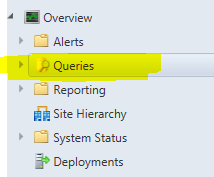
You can actually use the wizard to create it. It is very simple, see below screenshot.
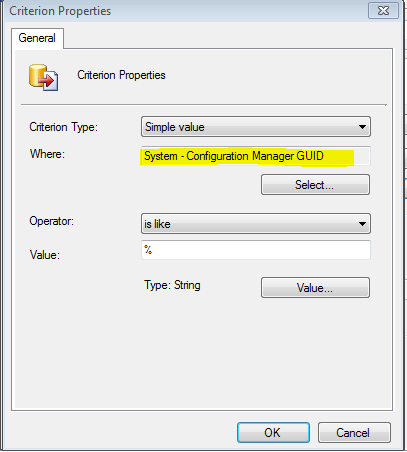
Does this help?
Monday, March 30, 2015 11:02 AM
DOH. Dumb me should have noticed that.
I created and ran the query but it found no results. It didn't error out either.
Very strange, where is this GUID coming from if it's not in the table it should be? It's only in the ClientKeyData table myself and Daniel mentioned but there it's not equated to a machine name.
Ben JohnsonWY
Monday, March 30, 2015 11:35 AM
does the query work if you find a good client and use that clients GUID?
Monday, March 30, 2015 11:50 AM
Yes.
Ben JohnsonWY
Monday, March 30, 2015 12:01 PM
Yes.
Ben JohnsonWY
How often are you seeing the 5444 message? has it happened recently? I have no idea why you would get reports of a machine with SMSID X and then when searching for SMSID X there is nothing unless the messages were from some time ago and the device information has been purged from the db.
I am seeing similar messages in my SMS_MP_CONTROL_MANAGER with 5447.
MP has rejected a message from GUID:X because the signature could not be validated. If this is a valid client, it will attempt to re-register automatically so its signature can be correctly validated.
Running the query and using GUID:X returns results for me here though my messages seem to be slightly different to yours.
Is it worth verifying all your boundaries etc?
Monday, March 30, 2015 12:05 PM
It appears about 25 times an hour. It is a strange case, I admit. That's why I posted this thread.
Ben JohnsonWY
Monday, March 30, 2015 2:10 PM
What Garth has said makes sense, problem is are the IIS logs timestamped? I don't think they are which will indeed mean it will take some serious digging to find the IP Address.
Monday, March 30, 2015 2:18 PM
Yes the logs are timestamped (UTC), so you should be able to pick a small windows and review all of the entries.
Garth Jones | My blogs: Enhansoft and Old Blog site | Twitter: @GarthMJ
Monday, March 30, 2015 2:29 PM
Actually, mine weren't, date and time were not selected, so I turned that on, and since this is sending 2 dozen or so msgs to my site server every hour, just waited awhile. Then I matched up the error msgs times in the MP log and the IIS log to see which IP kept showing up every time. I know the IP now. It's some sort of rogue machine because it's not in IPAM and not found via nslookup. The network guys will track this down for me. Also note that IIS runs on UTC time, regardless of what time zone your computer is set to. Thanks all!
Ben JohnsonWY