Note
Access to this page requires authorization. You can try signing in or changing directories.
Access to this page requires authorization. You can try changing directories.
Question
Friday, July 5, 2019 5:33 PM
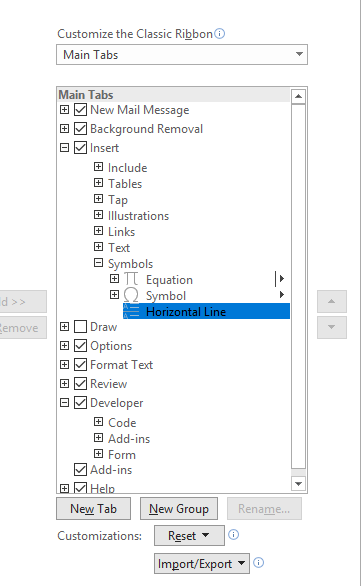
Looking for a keyboard shortcut to insert horizontal line in outlook message. With the new compact ribbon design, it is cumbersome to get to with a mouse. I have googled but can't find a solution. It seems like it should be simple. I can go into Customize Ribbon and see the command I want, but don't know how to assign a shortcut key to it (say ctrl-L). What am I missing? Thanks.
All replies (3)
Monday, July 8, 2019 1:55 AM ✅Answered
Hi,
I understand that you'd like to find a easy way to insert a horizontal line. The fastest way to add a horizontal line or rule is to use the AutoFormat feature. When you type certain characters three times on their own line and then press Enter, those characters instantly become a horizontal line.
In this case, please place the cursor at the position where you will add a horizontal line, and then press the hyphens key (-) three times, and then press the Enter key, at last you will get a horizontal line in the email message.
As for setting a shortcut for horizontal line, according to my research, there may be not a way to achieve this.
Hope this can be helpful.
Regards,
Aidan Wang
Please remember to mark the replies as answers if they helped. If you have feedback for TechNet Subscriber Support, contact [email protected].
Click here to learn more. Visit the dedicated forum to share, explore and talk to experts about Microsoft Teams.
Wednesday, July 10, 2019 9:46 AM
Hi,
Have you got the issue fixed?
I'm writing to see if the reply above is helpful to you. If yes, would you mind helping mark the reply as answer? So that others who might have a similar question can benefit from your thread? Thanks for your understanding and support.
Regards,
Aidan Wang
Please remember to mark the replies as answers if they helped. If you have feedback for TechNet Subscriber Support, contact [email protected].
Click here to learn more. Visit the dedicated forum to share, explore and talk to experts about Microsoft Teams.
Wednesday, July 10, 2019 3:23 PM
Unfortunate, but thank you for the answer.
-Dom