Note
Access to this page requires authorization. You can try signing in or changing directories.
Access to this page requires authorization. You can try changing directories.
Question
Friday, June 17, 2016 9:05 AM
I'm creating a C# Windows Form Application to register and/or unregister dlls programmatically. To do that, I simply use an instance of the System.Diagnostic.Process class. I would like to redirect both STDOutput and STDError inside a textbox element.
Using the following code, when I reg or unreg a managed .dll file (that is I use RegAsm.exe) I can obtain my redirecting goal.
In case of regsvr32.exe then my problem occurs: the Regsvr32's resulting DialogBox raises up (in both success or error cases)... but the message is totally blank.

So I have tried to use the RegSvr32's /s flag option... now the DialogBox does not raise up, but nothing becomes written inside the textbox.
Is there someone that can help me to solve this problem? I'm getting crazy! Thanks!
A very curious note: As I'm stubborn, I've tried to register an unmanaged dll, using this simple code (without the /s flag), implementing a C# Console Application... the RegSvr32 dialog box is pretty visible in both success and error cases.
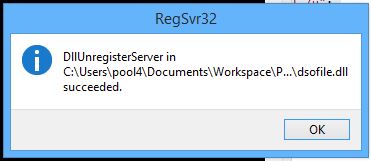
So I've substituted the Process block code in the old code but the RegSvr32 dialog box still does not appear!!!
Here is the Windows Form code:
In the Form1 class I implemented following delegates and methods to print inside the Form1.textbox element STDOutput and STDError:
void AppendLine( string line )
{
  if( textBox.Text.Length == 0 )
    textBox.Text = value;
  else
    textBox.AppendText( "\r\n" + value );
}

void OnOutputReceivedEvent( object sender, DataReceivedEventArgs e )
{
  AppendLineMultiThread( e.Data );
}

void OnErrorReceivedEvent( object sender, DataReceivedEventArgs e )
{
  AppendLineMultiThread( e.Data );
}

delegate void AppendLineMultiThreadHandler( string text );
private void AppendLineMultiThread( string line )
{
  // InvokeRequired required compares the thread ID of the calling thread to the thread ID of the creating thread. If these threads are different, it returns true.
  if(InvokeRequired )
  {
    AppendLineMultiThreadHandler d = new AppendLineMultiThreadHandler( AppendLine );
    Invoke( d,  line );
  }
  else
  {
    AppendLine( line ); // call directly
  }
}
Inside the Form1.Run() method (it will be called when the user will click on my RUN button) each item registers both events, and then execute the Reg or Unreg process:
void Run()
{
  foreach( RegistererItem i in Config.RegItems )
  {
    i.ErrorReceivedEvent += OnErrorReceivedEvent;
    i.OutputReceivedEvent += OnOutputReceivedEvent;
    i.Execute();
  }
}
And here is the RegistererItem.Execute() method:
/// <summary>
/// The method used to Register or Unregister a dll.
/// </summary>
public void Execute()
{
  string exe = "depending on hidden parameters here I have 'regsvr32.exe' or 'RegAsm.exe'";
  string args = "depending on hidden parameters here I have '/codebase /s' or '/u /s'";

  try
  {
    using( Process reg = new Process() )
    {
      reg.StartInfo.FileName = exe;
      reg.StartInfo.Arguments = args;
      reg.StartInfo.UseShellExecute = false;
      reg.StartInfo.CreateNoWindow = true;

      reg.StartInfo.RedirectStandardOutput = true;
      reg.StartInfo.RedirectStandardError = true;

      reg.ErrorDataReceived += OnErrorDataReceived;
      reg.OutputDataReceived += OnOutputDataReceived;
      reg.EnableRaisingEvents = true;
      reg.Start();
      reg.BeginErrorReadLine();
      reg.BeginOutputReadLine();
      //reg.WaitForExit(); // commented 'cause at the moment I don't care about it
    }
  }
  catch( Exception exc )
  {
    throw new Exception( exe + " " + args, exc );
  }
}

public delegate void DataReceivedEventHandler( object sender, DataReceivedEventArgs e );
public event DataReceivedEventHandler ErrorReceivedEvent;
void OnErrorDataReceived( object sender, DataReceivedEventArgs e )
{
  if( ErrorReceivedEvent != null )
    ErrorReceivedEvent( sender, e );
}

public event DataReceivedEventHandler OutputReceivedEvent;
void OnOutputDataReceived( object sender, DataReceivedEventArgs e )
{
  if( OutputReceivedEvent != null )
    OutputReceivedEvent( sender, e );
}
All replies (1)
Friday, June 17, 2016 11:13 AM ✅Answered
Hi,
my suggestion would be to not call such methods.
Registering a DLL (unamanged / COM) is quite easy. Regsvr32 is not doing anything really special. It is loading the library and then calls DllRegisterServer. So instead of calling the regsvr32 executable, you could do this on your own, too.
You can even find some example code for this at
https://social.msdn.microsoft.com/Forums/vstudio/en-US/491e8d05-4662-4e3c-87b2-764eb16aa4c1/programmatically-register-com-activex-dlls-via-managed-code?forum=clr
With kind regards,
Konrad