Note
Access to this page requires authorization. You can try signing in or changing directories.
Access to this page requires authorization. You can try changing directories.
Question
Wednesday, November 27, 2019 11:32 PM
I need my program (vb.net) to open a protected excel sheet that is read only, query a value in a text box, and return the query into a message box.
I got it to work with OLEDBConnections, but it seems I cannot pass a password to excel using this method. Any suggestions?
Here is my code snippet in OLEDB
MyConnection = New System.Data.OleDb.OleDbConnection("Provider=Microsoft.ACE.OLEDB.12.0;Data Source=" + excel + "; Extended Properties=Excel 12.0;")
MyCommand = New System.Data.OleDb.OleDbDataAdapter("select * from [Operating$] where ID LIKE " & txtID.Text & "", MyConnection)
Without a password, this works going into a datagridview. How would I get it into a message box?
All replies (10)
Friday, November 29, 2019 10:03 AM
Hello,
After testing, I found that using OLEDB to connect to Excel, I could not read the password-protected and read-only excel file.
It is recommended that you use the Microsoft.Office.Interop component to open it.
xlApp = New Excel.Application
xlWorkBook = xlApp.Workbooks.Open("D:\protect.xlsx", [ReadOnly]:=False, Password:="123")
Best Regards,
Julie
MSDN Community Support Please remember to click "Mark as Answer" the responses that resolved your issue, and to click "Unmark as Answer" if not. This can be beneficial to other community members reading this thread. If you have any compliments or complaints to MSDN Support, feel free to contact [email protected].
Friday, November 29, 2019 10:30 AM
Hello,
OleDb data provider can not open an Excel file with a password. The following page shows all possibilities but no password.
Options EPPlus library or ExcelReader.
Please remember to mark the replies as answers if they help and unmarked them if they provide no help, this will help others who are looking for solutions to the same or similar problem. Contact via my Twitter (Karen Payne) or Facebook (Karen Payne) via my MSDN profile but will not answer coding question on either.
NuGet BaseConnectionLibrary for database connections.
StackOverFlow
Friday, November 29, 2019 3:38 PM
I understand, but then how to I do a select statement? For example, I am looking at a textbox. If a user types in 1234, I need to find 1234 in the excel and the corresponding values in the row.
for example: Textbox="1234"
Find value in excel for "1234". It finds the value in Cell A23, and return should return the values in cells A23= "1234", +A24= New York, +A25= zip codes all in a Message Prompt.
I do not know how to do that with Interlop. With OLEDB, I can do a select statement.
Monday, December 2, 2019 10:21 AM
Hi,
As I told you earlier, there is no way to open password protected Excel files and create Excel queries using OleDb.
You can use COM components to achieve similar query functions, but it is not as good as the SQL statement query in OleDb. So if you want to use a password, it is recommended that you use a database to accomplish this task.
As for using the Com component, I have a simple demo for you. The main purpose is to interact with the contents of the Excel file and the DataTable, and then simply filter the DataTable. The results are as follows:
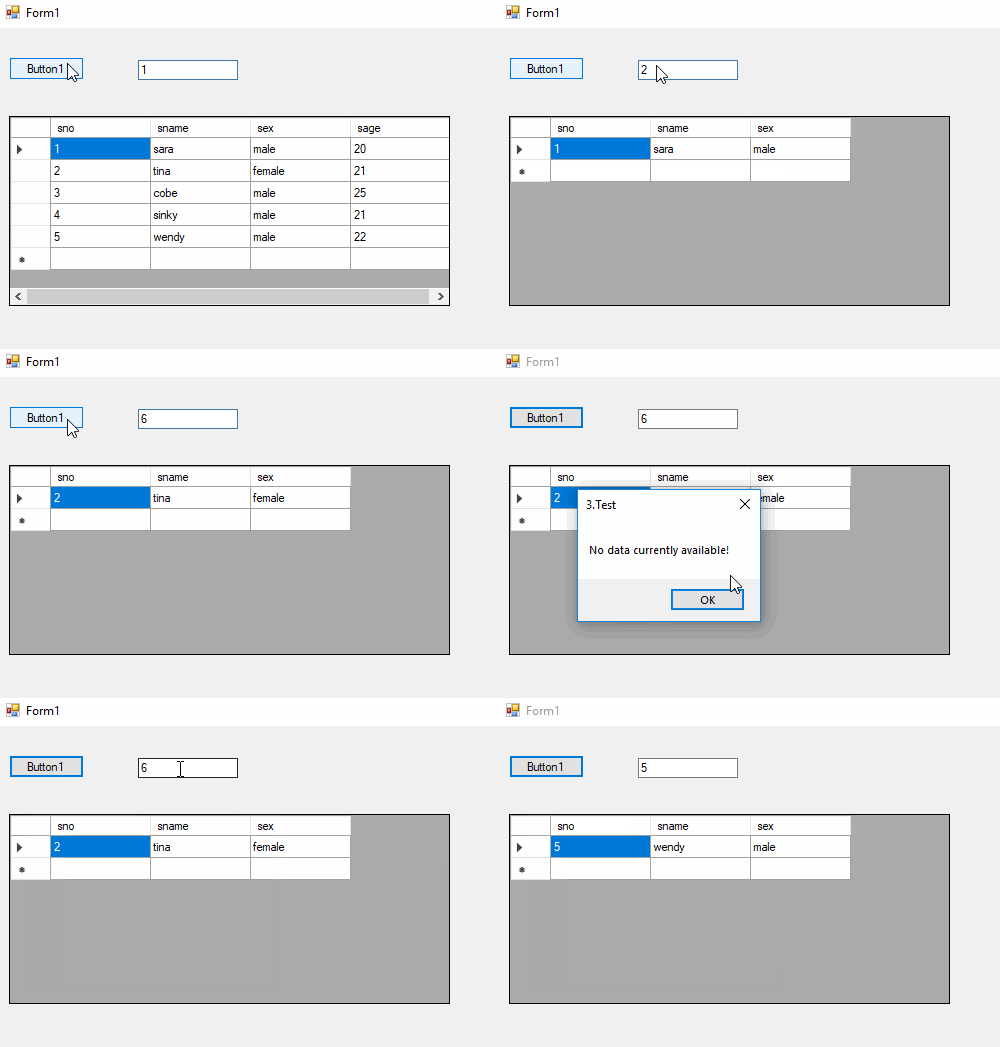
The relevant code is as follows:
Imports Excel1 = Microsoft.Office.Interop.Excel


Public Class Form1

    Private Sub Button1_Click(sender As Object, e As EventArgs) Handles Button1.Click
        Dim dt As DataTable = New DataTable()
        dt = GetDataFromExcelByCom(True)

        Dim newdt As DataTable = New DataTable()
        newdt = dt.Clone()
        Dim rows As DataRow() = dt.[Select]("sno   like   '%" & TextBox1.Text & "%'")
        If rows.Count = 0 Then
            MsgBox("No data currently available!")
            Return
        End If

        For Each row As DataRow In rows
            newdt.Rows.Add(row.ItemArray)
            newdt.Columns.Remove("sage")
        Next
        DataGridView1.DataSource = newdt
    End Sub
    Private Function GetDataFromExcelByCom(ByVal Optional hasTitle As Boolean = False) As DataTable

        Dim excelFilePath = "D:\protect.xlsx"
        Dim app As Excel1.Application = New Excel1.Application()
        Dim sheets As Excel1.Sheets
        Dim oMissiong As Object = System.Reflection.Missing.Value
        Dim workbook As Excel1.Workbook = Nothing
        Dim dt As DataTable = New DataTable()

        Try
            If app Is Nothing Then Return Nothing
            workbook = app.Workbooks.Add(excelFilePath)
            sheets = workbook.Worksheets
            Dim worksheet As Excel1.Worksheet = sheets(1)
            Dim ji As Integer = CType(12, Integer)
            If worksheet Is Nothing Then Return Nothing
            Dim iRowCount As Integer = worksheet.UsedRange.Rows.Count
            Dim iColCount As Integer = worksheet.UsedRange.Columns.Count

            For i As Integer = 0 To iColCount - 1
                Dim name = "column" & i

                If hasTitle Then
                    Dim txt = (CType(worksheet.Cells(1, i + 1), Excel1.Range)).Text.ToString()
                    If Not String.IsNullOrWhiteSpace(txt) Then name = txt
                End If

                While dt.Columns.Contains(name)
                    name = name & "_1"
                End While

                dt.Columns.Add(New DataColumn(name, GetType(String)))
            Next

            Dim range As Excel1.Range
            Dim rowIdx As Integer = If(hasTitle, 2, 1)

            For iRow As Integer = rowIdx To iRowCount
                Dim dr As DataRow = dt.NewRow()

                For iCol As Integer = 1 To iColCount
                    range = CType(worksheet.Cells(iRow, iCol), Excel1.Range)
                    dr(iCol - 1) = If((range.Value2 Is Nothing), "", range.Text.ToString())
                Next

                dt.Rows.Add(dr)
            Next

            Return dt
        Catch
            Return Nothing
        Finally
            workbook.Close(False, oMissiong, oMissiong)
            System.Runtime.InteropServices.Marshal.ReleaseComObject(workbook)
            workbook = Nothing
            app.Workbooks.Close()
            app.Quit()
            System.Runtime.InteropServices.Marshal.ReleaseComObject(app)
            app = Nothing
        End Try
    End Function

    Private Sub Form1_Load(sender As Object, e As EventArgs) Handles MyBase.Load
        Dim dt As DataTable = GetDataFromExcelByCom(True)
        DataGridView1.DataSource = dt
    End Sub
End Class
Hope it be helpful.
Best Regards,
Julie
MSDN Community Support Please remember to click "Mark as Answer" the responses that resolved your issue, and to click "Unmark as Answer" if not. This can be beneficial to other community members reading this thread. If you have any compliments or complaints to MSDN Support, feel free to contact [email protected].
Monday, December 2, 2019 11:14 PM
Yes, this looks something that I need to do. Any chance putting comments in the code so I can better understand why you are doing certain actions?
Tuesday, December 3, 2019 5:30 AM
Hi,
I have added comments where necessary to help you understand. Hope this example helps you.
Imports Excel1 = Microsoft.Office.Interop.Excel


Public Class Form1

    Private Sub Button1_Click(sender As Object, e As EventArgs) Handles Button1.Click
        Dim dt As DataTable = New DataTable()
        dt = GetDataFromExcelByCom(True)

        'Create a newdt to filter the required data from the original dt
        Dim newdt As DataTable = New DataTable()
        newdt = dt.Clone()
        Dim rows As DataRow() = dt.[Select]("sno   like   '%" & TextBox1.Text & "%'")
        If rows.Count = 0 Then
            MsgBox("No data currently available!")
            Return
        End If

        For Each row As DataRow In rows
            newdt.Rows.Add(row.ItemArray)
            newdt.Columns.Remove("sage") 'Delete unwanted columns
        Next
        DataGridView1.DataSource = newdt
    End Sub
    Private Function GetDataFromExcelByCom(ByVal Optional hasTitle As Boolean = False) As DataTable

        Dim excelFilePath = "D:\protect.xlsx"
        Dim app As Excel1.Application = New Excel1.Application()
        Dim workbook As Excel1.Workbook = Nothing
        Dim sheets As Excel1.Sheets
        Dim dt As DataTable = New DataTable()
        Dim oMissiong As Object = System.Reflection.Missing.Value ' pass an argument in an optional parameter position to a method with optional parameters

        Try
            If app Is Nothing Then Return Nothing
            workbook = app.Workbooks.Add(excelFilePath)
            sheets = workbook.Worksheets
            Dim worksheet As Excel1.Worksheet = sheets(1) 'Open the first Sheet by default

            'Sheet1 is nothing
            If worksheet Is Nothing Then Return Nothing
            'Sheet1 isnot nothing
            Dim iRowCount As Integer = worksheet.UsedRange.Rows.Count 'Number of valid rows
            Dim iColCount As Integer = worksheet.UsedRange.Columns.Count 'Number of valid columns

            'Add column names
            For i As Integer = 0 To iColCount - 1
                Dim name = "column" & i

                If hasTitle Then
                    Dim txt = (CType(worksheet.Cells(1, i + 1), Excel1.Range)).Text.ToString()
                    If Not String.IsNullOrWhiteSpace(txt) Then name = txt
                End If

                While dt.Columns.Contains(name)
                    name = name & "_1"
                    MsgBox(name)
                End While

                dt.Columns.Add(New DataColumn(name, GetType(String)))
            Next

            Dim range As Excel1.Range
            Dim rowIdx As Integer = If(hasTitle, 2, 1) 'If there is a column name, read from the second line, if there is no column name, read from the first line

            'Write data to dt
            For iRow As Integer = rowIdx To iRowCount
                Dim dr As DataRow = dt.NewRow()

                For iCol As Integer = 1 To iColCount
                    range = CType(worksheet.Cells(iRow, iCol), Excel1.Range)
                    dr(iCol - 1) = If((range.Value2 Is Nothing), "", range.Text.ToString())
                Next

                dt.Rows.Add(dr)
            Next

            Return dt
        Catch
            Return Nothing
        Finally
            workbook.Close(False, oMissiong, oMissiong) 'Close the open excel file and start garbage collection
            workbook = Nothing
            app.Workbooks.Close()
            app.Quit()
            app = Nothing
            GC.Collect()
        End Try
    End Function

    Private Sub Form1_Load(sender As Object, e As EventArgs) Handles MyBase.Load
        Dim dt As DataTable = GetDataFromExcelByCom(True)
        DataGridView1.DataSource = dt
    End Sub
End Class
Hope it be helpful.
Best Regards,
Julie
MSDN Community Support Please remember to click "Mark as Answer" the responses that resolved your issue, and to click "Unmark as Answer" if not. This can be beneficial to other community members reading this thread. If you have any compliments or complaints to MSDN Support, feel free to contact [email protected].
Wednesday, December 4, 2019 4:09 PM
Thanks.
A few questions.
1) Why did you load the datagrideview1 on loadform? it seems it is being called twice. Once on load, and once when clicking the button. This method opens my excel twice.
2) it runs really slow. I mean really slow! What could cause that? There a 284 rows and 10 columns. Not a lot of data.
3) How would I open the excel with the password hardcoded? As of now, it prompts me.
Thursday, December 5, 2019 1:48 AM
Hi,
1. That's just to let you see the contrast before and after, for your convenience, you can certainly not use it.
2. There is no doubt that OLEDB is faster than Interop objects in performance because no EXCEL objects are created.
3. The code I posted can access excel without a password. If you want to set open the excel with the password hardcoded, this one may help.
ps: I found an example using a combination of OLEDB and Interop that might helpful.
Best Regards,
Julie
MSDN Community Support Please remember to click "Mark as Answer" the responses that resolved your issue, and to click "Unmark as Answer" if not. This can be beneficial to other community members reading this thread. If you have any compliments or complaints to MSDN Support, feel free to contact [email protected].
Thursday, December 5, 2019 1:57 AM
I understand, but then how to I do a select statement? For example, I am looking at a textbox. If a user types in 1234, I need to find 1234 in the excel and the corresponding values in the row.
for example: Textbox="1234"
Find value in excel for "1234". It finds the value in Cell A23, and return should return the values in cells A23= "1234", +A24= New York, +A25= zip codes all in a Message Prompt.
I do not know how to do that with Interlop. With OLEDB, I can do a select statement.
With EPPlus you can load data from a sheet into a DataTable e.g.
worksheet.Cells("A1").LoadFromDataTable(dataTable, true)
Then using filtering and search capabilities of a DataTable and the DefaultView (DataView).
Please remember to mark the replies as answers if they help and unmarked them if they provide no help, this will help others who are looking for solutions to the same or similar problem. Contact via my Twitter (Karen Payne) or Facebook (Karen Payne) via my MSDN profile but will not answer coding question on either.
NuGet BaseConnectionLibrary for database connections.
StackOverFlow
Friday, December 6, 2019 3:13 PM
 Private Function GetDataFromExcelByCom(ByVal Optional hasTitle As Boolean = False) As DataTable

        Dim excelFilePath = "c:\temp\accounts.xlsx"
        Dim App As Excel1.Application = Nothing
        Dim Sheets As Excel1.Sheets = Nothing
        Dim WorkBooks As Excel1.Workbooks = Nothing
        Dim WorkBook As Excel1.Workbook = Nothing

        Dim dt As DataTable = New DataTable()
        Dim oMissiong As Object = System.Reflection.Missing.Value ' pass an argument in an optional parameter position to a method with optional parameters


        Try
            WorkBook = WorkBooks.Open(excelFilePath,,,,, "password", True)
            Sheets = WorkBook.Worksheets("Operating")


            Dim worksheet As Excel1.Worksheet = Sheets(1) 'Open the first Sheet by default

            'Sheet1 is nothing
            If worksheet Is Nothing Then Return Nothing
            'Sheet1 isnot nothing
            Dim iRowCount As Integer = worksheet.UsedRange.Rows.Count 'Number of valid rows
            Dim iColCount As Integer = worksheet.UsedRange.Columns.Count 'Number of valid columns

            'Add column names
            For i As Integer = 0 To iColCount - 1
                Dim name = "column" & i

                If hasTitle Then
                    Dim txt = (CType(worksheet.Cells(1, i + 1), Excel1.Range)).Text.ToString()
                    If Not String.IsNullOrWhiteSpace(txt) Then name = txt
                End If

                While dt.Columns.Contains(name)
                    name = name & "_1"
                    MsgBox(name)
                End While

                dt.Columns.Add(New DataColumn(name, GetType(String)))
            Next

            Dim range As Excel1.Range
            Dim rowIdx As Integer = If(hasTitle, 2, 1) 'If there is a column name, read from the second line, if there is no column name, read from the first line

            'Write data to dt
            For iRow As Integer = rowIdx To iRowCount
                Dim dr As DataRow = dt.NewRow()

                For iCol As Integer = 1 To iColCount
                    range = CType(worksheet.Cells(iRow, iCol), Excel1.Range)
                    dr(iCol - 1) = If((range.Value2 Is Nothing), "", range.Text.ToString())
                Next

                dt.Rows.Add(dr)
            Next

            Return dt
        Catch
            Return Nothing
        Finally
            WorkBook.Close(False, oMissiong, oMissiong) 'Close the open excel file and start garbage collection
            workbook = Nothing
            app.Workbooks.Close()
            app.Quit()
            app = Nothing
            GC.Collect()
        End Try

    End Function
I modified your code to hardcode a password, but it fails on opening line:WorkBook = WorkBooks.Open(excelFilePath,,,,, "password", True)The error is:System.InvalidCastException: 'Conversion from string "oledb connection error" to type 'Integer' is not valid.' Inner Exception: FormatException: Input string was not in a correct format.