Note
Access to this page requires authorization. You can try signing in or changing directories.
Access to this page requires authorization. You can try changing directories.
Question
Monday, June 5, 2017 5:46 PM
hai , help I would like to be able to display a DateTimePicker that has a default value of nothing but not like this
DateTimePicker1.CustomFormat = " "
because in database will input 1 space
All replies (5)
Monday, June 5, 2017 6:02 PM
Then why not just check what the Format is first. If it is a space " ", then insert a null value into the Database. If it is not a space, then insert the date value.
        If DateTimePicker1.Format = DateTimePickerFormat.Custom AndAlso DateTimePicker1.CustomFormat = " " Then
            'enter a Null value to the database
        Else
            'enter DateTimePicker1.Value into the database
        End If
If you say it can`t be done then i`ll try it
Monday, June 5, 2017 6:12 PM
hai , help I would like to be able to display a
DateTimePickerthat has a default value of nothing but not like thisDateTimePicker1.CustomFormat = " "because in database will input 1 space
Hi
As I understand it, a DateTimePicker can only use a date value between MinDate and MaxDate, and can not be empty. A CustomFormat, if set to Nothing or an empty string will reset to default format.
What exactly are you trying to do? Why would you use a DateTimePicker with such strange settings?
Regards Les, Livingston, Scotland
Monday, June 5, 2017 6:23 PM
As I understand it, a DateTimePicker can only use a date value between MinDate and MaxDate, and can not be empty. A CustomFormat, if set to Nothing or an empty string will reset to default format.
Regards Les, Livingston, Scotland
If you set the Format to Custom and set the CustomFormat to a Space " ", it will display an empty DateTimePicker.
Public Class Form1
    Private Sub Form1_Load(sender As Object, e As EventArgs) Handles MyBase.Load
        DateTimePicker1.Format = DateTimePickerFormat.Custom
        DateTimePicker1.CustomFormat = " "
    End Sub

    Private Sub DateTimePicker1_ValueChanged(sender As Object, e As EventArgs) Handles DateTimePicker1.ValueChanged
        If DateTimePicker1.Format = DateTimePickerFormat.Custom AndAlso DateTimePicker1.CustomFormat = " " Then
            DateTimePicker1.Format = DateTimePickerFormat.Short
        End If
    End Sub
End Class
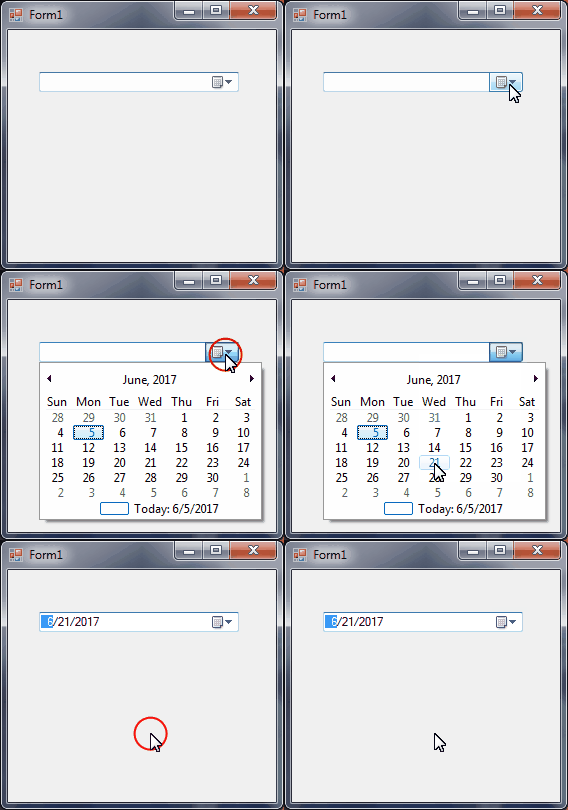
If you say it can`t be done then i`ll try it
Monday, June 5, 2017 7:28 PM
hai , help I would like to be able to display a
DateTimePickerthat has a default value of nothing but not like thisDateTimePicker1.CustomFormat = " "because in database will input 1 space
What kind of database do you have. I assume not an official one because those have all datetime values for date. (In SQL server you have 3)
- from 1900
- from the Gregorian date system in the British Empire and therefore in the current USA
- from 1/1/1
But non with a space
Be aware I write this only to save others from crazy handling dates, you can do it as you wish.
Success
Cor
Tuesday, June 6, 2017 3:22 AM
Hi John,
According to your description, you want to set datetimepicker as blank, but you don't want to use DateTimePicker1.CustomFormate=" ". I suggest you to add one textbox and one DateTimePicker control in your form, if the date is the default date the textbox is visible is true, if it has a valid date visibility is false. If it starts with a default value "01/01/1900" the text box covers it with an empty box. If the empty text box gets focus the visibility is set to false and the pick calendar is visible.
Best Regards,
Cherry
MSDN Community Support
Please remember to click "Mark as Answer" the responses that resolved your issue, and to click "Unmark as Answer" if not. This can be beneficial to other community members reading this thread. If you have any compliments or complaints to MSDN Support, feel free to contact [email protected].