Note
Access to this page requires authorization. You can try signing in or changing directories.
Access to this page requires authorization. You can try changing directories.
Question
Tuesday, February 18, 2014 7:54 PM
We need to implement a drive class button called ButtonSpecial which is inherited from the System.Windows.Forms.Button
The ButtonSpecial text is coming from a resource file and we assign the text value during ButtonSearch contructor (New()). After that, we do not want to change ButtonSpecial text value any more. This means when adding this ButtonSpecial into a form, it will display text as "Special" and in design mode, the text property is not displayed in the Properties view.
We have tried the following, it works. However, if change the access from "Public" to "Private" or "Protected", in design mode and in properties view, we still see the Text property and still can modify it. And the modified text value can not be saved. the Form resource file still includes "ButtonSpecial.Text" entry. We want to "ButtonSpecial.Text" does not include in the Form resource file.
Does <Browsable> attribute only works for "Public" property?
<Browsable(False), DesignerSerializationVisibility(DesignerSerializationVisibility.Hidden)> _
    Public Shadows Property Text() As String
        Get
            Return MyBase.Text
        End Get
        Set(ByVal Value As String)
            MyBase.Text = Value
        End Set
    End Property
Is using <Browsable(False)> and "Public" property the only way to achive this goal? thx!
JaneC
All replies (9)
Tuesday, February 18, 2014 10:08 PM ✅Answered | 1 vote
I might suggest the following
Public Class ButtonSpecial
    Inherits Button
    <Browsable(False),
    EditorBrowsable(System.ComponentModel.EditorBrowsableState.Never),
    DesignerSerializationVisibility(DesignerSerializationVisibility.Hidden)> _
    Public Overrides Property Text() As String
        Get
            Return MyBase.Text
        End Get
        Set(ByVal Value As String)
            MyBase.Text = Value
        End Set
    End Property
    <Category("Appearance")> _
    <Description("Represents the text for this control")> _
    Public ReadOnly Property Caption As String
        Get
            Return MyBase.Text
        End Get
    End Property
    Public Sub New()
        MyBase.Text = "xxx"
    End Sub
End Class
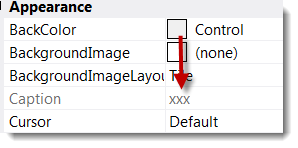
Please remember to mark the replies as answers if they help and unmark them if they provide no help, this will help others who are looking for solutions to the same or similar problem.
Tuesday, February 18, 2014 11:14 PM ✅Answered | 2 votes
I would just suggest two changes for completeness:
<Browsable(False),
EditorBrowsable(System.ComponentModel.EditorBrowsableState.Never),
DesignerSerializationVisibility(DesignerSerializationVisibility.Hidden)> _
<Obsolete("Accessing the Text property is invalid on ButtonSpecial", True)>
Public Overrides Property Text() As String
    Get
        Return MyBase.Text
    End Get
    Set(ByVal Value As String)
        Throw New NotImplementedException("Accessing the Text property is invalid on ButtonSpecial")
    End Set
End Property
The Obsolete attribute will ensure that a user doesn't still type instance.Text = "Something" and throwing the exception will ensure that runtime code does not change the Text property value.
Reed Kimble - "When you do things right, people won't be sure you've done anything at all"
Tuesday, February 18, 2014 8:14 PM | 2 votes
Hello,
Perhaps this might help, a custom Button and TextBox
Imports System.ComponentModel
Public Class MyTextBox
    Inherits TextBox
    <Browsable(False),
    EditorBrowsable(System.ComponentModel.EditorBrowsableState.Never),
    DesignerSerializationVisibility(DesignerSerializationVisibility.Hidden)> _
    Public Shadows Property Text() As String
        Get
            Return MyBase.Text
        End Get
        Set(ByVal Value As String)
            MyBase.Text = Value
        End Set
    End Property

End Class
Public Class ButtonSpecial
    Inherits Button
    <Browsable(False),
    EditorBrowsable(System.ComponentModel.EditorBrowsableState.Never),
    DesignerSerializationVisibility(DesignerSerializationVisibility.Hidden)> _
    Public Shadows Property Text() As String
        Get
            Return MyBase.Text
        End Get
        Set(ByVal Value As String)
            MyBase.Text = Value
        End Set
    End Property
    Public Sub New()
        MyBase.Text = "xxx"
    End Sub
End Class
Please remember to mark the replies as answers if they help and unmark them if they provide no help, this will help others who are looking for solutions to the same or similar problem.
Tuesday, February 18, 2014 8:28 PM | 1 vote
You can also add the attribute <Obsolete(True)> and that will cause a design-time error if someone tries to set the property anyway.
You might also consider changing the Set accessor of the property to throw a NotImplementedException so that the property cannot be set by reflection at runtime.
Reed Kimble - "When you do things right, people won't be sure you've done anything at all"
Tuesday, February 18, 2014 8:31 PM
Sorry, just realized you were still shadowing Kevin... should be an overriable property so no need to shadow.
Reed Kimble - "When you do things right, people won't be sure you've done anything at all"
Tuesday, February 18, 2014 8:37 PM
Sorry, just realized you were still shadowing Kevin... should be an overriable property so no need to shadow.
Reed Kimble - "When you do things right, people won't be sure you've done anything at all"
Yep, just copied from the orginal question and changing to overriable the IDE gave me a slap in the face Overrides is fine.
Please remember to mark the replies as answers if they help and unmark them if they provide no help, this will help others who are looking for solutions to the same or similar problem.
Tuesday, February 18, 2014 9:34 PM
HI Kevin & Reed,
Thanks for replying our question!
Why we can not use "Private" or "Protected"?
If we use them, then the design mode we still see "Text" property show in properties view.
thx!
JaneC
Tuesday, February 18, 2014 11:10 PM | 1 vote
HI Kevin & Reed,
Thanks for replying our question!
Why we can not use "Private" or "Protected"?
If we use them, then the design mode we still see "Text" property show in properties view.
thx!
JaneC
You cannot change the access level of the member when you override it, so Private or Protected are not options.
-edit-
sorry, text was already gone via EditorBrowsable.
Reed Kimble - "When you do things right, people won't be sure you've done anything at all"
Wednesday, February 19, 2014 8:01 AM
Jane,
In my perception you cannot. In .Net there are more classes which show a property in the propertybox while they are completely shadowed, take for instance the background of a picturebox. It is always in the propertybox but it does nothing, it is simply inherited from control and I guess shadowed.
Success
Cor