Note
Access to this page requires authorization. You can try signing in or changing directories.
Access to this page requires authorization. You can try changing directories.
Question
Wednesday, April 4, 2018 1:11 PM
When i go to my Assembly information for a C# project with an output type of Class Library, my option for "Make assembly COM-Visible is greyed out. How can I get this option available? I am running VS 2017 Community.
All replies (5)
Thursday, April 5, 2018 3:42 AM
Hi friend,
Welcome to the MSDN forum.
What's your C# project type?
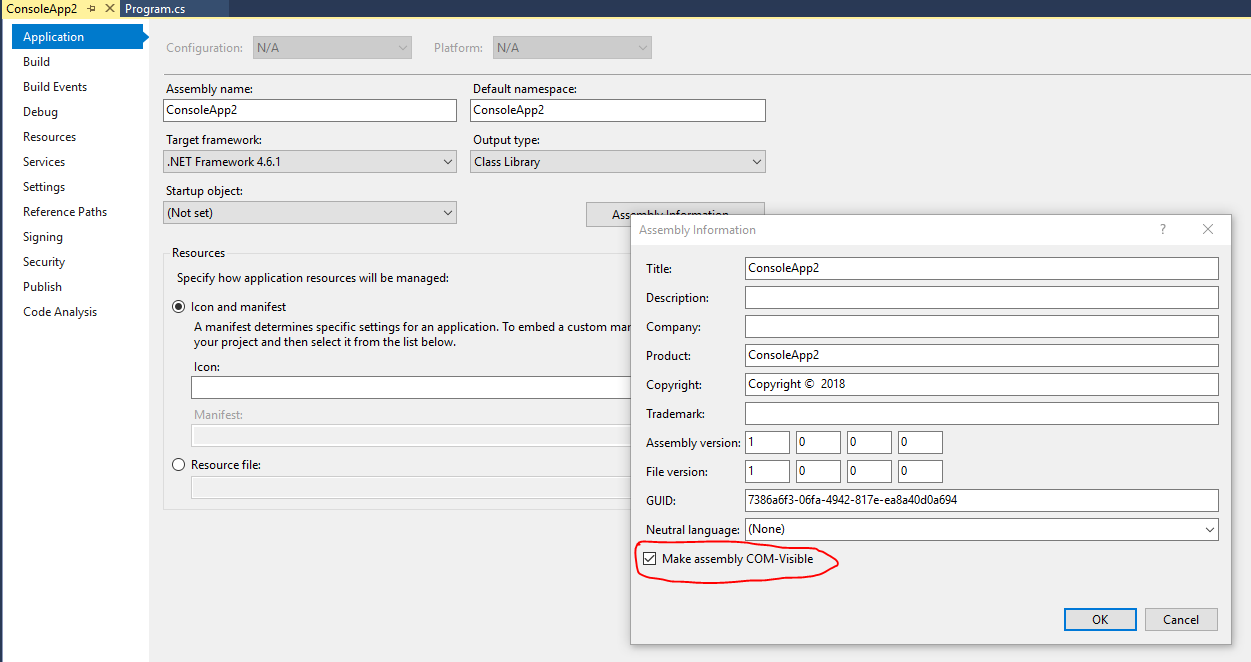
Please try to create a new C# console project and right click the project name, select 'Properties' and Output type set as 'Class Library', click "Assembly Information" and the option "Make assembly COM-Visible" should enabled like the following:
Best regards,
Sara
MSDN Community Support Please remember to click "Mark as Answer" the responses that resolved your issue, and to click "Unmark as Answer" if not. This can be beneficial to other community members reading this thread. If you have any compliments or complaints to MSDN Support, feel free to contact [email protected]
Wednesday, April 11, 2018 7:23 AM
Hi friend,
Do you have any updates? If this issue persists, please share more detail information and feel free to let us know.
If it is solved, we are welcome you share the solution in here, that will help other community members who meet the similar issue, then we can close this thread for you, thank you for your cooperation.
Best regards,
Sara
MSDN Community Support Please remember to click "Mark as Answer" the responses that resolved your issue, and to click "Unmark as Answer" if not. This can be beneficial to other community members reading this thread. If you have any compliments or complaints to MSDN Support, feel free to contact [email protected]
Sunday, June 3, 2018 7:59 PM
Hello Sara,
I get the same problem, even worse, since I do not have any"Assembly Information" button...in the "Application tab, or elswhere....
(I just Installed Visual Studio 2017 yesterday...)
Friday, October 12, 2018 6:39 PM | 2 votes
Had similar issues.
I solved this problem by selecting the starting template "Class Library (.NET Framework)" instead of "Class Library (.NET Standard)".
Tuesday, November 19, 2019 6:15 AM
Thank you @Nopes.. This is what i expected..