Note
Access to this page requires authorization. You can try signing in or changing directories.
Access to this page requires authorization. You can try changing directories.
Question
Wednesday, August 13, 2014 3:08 PM
We have a SBS 2011 network and have found that clients that HAD tracking options set in their Outlook 2010, that after we upgraded them to Office 2013 (and Outlook 2013) that now the tracking options section in Mail Options is completely greyed out.
Typically we have some users that want the option to have every email sent also have a read receipt, and some users we want to have it set so that emails with read receipts automatically send one (the user doesn't get a choice). We had that in Outlook 2010 but now it's greyed out in 2013.
We've never set any GPO policies...everything has been default policies, so something has changed in 2013 with regards to domain users and Outlook 2013.
I'm happy to use registry entries on individual workstations (we only have few with specific needs) instead of messing with policies, or just some way to re-enable the Tracking Options in Outlook 2013 Options -> Mail.
Thanks!
All replies (10)
Monday, August 18, 2014 6:45 AM ✅Answered | 1 vote
Thank you for the update.
Since you have the registry keys, it means some changes may have been made to the tracking settings. Please contact your admin and double check that you haven't set any GPO to change the tracking settings. The GPO setting for Tracking options is under Administrative Templates > Microsoft Outlook 2013 > Outlook Options > Preferences > E-mail Options > Tracking Options.
In addition, you can try to create a new mail profile in Control Panel > Mail, and then reconfigure your email account in the new profile to check the result.
Regards,
Steve Fan
Forum Support
Come back and mark the replies as answers if they help and unmark them if they provide no help.
If you have any feedback on our support, please click here
Thursday, August 14, 2014 9:17 AM
Hi,
Do you mean the Tracking option under File > Options > Mail is grayed out?
If so, you can try to modify your registry to check the result.
Note: Serious problems might occur if you modify the registry incorrectly. For added protection, back up the registry before you modify it.
Please open your registry editor and navigate to:
HKEY_CURRENT_USER\Software\Policies\Microsoft\Office\15.0\outlook\options
Can you find any entries under options (general, mail)? If so, try to rename the keys (general, mail) and then restart Outlook 2013 to check the issue again.
In addition, under HKEY_CURRENT_USER\Software\Policies\Microsoft\Office\15.0\outlook, also check if you have the preferences key. Click on preferences and rename the key deliveryreceipt and readreceipt.
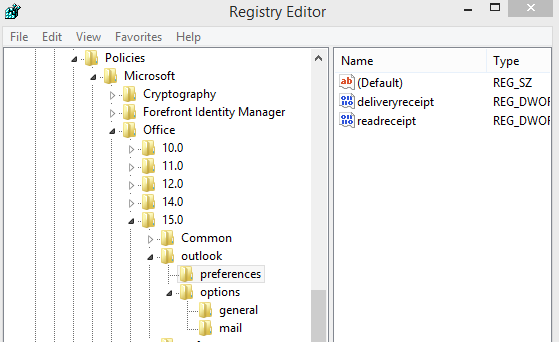
Please let me know the result.
Regards,
Steve Fan
Forum Support
Come back and mark the replies as answers if they help and unmark them if they provide no help.
If you have any feedback on our support, please click here
Thursday, August 14, 2014 2:16 PM
Hi Steve. Thanks for the info, but unfortunately, neither worked to fix the issue.
I did have general and mail under options key, and renamed both and started Outlook, but still Tracking options are locked and greyed out.
There was no deliveryreceipt or readreceipt keys under Outlook.
Any other ideas?
Thank you.
Friday, August 15, 2014 5:25 AM
Hi,
When you rename the keys and then restart Outlook, will the keys change to its original names (or create new keys named general and mail)?
If you have backed up your registry, you can try to directly delete the general and mail key and then restart Outlook to check the result.
In addition, you can also try to open Outlook in safe mode to check if the issue is caused by a problematic add-in. To do this, press Windows key + R to open the Run command, type outlook.exe /safe and press Enter.
Please let me know the result.
Regards,
Steve Fan
Forum Support
Come back and mark the replies as answers if they help and unmark them if they provide no help.
If you have any feedback on our support, please click here
Friday, August 15, 2014 1:27 PM
Steve,
To answer you question about the general and mail keys, they do not recreate when I rename them, and when I delete the keys and run Outlook, they do not recreate. FYI, there is very little in the mail and general keys.
I tried safe mode, and no difference. The tracking options are still greyed out.
Any other tricks up your sleeve?
Thanks!
Thursday, August 21, 2014 3:14 PM
Hi,
Just checking in to see if the information was helpful. Please let us know if you would like further assistance.
Best Regards,
Steve Fan
Forum Support
Come back and mark the replies as answers if they help and unmark them if they provide no help.
If you have any feedback on our support, please click here
Thursday, August 21, 2014 3:50 PM
Sorry for the delay. I have to figure out how reload the Office Admin Templates back into the Group Policy editor. I had them there, but not there anymore and I forget how! Currently there are no options for Office in the Group Policy Editor.
I also have not tried a new profile yet. Hopefully this weekend.
Thanks.
Monday, August 25, 2014 1:24 AM
Hi,
How is everything going? Any update on this issue? Please don't hesitate to post back.
Regards,
Steve Fan
Forum Support
Come back and mark the replies as answers if they help and unmark them if they provide no help.
If you have any feedback on our support, please click here
Thursday, August 28, 2014 2:06 AM
Hi,
I'm marking the reply as answer as there has been no update for a couple of days.
If you come back to find it doesn't work for you, please reply to us and unmark the answer.
Best Regards,
Steve Fan
Forum Support
Come back and mark the replies as answers if they help and unmark them if they provide no help.
If you have any feedback on our support, please click here
Friday, April 21, 2017 10:28 PM
Hi,
When you rename the keys and then restart Outlook, will the keys change to its original names (or create new keys named general and mail)?
If you have backed up your registry, you can try to directly delete the general and mail key and then restart Outlook to check the result.
Thanks this works for me, but the keys I deleted do not recreate, may I have a problem if they won't recreated?