Note
Access to this page requires authorization. You can try signing in or changing directories.
Access to this page requires authorization. You can try changing directories.
Question
Saturday, October 31, 2015 10:09 PM
I have a domain computer that several users will be using the same account on for temp work. We have a retail version of Office 2013 Pro Plus installed. Whenever the user opens an office account they are 'automatically' logged in with that computer's domain account. I want to disable this feature so that Office 2013 products ARE NOT automatically signed in to any account.
How do I do this?
All replies (8)
Monday, November 2, 2015 7:41 AM
Hi,
It seems you have enabled Single Sign-On(SSO) to Office 365, you will need to disable it if you don't want the automatic login.
Before you decide to do so, I actually recommend you not let the users work like that. If it is convenient, let each user use his/her own account on the computer. Sometimes sharing a computer may cause some trouble and the risk of leaking private information.
For Office 365 SSO, you can refer to these articles:
https://technet.microsoft.com/en-us/magazine/jj631606.aspx
Regards,
Melon Chen
TechNet Community Support
Please mark the reply as an answer if you find it is helpful.
If you have feedback for TechNet Support, contact [email protected].
Monday, November 2, 2015 11:23 PM
There is no SSO enabled as the install for Office 2013 was not an O365 product but a retail purchase with retail activation key entered. This Office install was never associated with an O365 product.
Tuesday, November 3, 2015 8:08 AM
Hi,
Sorry I missed that.
Then you can try to modify the registry key below:
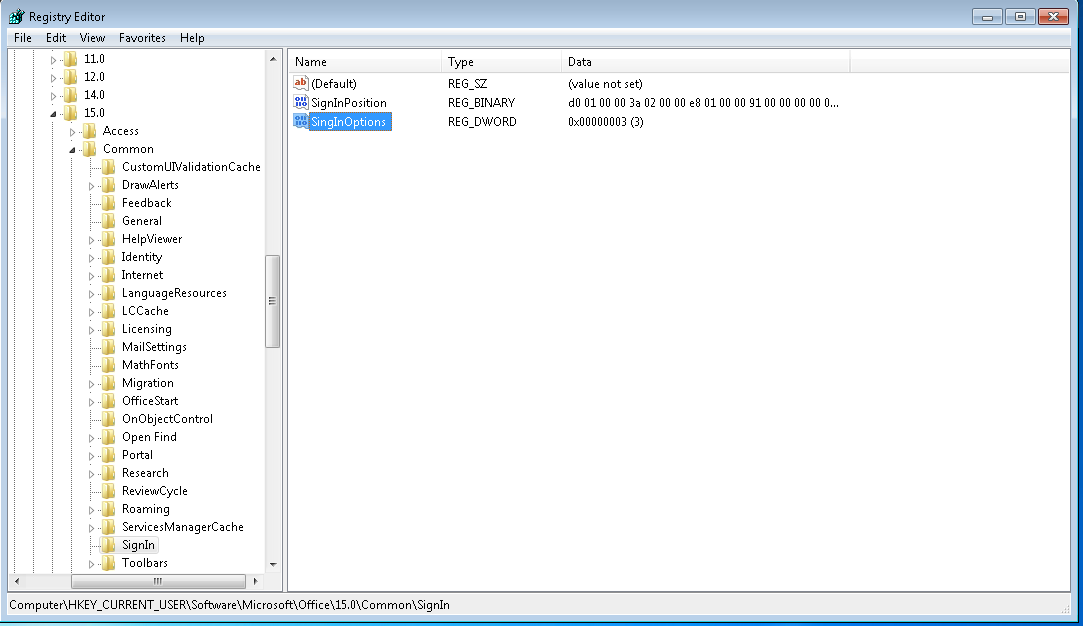
HKEY_CURRENT_USER\Software\Microsoft\Office\15.0\Common\SignIn
Name: SignInOptions
Type: DWORD
Change its value to 3, then users won't be allowed to sign in with any account.
Important Follow the steps in this section carefully. Serious problems might occur if you modify the registry incorrectly. Before you modify it, back up the registry for restoration in case problems occur.
For your reference:
https://support.microsoft.com/en-us/kb/3039000
Regards,
Melon Chen
TechNet Community Support
Please mark the reply as an answer if you find it is helpful.
If you have feedback for TechNet Support, contact [email protected].
Saturday, November 7, 2015 6:49 PM
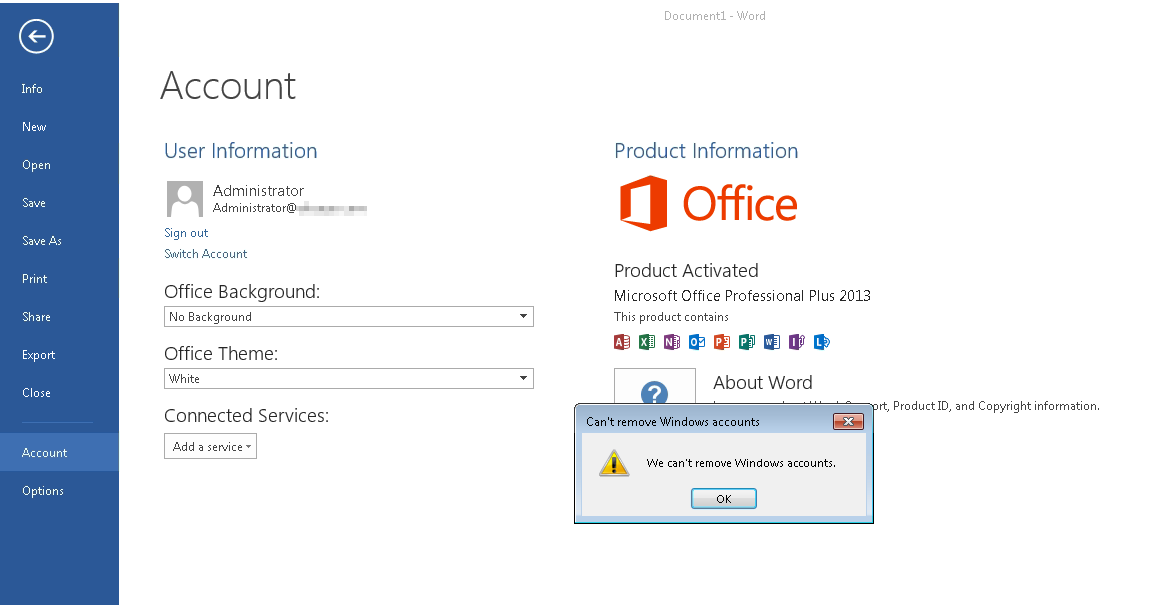
That regkey entry does not work. Office products still automatically sign me in and I am still unable to 'sign out'. I already rebooted the system in question.
Sunday, November 15, 2015 9:30 PM
Any more ideas?
...anyone?
Sunday, November 15, 2015 10:43 PM
the registry screen shot you showed above, seems to have a mis-spelt setting name "SingInOptions" ?
This information may be helpful:
https://technet.microsoft.com/en-us/library/jj683102(v=office.15).aspx#Bkmk_4_DeleteCreds
https://community.spiceworks.com/topic/489161-office-2013-stays-signed-on
Don [doesn't work for MSFT, and they're probably glad about that ;]
Monday, November 16, 2015 2:13 AM
Doh!
Sorry, I just put it back in for the screenshot. In testing it was spelled correctly, with the same results. It still doesn't prevent the auto sign in and I still can't sign out.
Monday, November 30, 2015 3:43 PM
Any further ideas?
TIA!