Note
Access to this page requires authorization. You can try signing in or changing directories.
Access to this page requires authorization. You can try changing directories.
Question
Sunday, June 3, 2018 11:35 AM
We have a classic sharepoint online team site. and inside our modern site page, i want to add 2 separate modern News web parts:-
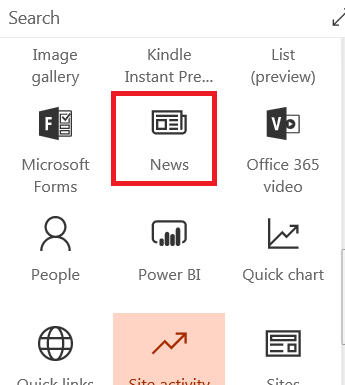
now the problem i am facing is that when i added 2 separate News modern web parts inside our modern site page, the 2 web parts will be showing the same items. now i can see that inside the web part we can define the site source as follow:-
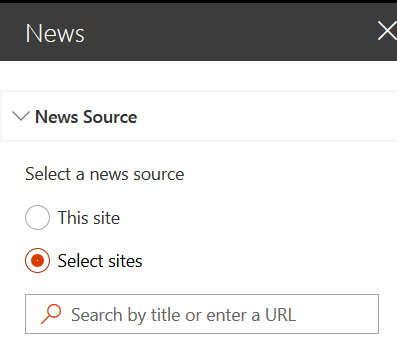
so what i did is that i created a new sub-site titled as "news & announcements", then i chnage the source for one of the web part to be the new sub-site. so now when i added a new News page inside the sub-site it will be shown inside News web part as follow:-
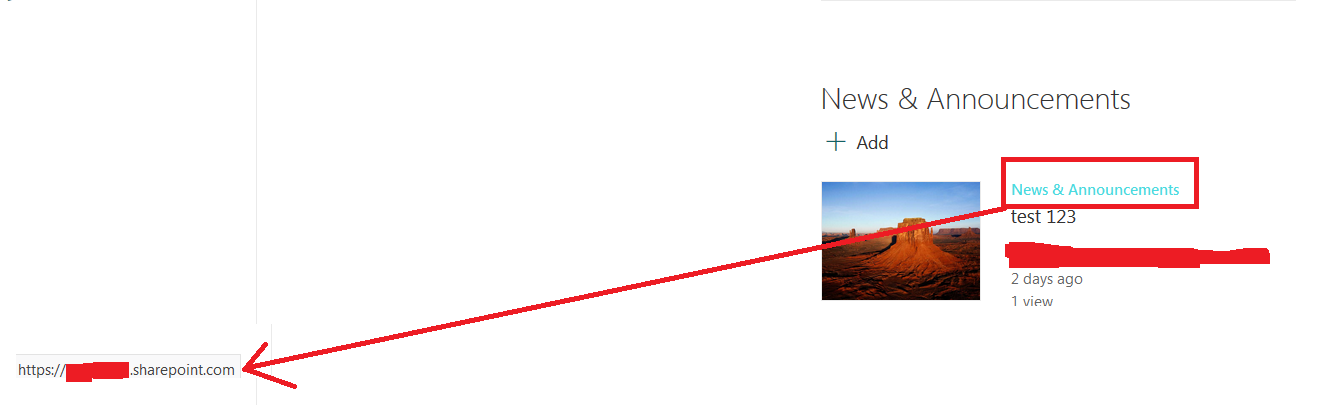
but i am facing these 2 issues, with adding a seperate sub-site to manage the news items:-
1. Inside the News web part which has its source as the new sub-site, it will be showing the sub-site title for each news item. but if i click on the title i will be redirected to the site collection root site, instead of being redirected tot he sub-site (i have provided a screen shot of the issue in the above picture) !!...so the url should be https:://tenantname.sharepoint/newsandannouncement , instead of https:://tenantname.sharepoint/. so is there a way to fix the url issue inside the News web part?
2. can we do extra filtering on the News web part, other than the source site? can i for example add a new field inside the modern page, and based on the field value to show it inside the related News web part? so if this is possible then there will be no need to add sub-sites to manage different News web parts.. where i can add all the news items inside the same site, and based on the custom column value to show it inside the related News web part..
All replies (5)
Sunday, June 3, 2018 12:43 PM
This is currently a known limitation of the news web part (in fact its a limitation of most web parts). Web parts need to be specifically written to act as separate instances on a page. Otherwise they store their configuration information in a single location for each type of web part. So changing the setup for one news web part on a page changes it for all of them. Other than building your own News web part there is currently no workaround.
Paul Stork SharePoint Server MVP
Owner/Principal Architect: Don't Pa..Panic Consulting
Blog: http://dontpapanic.com/blog
Twitter: Follow @pstork
Please remember to mark your question as 'answered' if this solves your problem.
Sunday, June 3, 2018 3:56 PM
This is currently a known limitation of the news web part (in fact its a limitation of most web parts). Web parts need to be specifically written to act as separate instances on a page. Otherwise they store their configuration information in a single location for each type of web part. So changing the setup for one news web part on a page changes it for all of them. Other than building your own News web part there is currently no workaround.
Paul Stork SharePoint Server MVP
Owner/Principal Architect: Don't Pa..Panic Consulting
Blog: http://dontpapanic.com/blog
Twitter: Follow @pstork
Please remember to mark your question as 'answered' if this solves your problem.
but currently i can add 2 separate News web parts, and to specify that one of them will read the news from a different sub-site, while the other web part to read the news from the current site. so i can define 2 different configuration for 2 web parts inside the same modern page..But my problem is with the 2 issues i mentioned in my question..
Thanks
Sunday, June 3, 2018 8:53 PM
As your image shows you get a radio button for 'this site' or 'selected sites'. Those are two different properties. You can't choose two different sets of 'selected sites' in the two web parts. Having one set for 'this site' won't overwrite the value for 'selected sites' in the other.
Paul Stork SharePoint Server MVP
Owner/Principal Architect: Don't Pa..Panic Consulting
Blog: http://dontpapanic.com/blog
Twitter: Follow @pstork
Please remember to mark your question as 'answered' if this solves your problem.
Monday, June 4, 2018 10:30 AM
As your image shows you get a radio button for 'this site' or 'selected sites'. Those are two different properties. You can't choose two different sets of 'selected sites' in the two web parts. Having one set for 'this site' won't overwrite the value for 'selected sites' in the other.
Paul Stork SharePoint Server MVP
Owner/Principal Architect: Don't Pa..Panic Consulting
Blog: http://dontpapanic.com/blog
Twitter: Follow @pstork
Please remember to mark your question as 'answered' if this solves your problem.
seems you did not understand my problem. now in my case i define 2 News web parts inside the same modern page, and i was able to set one web part to read the news from current site, while the other web part to read from different source.. so this is a supported thing inside sharepoint online.. my problem is different
Monday, June 4, 2018 1:02 PM
I understand that you can have two news web parts on the same page if one is from the current site and one from a sub site. And I understand that isn't your problem. What I am trying to explain is that you can't have two news web parts pointing at different sub sites on the same page. Even using two web parts with one pointing at the current site may not work perfectly since some of the settings will probably be shared. Based on your example I think that is what is happening to you.
The bottom line still is that web parts are usually designed and programmed to be single instances on a page. Creating a web part that will support multiple instances on a page takes special care to keep all the settings separate. I don't believe that has been done with the News web part. So in general its not a good idea to put two of them on a page and even if you do get them to point to different locations there will be some peculiarities that arise, as you have seen.
Paul Stork SharePoint Server MVP
Owner/Principal Architect: Don't Pa..Panic Consulting
Blog: http://dontpapanic.com/blog
Twitter: Follow @pstork
Please remember to mark your question as 'answered' if this solves your problem.