Note
Access to this page requires authorization. You can try signing in or changing directories.
Access to this page requires authorization. You can try changing directories.
Question
Sunday, January 27, 2013 6:09 PM
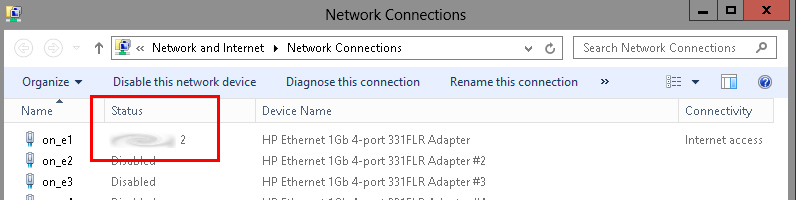
All my other servers do not have this "2" after my domain name in the network status. I have searched and cannot find any documentation on what this means and why it is there. Can anyone tell me why there is a "2" there and/or how to get rid of it?
All replies (3)
Sunday, January 27, 2013 8:03 PM ✅Answered | 1 vote
Fixed.
Here is the registry key where the connection profiles are stored. It seems I had a duplicate for some reason. Deleted the original profile and renamed the current one to remove the "2"
HKEY_LOCAL_MACHINE\SOFTWARE\Microsoft\Windows NT\CurrentVersion\NetworkList\Profiles\
Tuesday, January 29, 2013 10:01 AM
Hi cyr0nk0r,
Thanks for the update and glad to hear that the issue has been resolved.
Cheers!
Jeremy Wu
TechNet Community Support
Monday, June 10, 2019 4:02 AM
I deleted all entries as in HKEY_LOCAL_MACHINE\SOFTWARE\Microsoft\Windows NT\CurrentVersion\NetworkList\Profiles\
The reason, for some reason profiles that were deleted kept auto generating, deleting all entries fixed this.
I have only one network adapter installed.